Order No.
35 MHz: F 8042
40 MHz: F 8043
41 MHz: F 8044
FX-30
14.18 ELECTRIC MOTOR SETTINGS
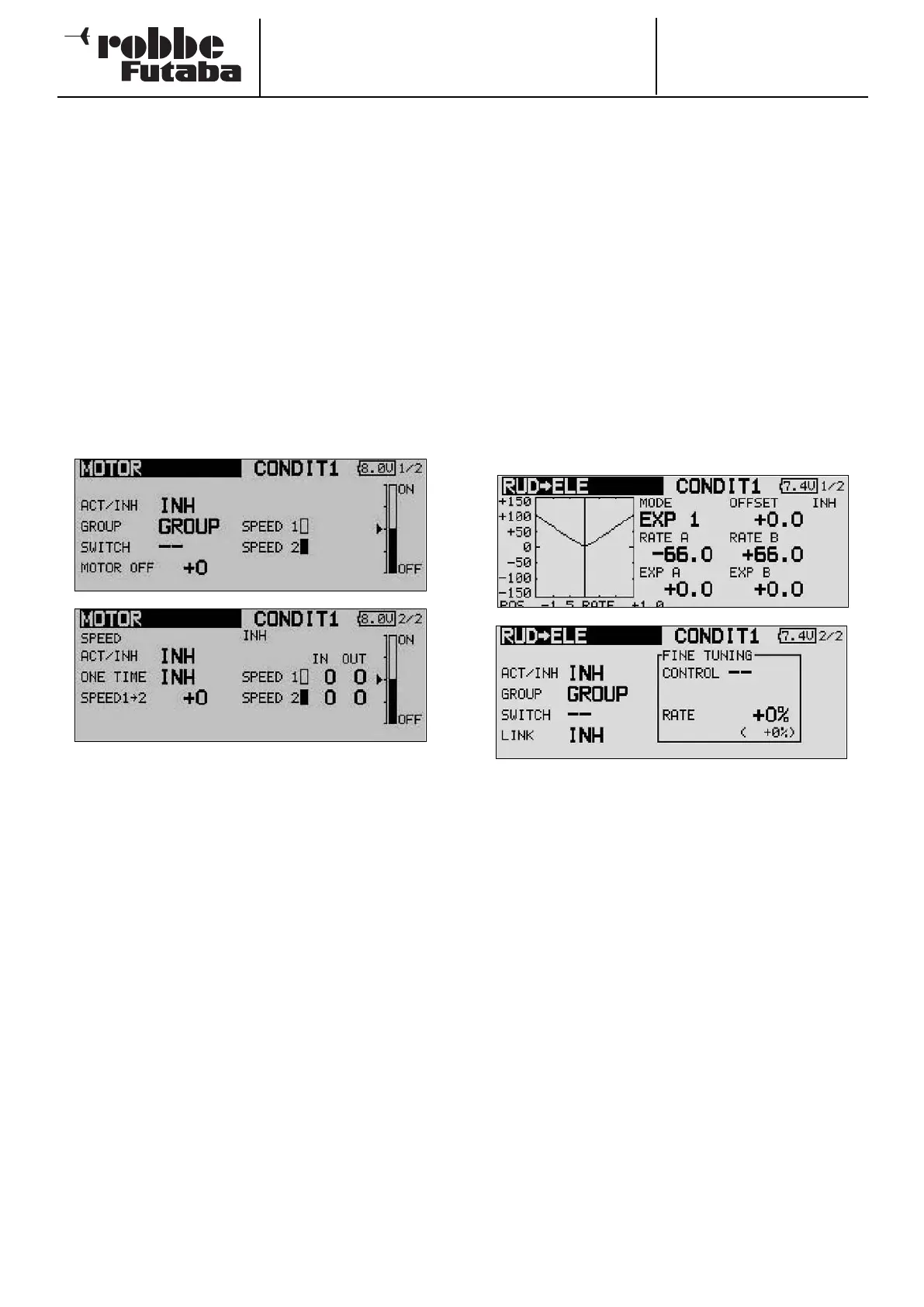
The purpose of this menu is to enter the settings for switching
an electric motor on and off; it is of particular interest if you
wish to control the electric motor of a hot-line model using a
simple switch. It is possible to program two different motor
speeds for slow and fast flight (Speed1 / Speed2). In this case
you will need to assign a three-position switch to the function.
It is important to check that the propeller fitted to the motor is
capable of absorbing the loads, especially for the ‘Speed2’
setting. A ‘Once mode’ is provided; when this option is sele-
cted, the settings can only be changed within the menu.
Use the 3-D hot-key to mark the ‘MOTOR’ option in the Model
menu, then confirm your choice with EDIT. The menu has two
levels (pages), which are shown below.
T
he function first has to be activated in the usual manner in the
‘ACT / INA’ line.
The effects and method of setting the ‘Global’ or ‘Separate’
mode have already been described; the function is pro-
grammed in the ‘Mode’ line.
A switch can be defined to trigger the mixer, using the stan-
dard procedure. The default setting is switch ‘G’. Move to the
‘Motor off’ line, where you can define the switch position at
which the motor is to be switched off. Mark the field and move
the switch to the ‘OFF’ position, then confirm the security
query by pressing the ‘EDIT’ button. The setting is now stored,
and is displayed in the field in graphic form.
The speed settings are entered on the second page of the
menu; this sub-menu must first be activated in the ‘ACT / INA’
line. You can then decide whether to activate ‘Once mode’: the
setting is selected using exactly the same procedure as for
activating a mixer.
The next step is to define the settings for ‘SPEED1’ and
‘SPEED2’. Mark the appropriate field, and use the ‘3-D hot-
key’ to enter the percentage value.
Finally you should ensure that the ‘Motor stopped’ settings
coincide with the Fail-Safe settings for the motor control func-
tion.
14.19 RUDDER -> ELEVATOR MIXER
(for power models only)
The purpose of this mixer is to cause the elevator to deflect up
when a rudder command is given. This option is required in
order to counter the tendency of many models to dive slightly
when a rudder command is given. This function may also be
o
f interest to pilots who enjoy extreme 3-D aerobatics.
The mixer rate can be set up accurately using a curve. The
function can be activated by a switch which you can select,
and can be connected to other mixers by setting up a Link. As
with many functions, it is also possible to determine whether
the settings are to apply to all flight modes (Global) or only to
the currently activated flight mode (Separate). An auxiliary
transmitter control can be assigned for fine-tuning the set-
t
ings.
Use the 3-D hot-key to mark the ‘Rudder -> elevator’ option in
the Model menu, and confirm your choice with EDIT. The
screen display has two levels (pages), which look like this:
The function first has to be activated in the usual manner in the
‘ACT / INA’ line. You can now set the ‘Global’ or ‘Separate’
mode.
In the ‘Switch’ line a switch can be selected in the customary
manner, and its direction of operation determined. The default
setting here is ‘NONE’.
On the first page of the menu you can define and program a
mixer curve. This mixer curve determines the rate of following,
i.e. the extent to which the elevator moves when a rudder
command is given.
In contrast to all the other compensation mixers, this mixer
requires a V-shaped curve; i.e. regardless of the direction of
the rudder command, the elevator compensation is always in
the same direction, i.e. ‘up’.
On the second page of the menu the fine-tuning settings can
be carried out in a separate frame. It is possible to assign a
transmitter control to the task of fine-tuning the mixer setting.
The direction of effect of this control can also be defined (see
page 54 for an example).
Finally it is possible to define a Link in order to connect the
mixer to other mixers. This is accomplished by marking the
‘Link’ field and setting it to ‘ON’.
60



 To Next Page