Order No.
35 MHz: F 8042
40 MHz: F 8043
41 MHz: F 8044
FX-30
For this reason it is very important that mechanical linkages work
smoothly and freely, and that the servo is not mechanically
obstructed at any point in its travel.
When the receiver battery is almost discharged, you will noti-
ce that the servos run more slowly than usually. If you ever
reach this point, cease operations immediately, and recharge
the battery.
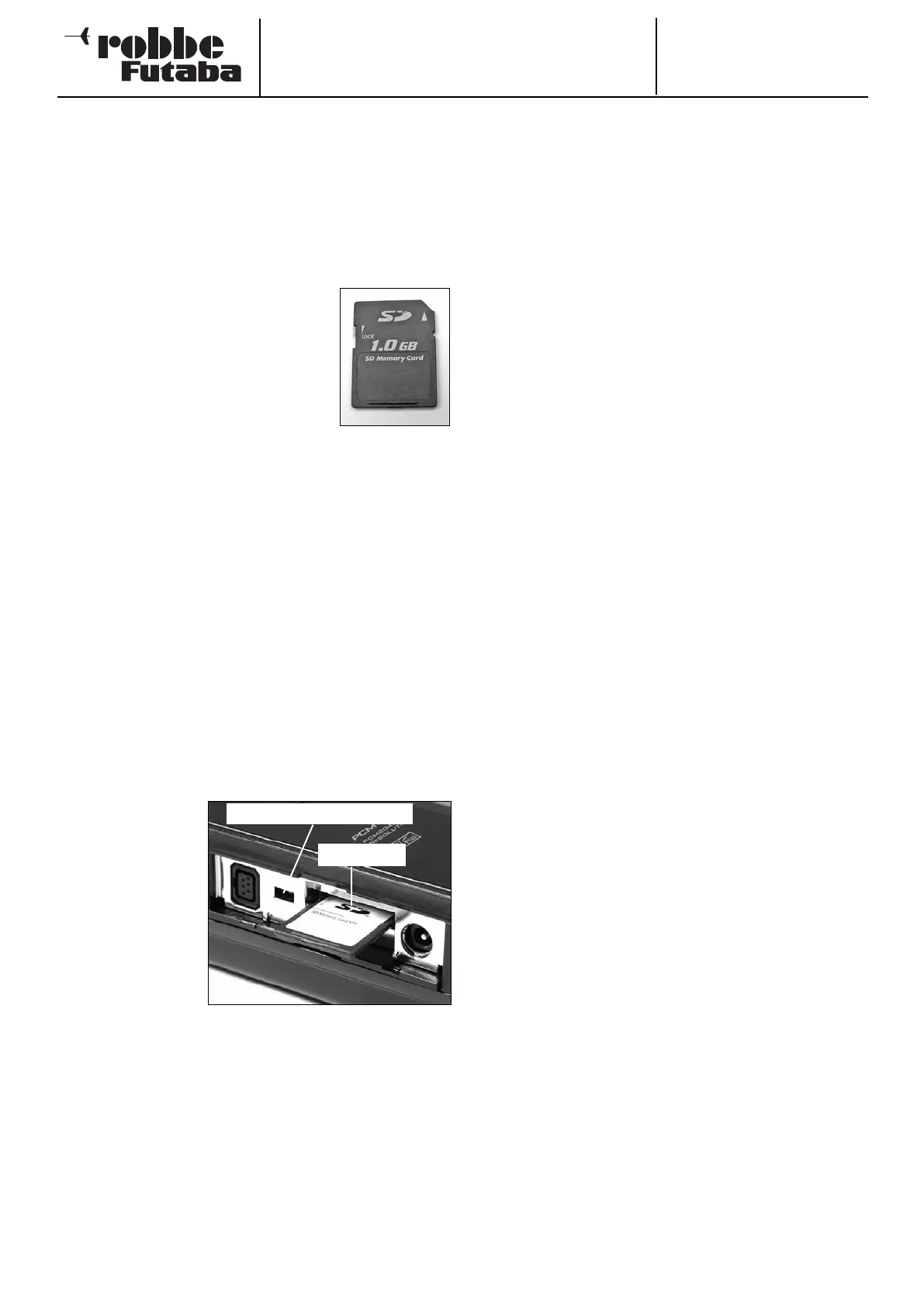
4.6 SD CARD MEMORY MODULE
Model data relating to the various models
can be stored on an SD card (max. capaci-
ty 1 GB), which can be purchased separa-
tely. We recommend the use of high-speed
S
D cars such as the Sun-Disk type.
SD cards of other makes designed for digi-
tal cameras can also be used, but we are
unable to guarantee that all will work per-
fectly since so many different types are
available.
Important note:
The SC card must be initialised (formatted) before you can
store model data on it. This is the procedure:
• Insert the card in the transmitter, and switch it on.
• The following message appears: ‘Card not initialised. Stop
/ Format’
• Select the Format field to initialise the card, and press the
3-D hot-key button.
• A security query appears; confirm this with ‘OK’.
• The message ‘Formatting card’ appears, and the screen
shows the progress of the procedure in bar-graph form.
• This process may take several minutes, depending on the
size of the card.
• When formatting is complete, you will see the message
‘Formatting finished’; confirm this with OK.
• The transmitter now automatically switches to the familiar
Start screen.
INSERTING THE SD CARD
This is the procedure
for inserting and repla-
cing the SD card:
• Switch the trans-
mitter off.
• Open the side flap
by pulling gently at
the marked point.
• The SD card slot is
now visible.
Hold the SD card with
the locking lug on the
underside. Push the
card into the slot as far as it will go; you should distinctly hear
the card click into place.
See page 72 for information on updating the software.
REMOVING THE SD CARD
Push the end of the SD card inward with a fingertip until it
moves slightly; you should hear a click. The SD card will now
be ejected automatically, and you can take the card out of the
slot.
Note:
Do not remove the SD card during a read or write process, as
this may corrupt the data stored on the card.
TRANSFERRING DATA TO A PC
You will need a card reader device which supports SD cards in
order to transfer data to or from a PC. These are available from
electrical suppliers as digital photo accessories.
The files stored on the SD card are not in Windows format, and
are not visible on a PC.
A
special software program called the “Futaba File System
Utility” is available for viewing and erasing these files. It can be
downloaded from the Download area of the robbe Support
Server at http://Support.robbe.com.
Another program whose purpose is to convert model data bet-
ween T12Z / T12FG / T14MZ / FX 30 and FX 40 transmitters is
in preparation, and will also be available for downloading from
the robbe Support Server in due course.
D
ATA SECURITY
The lifetime of an SD card is more than 100,000 write cycles.
If you experience read / write problems after a very long peri-
od of frequent use, the card should be replaced. We are unab-
le to accept responsibility for the security of the data on the
card, and we always recommend that you create a back-up
copy to be on the safe side.
Once data is stored on a DP card - or in the transmitter - it
does not require electrical current, so you will not lose data if
you remove the transmitter battery.
MEMORY CAPACITY
• The transmitter’s internal memory is sufficient for thirty
models, and an optional SD card can be used as an expan-
ded memory medium. The transmitter can manage cards
with capacities of 32 MB to 1 GB. A 1 GB card has suffi-
cient capacity for 1958 model data sets. The SD card can
also be employed by the user to update the transmitter’s
software. The program data for this is also available in the
Download area of the robbe website.
NOTES ON HANDLING SD CARDS
• Do not remove the SD card during the data writing pro-
cess.
• Do not subject the SD card to powerful magnetic or elec-
trical fields, as this can cause data loss and permanent
damage to the card.
• Do not subject the card to direct sunlight or conditions of
high aerial humidity.
• Do not allow the card to contact dirt, water or other fluids.
• Always hold the card by the edges when inserting or remo-
ving it.
• Take care always to insert the SD card the correct way
round.
• Always switch off the transmitter before inserting or remo-
ving the SD card.
9
SD card slot
Software update switch



 To Next Page