Order No.
35 MHz: F 8042
40 MHz: F 8043
41 MHz: F 8044
FX-30
15.10 SPEED GOVERNOR (REGULATOR) SETTINGS
This function enables you to adjust the settings of a speed
governor (regulator) from the transmitter, and / or call up pre-
set values. The nominal value of the governor can be entered
in the form of a percentage value, and a switch can be pro-
grammed for selecting any of three values (Rate 1, 2 or 3) as
the nominal rotational speed when set to Separate mode. As
with many functions, it is also possible to determine whether
t
he settings are to apply to all flight modes (Global) or only to
the currently active flight mode (Separate). A transmitter con-
trol can be assigned for fine-tuning this function.
Use the 3-D hot-key to mark the ‘GOVERNOR’ option in the
Helicopter Model menu, and confirm your choice with EDIT.
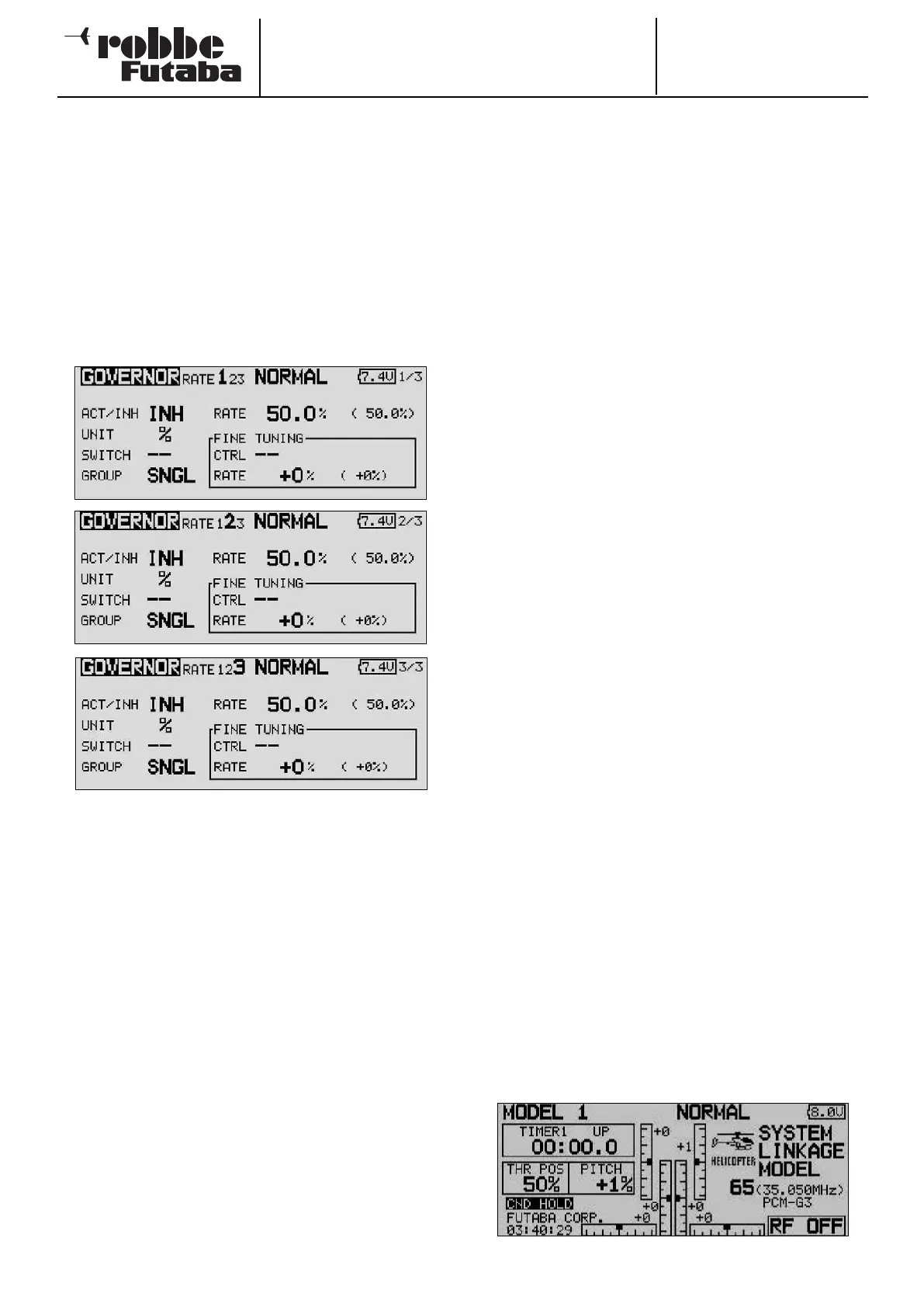
The menu has three levels (pages), which look like this:
The menu features three identical levels which are used to
enter three different gain levels (RATE 1 - 3).
This function must first be activated in the ‘ACT’ line in the
usual way by marking the appropriate field, changing the set-
ting with the ‘3-D hot-key’, and concluding the activation with
EDIT. The field then displays ‘OFF’ or ‘ON’, according to the
physical position of the switch.
A switch can be defined in the ‘SWITCH’ column using the
standard procedure: mark the appropriate field and define the
desired switch and its direction of operation for changing the
pre-set rotor speed. The default setting is ‘NONE’; at this set-
ting the governor operates at the nominal rotational speed set
on the unit itself. The effects and method of setting the
‘Global’ or ‘Separate’ mode have already been described; the
function is programmed in the ‘Mode’ line.
In the ‘Rate’ column you can enter the percentage value for
the nominal rotational speeds 1, 2 and 3 by marking the field
and entering the setting using the ‘3-D hot-key’. The default
setting is 50%; holding the ‘EDIT’ button pressed in for at least
one second restores the default setting.
If you wish, you can change the unit for rotational speed dis-
played on the screen; this is carried out in the ‘UNIT’ field. The
two options are a percentage value and a direct rotational
speed in rpm.
To change this, simply mark the field, carry out the change
using the 3-D hot-key, and conclude the procedure with EDIT.
In the ‘FINE Trim’ field you can carry out fine-tuning to the set-
tings. A transmitter control can be defined for fine-tuning the
p
re-set governor speed. The first step is to select a transmit-
ter control in the ‘Transmitter Control’ field: mark the appropri-
ate field and define the transmitter control or switch of your
choice using the ‘3-D hot-key’ in the Switch / Transmitter
Control Select menu which subsequently appears. Any of the
auxiliary transmitter controls can be selected; the current set-
ting and the direction of operation are displayed on-screen.
In this menu you can call up three different speed settings for
each flight mode. If you have assigned a separate transmitter
c
ontrol (linear slider) to the ‘Speed governor’ function in the
Functions menu, so that you can override the set values, then
this transmitter control has no function; this arrangement avo-
ids the settings in the menu counteracting the transmitter con-
trol positions. However, if you still wish to be able to adjust the
pre-set speed in the usual way using a slider, select the Speed
2 function. This function allows you to adjust the speed setting
using a separate transmitter control (e.g. linear slider).
Caution:
In this case we recommend that you enter no settings in the
Governor menu, as the functions may interact, either by a
cumulative effect or by cancelling each other out.
15.11 FLIGHT MODE HOLD (CND HOLD)
The purpose of this function is to enable you to carry out
adjustments in another flight mode. The motor is held at idle
to prevent the possibility of opening the throttle accidentally.
The ‘Flight mode hold’ function can only be activated in
‘Normal’ flight mode, and even then only if the throttle stick is
at the idle position.
A warning signal sounds as soon as you activate ‘Flight mode
hold’. In this way the transmitter alerts you to the fact that the
motor will not respond if you move the throttle stick. You can
now change to a different flight mode by operating the appro-
priate flight mode switch, and make changes to the settings in
that flight mode. When you activate this function, the throttle
servo is fixed at a pre-set position. If you wish to change the
settings for the channel which operates the throttle servo, you
must first disable the ‘Flight mode hold’ function.
Note that the ‘Flight mode hold’ function cannot be activated
or disabled if:
• a flight mode switch is switched on, or
• the throttle stick is at a value higher than 1/3 of full stick
travel.
This option is controlled from the Base display for model heli-
copters. To define the pre-set value, mark the field and move
the throttle stick to the desired position. Note that the stick
must be positioned at a point lower than 1/3 of full travel.
The Base, Model and Main menu displays show the status of
this option in the following way:
‘ON’: Flight mode hold switched on
‘INA’: Flight mode hold switched off (inactive)
70



 To Next Page