Order No.
35 MHz: F 8042
40 MHz: F 8043
41 MHz: F 8044
FX-30
12.16 DATA RESET
When you wish to enter the essential data for a new model,
you will often need to start by erasing the contents of a model
memory which you no longer need, or just certain areas of that
memory. The reset process is carried out in this menu, which
provides four options:
• Trim settings (T1 - T6, all flight modes - Global)
A
ll the trim settings for all flight modes can be reset using
this sub-menu.
• Trim settings (T1 - T6, ACT flight mode - Separate /
Global)
This sub-menu is used to reset the trim settings of the cur-
rent flight mode, and all ‘Global / Separate’ settings.
• Reset model menu settings
This sub-menu is used to reset all the functions of the
Model menu apart from the ‘Condition Select’ function (for
s
electing flight modes).
• Reset all model data
This sub-menu is used to reset all model data in the Base
menu, with the exception of the frequency settings, the
model type and the model select data.
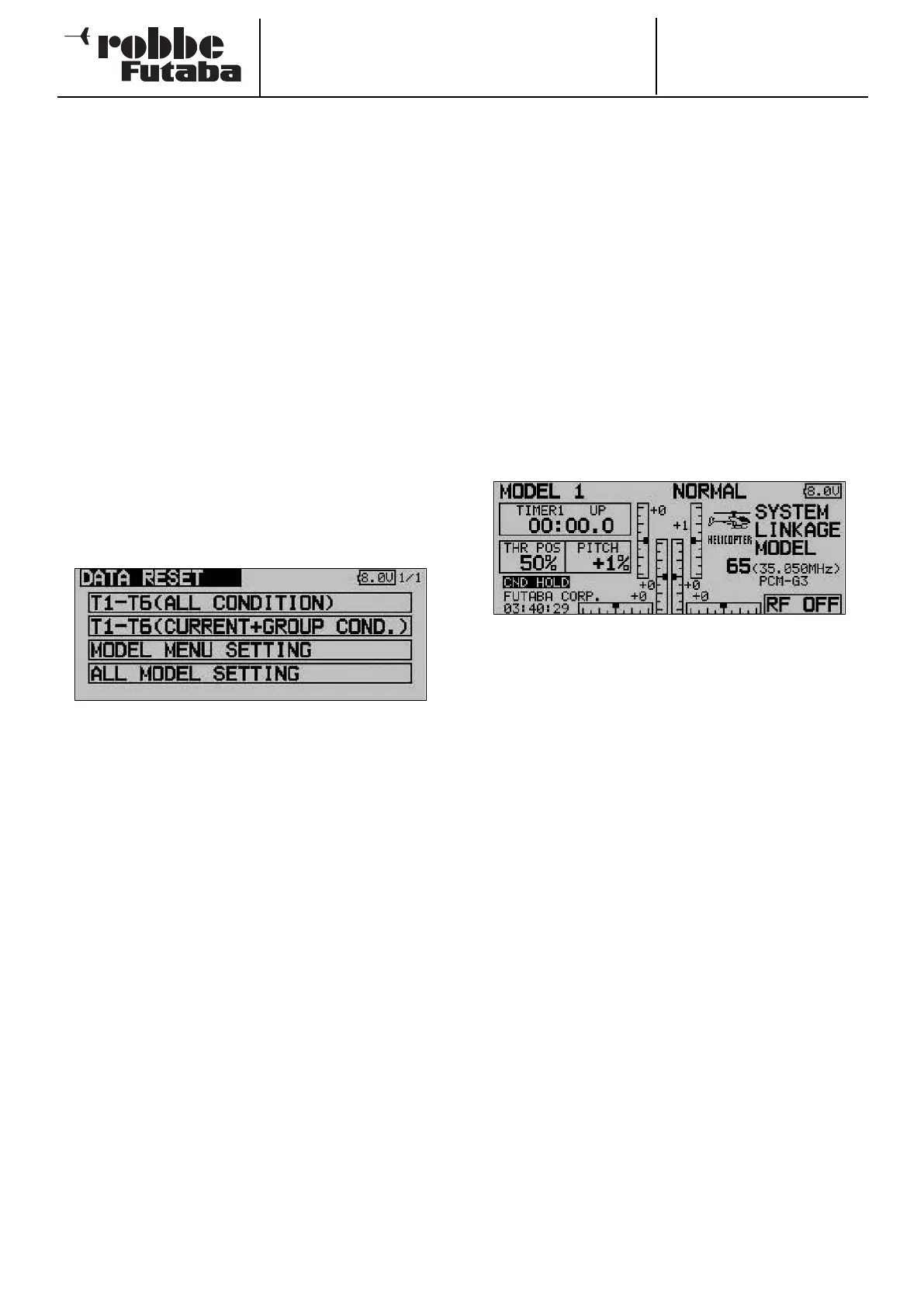
Start by marking the ‘DATA RESET function in the Base menu
using the 3-D hot-key, then confirm your choice with EDIT. The
screen now looks like this:
Select one of the four options on offer, and use the 3-D hot-
key to mark the field which corresponds to the process you
wish to use. Operate the ‘EDIT’ button to confirm your choice.
The actual erasure process is only carried out when you press
this button a second time. Pressing any other button interrupts
the process.
12.17 FLIGHT MODE HOLD
The purpose of this function is to enable you to change the
settings in a flight mode other than the current one. The motor
is held at the ‘idle’ setting, to prevent it being switched on
accidentally.
C
ND HOLD (Condition Hold)can only be activated when the
“Normal” flight mode is selected, and only if the throttle stick
is at the idle position.
As soon as you activate CND HOLD, the transmitter sounds a
warning signal, alerting you to the fact that the throttle servo or
speed controller will not respond if you move the throttle stick.
You can now switch to the flight mode you wish to adjust by
operating the appropriate flight mode change-over switch, and
alter any settings you wish in safety.
Activating this function sets the throttle servo to a fixed, preset
position. This means that you must disable the ‘CND HOLD’
function if you actually wish to carry out adjustments to the
channel which operates the throttle servo.
Note that CND HOLD cannot be activated or disabled if:
- a flight mode switch has already been switched on, or
- the throttle stick is at a value higher than 1/3 of full stick
travel.
To select the throttle setting you must first mark the field with
the cursor button, and then move the throttle stick to the des-
ired position. Note that the selected stick position must be
lower than 1/3 of stick travel. Pressing the ‘EDIT’ button now
activates the CND HOLD function.
The status of this option is shown in the Base display. This is
the meaning of the display:
• CND HOLD IS ON: flight mode hold switched on
• CND HOLD: flight mode hold switched off
39



 To Next Page