Order No.
35 MHz: F 8042
40 MHz: F 8043
41 MHz: F 8044
FX-30
The effects and settings for the programming of ‘Global’ or
‘Separate’ mode have already been described repeatedly;
they are altered in the ‘Mode’ line.
In the ‘Switch’ line a switch can be selected in the familiar
manner, and its direction of operation determined. The default
setting here is ‘NONE’, i.e. the mixer is always switched on.
O
n the fourth page of the menu the fine-tuning settings can be
carried out. A transmitter control can be defined which is used
to fine-tune the mixer setting. The first step is to define the
desired transmitter control in the ‘Transmitter control’ field:
mark the appropriate field and make your choice in the Switch
/ Transmitter Control Select menu using the ‘3-D hot-key’. Any
of the auxiliary transmitter controls can be used for this pur-
pose. Your selected control and its direction of effect are dis-
played on-screen.
A mixer curve can be set up using the conventional technique,
separately for each side of travel. The actual mixer rates for
the elevators are entered on the third page of the menu dis-
play. For each control surface the mixer rate can be entered as
a % value; the method has already been described many
times.
The actual settings for the travels of the (max.) four aileron ser-
vos and four flap servos are entered in separate sub-menus.
For each servo the servo travels can be entered separately for
each side of centre in the form of percentage values. The
values are entered using the familiar method: mark the field,
confirm it, then set the percentage value using the ‘3-D hot-
key’.
Please note that the programming options and the actual
appearance of the screen display may vary slightly according
to the model type and wing type you have selected.
54
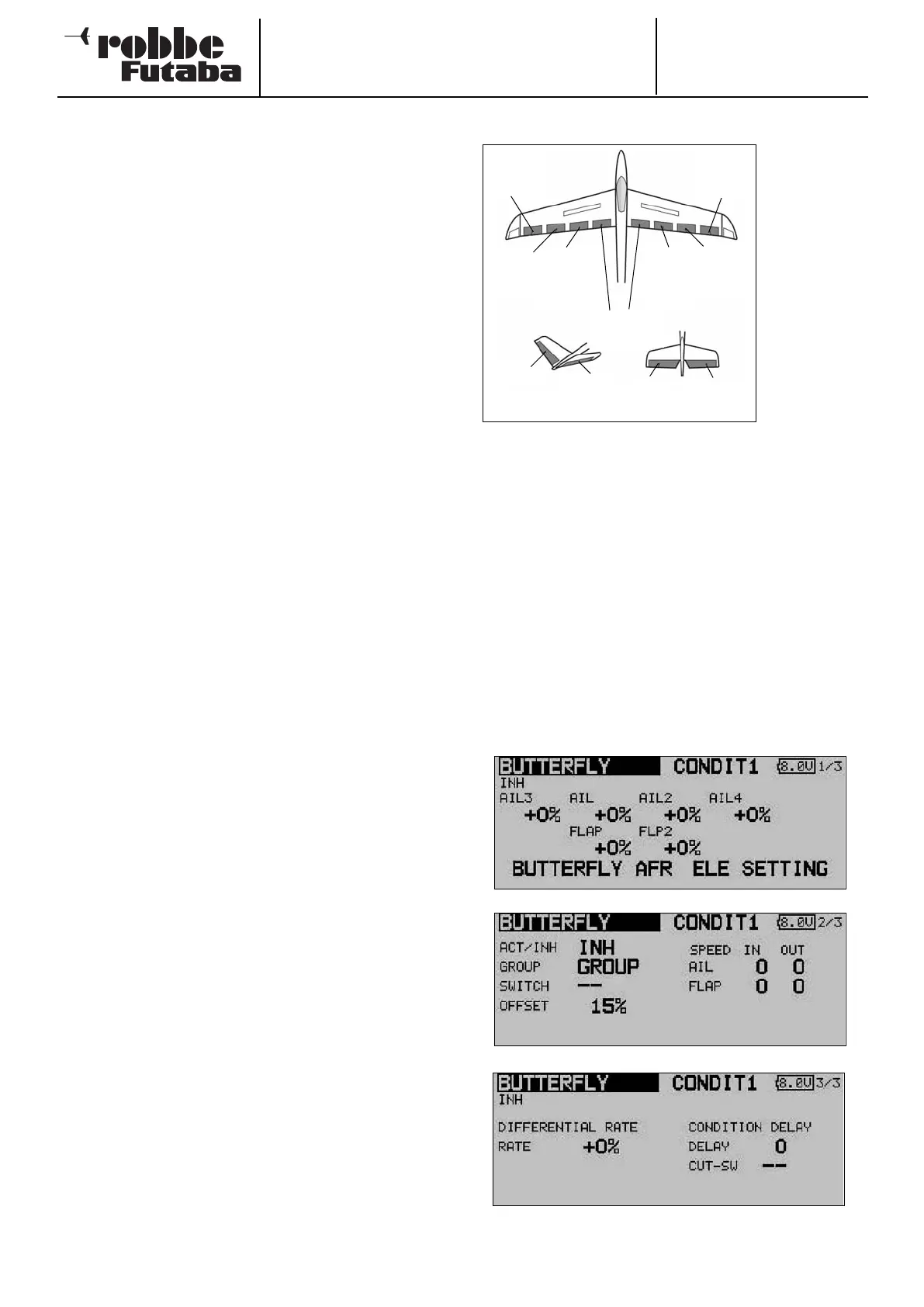
14.11 CROW (BUTTERFLY) MIXER
The purpose of
this menu is to
set up a mixer
which produ-
ces a very
powerful bra-
king effect on
the model by
d
eflecting the
ailerons up and
the camber-
changing /
brake flaps
down. The
function is par-
ticularly useful
for landing
high-speed models at restricted flying sites. If your model fea-
tures a four-flap wing, it is a straightforward matter to program
this mixer in such a way that all the wing control surfaces con-
tribute to the braking effect.
A mixer curve can be programmed for the Crow function, and
it is triggered by a switch which you can select. As with many
functions, it is also possible to determine whether the settings
are to apply to all flight modes (Global) or only to the current-
ly activated flight mode (Separate). The transit speed of the
aileron and flap servos can be adjusted individually. A delay
time can be selected, and an Offset point programmed. It is
also possible to adjust the degree of aileron differential in this
menu.
Use the 3-D hot-key to mark the button field for the ‘BUTTER-
FLY’ mixer in the Model menu, and confirm your choice with
EDIT. The menu has five displays (pages) which look like this:
Chip
aileron
(AIL3)
Main
aileron
(AIL1)
C
amber-
changing
flap
(CAMBER)
C
amber-
c
hanging
f
lap
(CAMBER2)
Brake flaps
(BRFL3 & 4)
Main
aileron
(AIL2)
Chip
aileron
(AIL4)
V-tail Ailvator
ELEVATOR
ELE
R
UDDER
ELE2



 To Next Page