Order No.
35 MHz: F 8042
40 MHz: F 8043
41 MHz: F 8044
FX-30
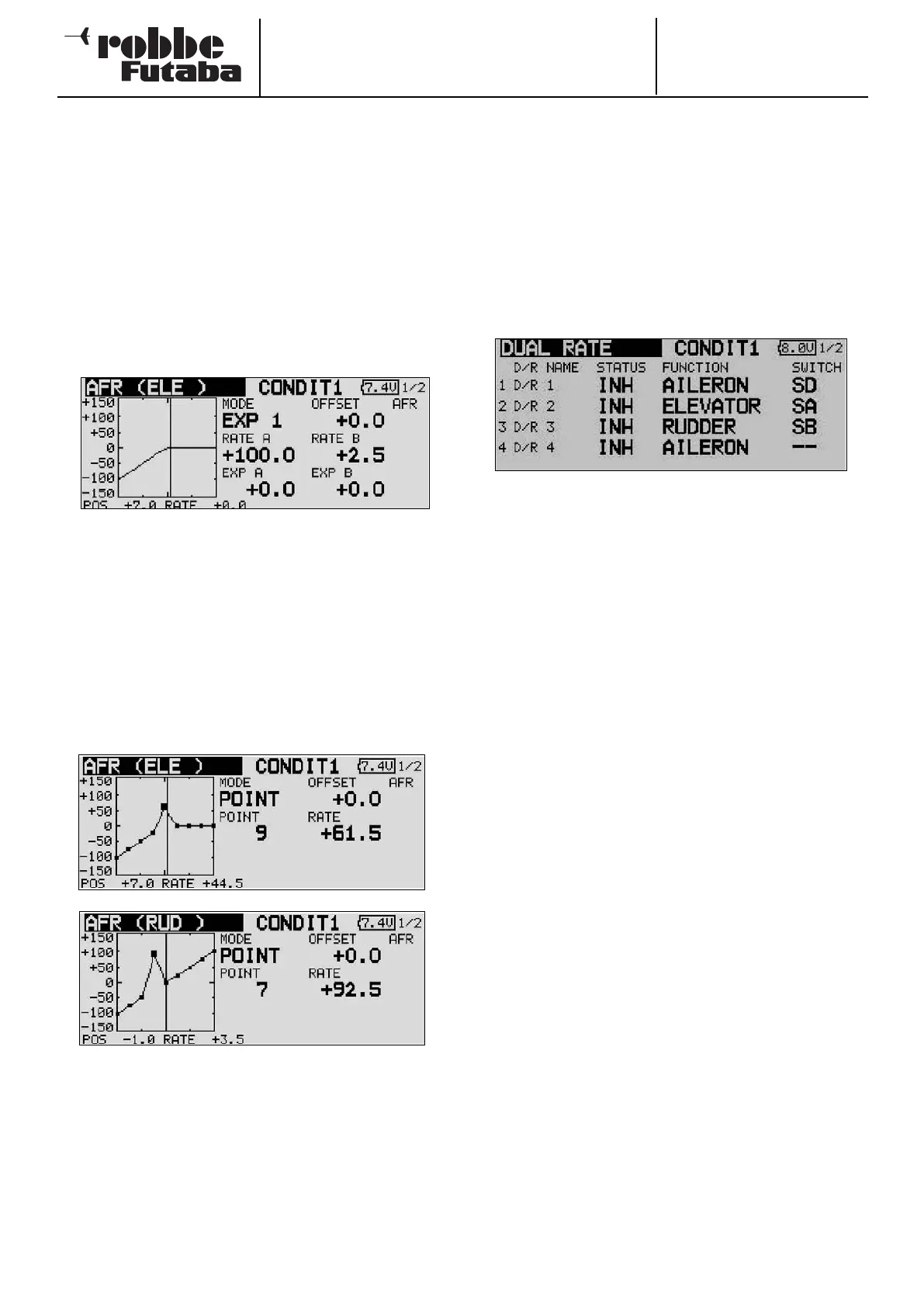
To set up a freely variable curve you have to define curve
points. The two screen shots show sections of the display as
examples of these curves.
• Use the cursor to mark the field in which the associated
curve point is displayed (POINT).
• The point which is to be modified is selected using the ‘3-
D
hot-key’. Once you have activated the appropriate point,
the value in the ‘RATE’ field can be defined by turning the
‘3-D hot-key’.
• The default set-up contains nine different points which can
be varied, but for special purposes the number of points
can be varied within the range two to seventeen.
• The position of the curve point can now be defined: mark
the appropriate field, and set the value by turning the ‘3-D
hot-key’. You must now hold the ‘EDIT’ button pressed in
for at least one second in order to adopt the new point.
• This is the procedure for erasing a curve point: mark the
point adjust field (POINT), select the point to be erased
using the ‘3-D hot-key’, and hold the ‘EDIT’ button pressed
in for at least one second.
• It is also possible to shift these two curve types vertically
using ‘Offset’.
13.3 DUAL RATE SETTINGS
• Up to six different Dual Rate settings can be entered. This
is accomplished by marking the Dual Rate field and pres-
sing the ‘EDIT’ button. The display changes, and you can
enter the appropriate settings in the sub-menu when then
a
ppears.
• The first step here is to activate the D/R settings you wish
to use, by marking the first field in the appropriate line. Turn
the ‘3-D hot-key’ to activate the setting (changes from INA
to ACT). This change must be confirmed with EDIT.
• Move to the ‘Function’ field and use the same procedure to
select the channel to which the D/R setting is to apply. You
now have to select an actuating switch. Use the 3-D hot-
key to mark the appropriate field, then press the ‘EDIT’
button. This calls up the Switch Select menu, where you
can define the desired switch and its direction of operation.
• The Dual Rate function provides a second control curve
which can be called up by operating a switch. You can
decide whether the function is to be linear with reduced
travels (classic D/R), Expo1, Expo2 or a curve with two to
seventeen points.
The D/R (Dual Rate) function can be used to set a second con-
trol curve for up to six transmitter controls, which is selected
by means of a switch. It makes no difference whether you
assign six switchable curves to one transmitter control, or two
curves to three transmitter controls, or a single curve to six
controls.
This function can be used in order to adjust the control travels
to the model for particular phases of flight (launch, landing).
In addition to this convenient facility, it is also possible to set
up the sixteen AFR curves as mentioned earlier; once again
these can be assigned to each flight mode individually by set-
ting up a maximum of eight flight modes.
43



 To Next Page