I
Installing the DLNA Application
To
play content on the PC on the
TV,
you have to first install the application.
System Requirements
1.
Insert the Prograrn
CD
supplied with this TV into your
PC.
2.
20MB of free
hard
disk space
is
needed for the prograrn installation.
>
If
you
share files,
up
to
20MB of hard disk drive space
is
required for each
100
files.
> If
you
cancel file sharing, the
hard
disk drive space used for the thurnbnail inforrnation
is
also freed.
Supported Formats
1.
Irnage: JPEG
Upg.
jpeg)
2.
Audio: MP3
(rnp31
3.
Video
MPEG1
(rnpg, rnpeg), MPEG2 PS/TS(mpg, mpeg,
trp,
ts,
tp),
divx(rnpg,
rnpeg,
avi), MPEG4 / H.264
(rnpg,
rnpeg)
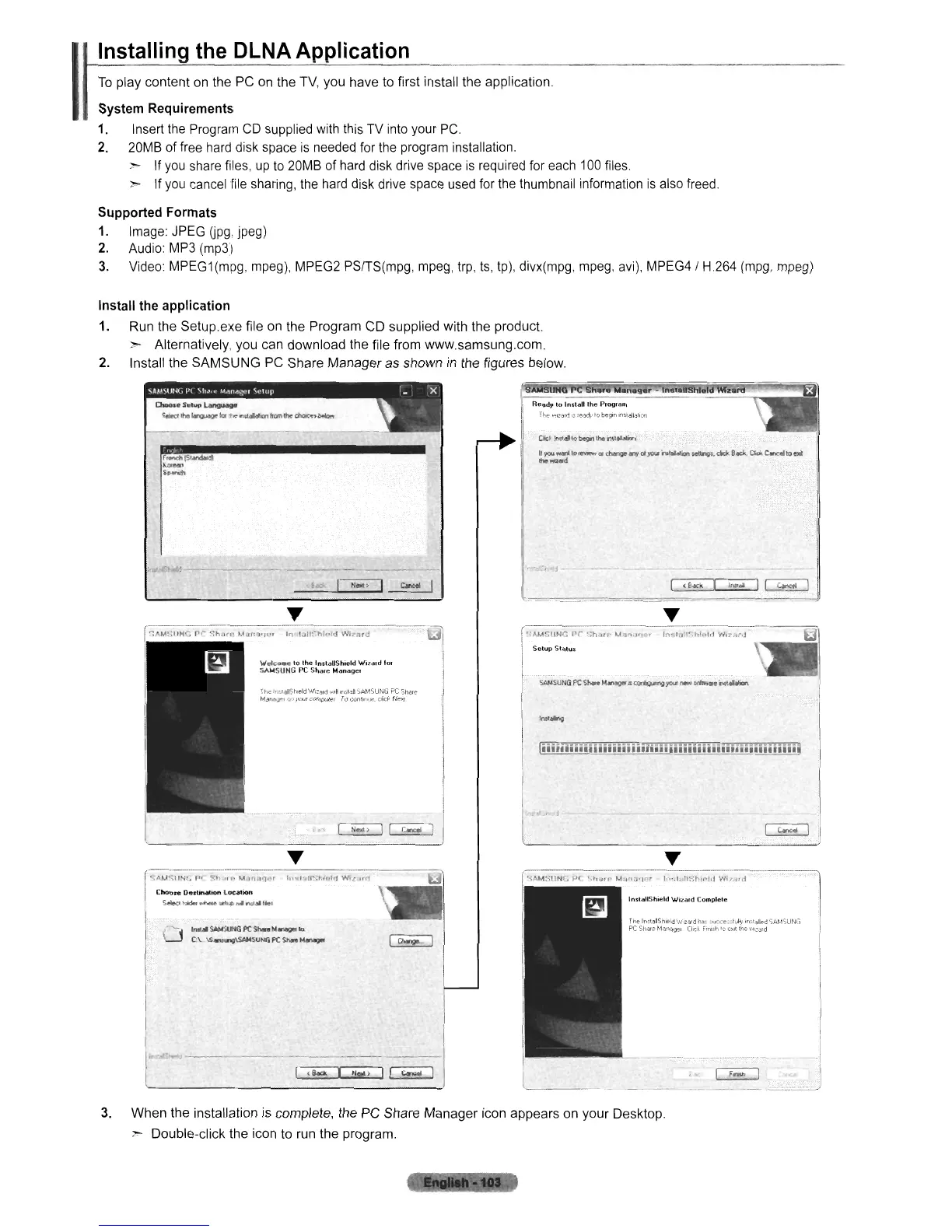
Install the application
1. Run the Setup.exe file
on
the Program CD supplied with the product.
> Alternatively, you can download the file from www.samsung.com.
2.
Install the SAMSUNG PC Share Manager as shown
in
the figures below.
0.0
••
S.t""
L~
~.woctIhl!ll~te.~I'\$l"""frcr.trheodlolcnbeioff
n
r-
"
CId
Irct4llQ
bIgil
U.
'""~.
I'
yoot,lwanllo
l~
or
change
~
at
'/CAlI
~
letmgs:.
dICk
Back
CIdo:.
Unce6
toelli:
!he,.,q.d
,.
1(&«>.II""
...
I~
, j
I
Iii
Ii.
IIi
Ii
i i
Ii
I
ii
Ii
i III
II.
I
Iii
II
il
II
••I
I.'
i
Ii
Iii
i
ii
i i
ii
:"AM~IIN(i
fJ(
:,h,Jff'
~.Jf'~l'lf1"
In·.'
.
.J"~:hlf·'d
Wl/,=,rtl~,~
-
--.
Inslall5hleld
Wizard
Complete
ThE<
In,laIShleld\""-Iu,rd
h,:
,".C'~-
kill}'
,f)~t"nl!'d
SAMSU~lGl
PC
St""M,,,,,,,
CI,ct
r"",h'o
,""
",,,,,,,j
I
fl\M$UNG:
PC
~-:h<l/r'
MII.,.I',
r
fn<.I,la"-.hi"lrl
W....
,-,J
I
Setup
Stalus
f·
SAMSU~'G
PC
Skare
MolINO".
COI"fonlg;)"DtM
new
KItw4Ie"taIat.Jcn
fn.e
''"i:;#;ihleld
WI~6rd
wiH
ird.!!
SAMSUNG
PC
Sh~!e
MiSf
r
(#,
your
t"or,'Ip\.ller
10 Ulnl.otM:.
del'
Ne~:1
<8"",1"
..
>1~
\Vcko.(1
10
the
InstaUShield Wizeud
fOI
SAMSUNG
PC
Shan: Manage,
----
----
--------
I'"
SAN'iUHG
PC
ShIRo
h4~
10:
C\.
\S~SUN6fCStweM~
I
""<>oM'
~
..
,
"""""
,
Chou"
Dedination
location
Sftedtoldtf...r.c.eDt4l.O""'tW..,,'k,
.
.,
3.
When the installation is complete, the PC Share Manager icon appears on your Desktop.
}'o-
Double-click the icon
to
run the program,












 To Next Page