Channel
Control
~~i~;;;;~~~
;~
~~~!:~I~;:-~;
,e;~:~'i;:';~;;~'~"-;;-:;:;
;;;-p,~g,a~
9
,ide
fo;
d;~;t~,
b'O~d;""
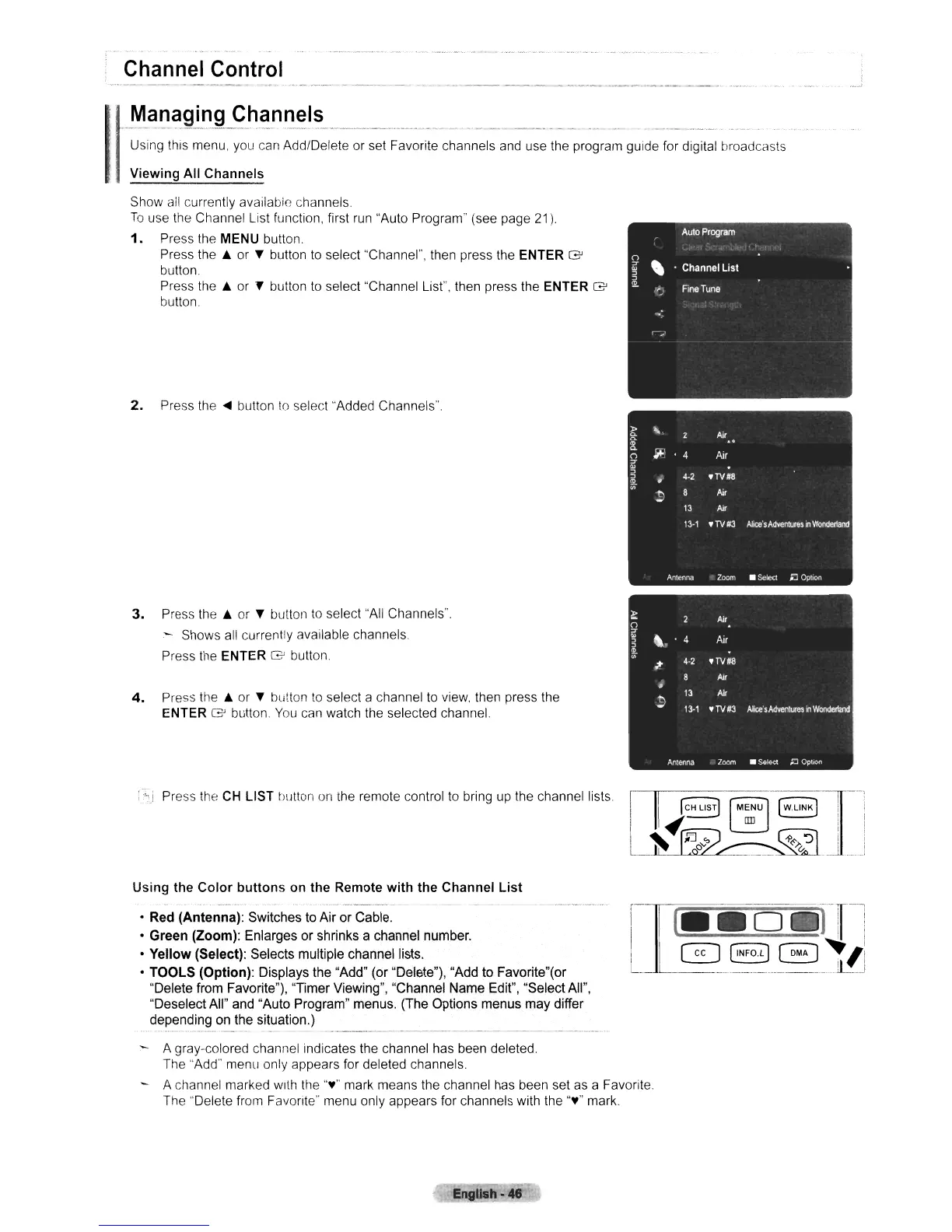
IViewing All Channels
Show
all
currently available channels
To
use the Channel List function, first
run
"Auto Program" (see page 21).
1.
Press the MENU button.
Press
the'"
or T button
to
select "Channel", then press the ENTER G
button.
Press
the'"
or
l'
button
to
select "Channel List". then press the ENTER G
button.
2.
Press
the'"
button
10
select "Added Channels".
3.
Press
the'"
or T button
to
select "All Channels".
- Shows all currently available channels.
Press the ENTER
G button.
4.
Press
the'"
or T button
to
select a channel
to
view. then press the
ENTER G button
You
can watch the selected channel
Press the
CH
LIST t)utton
on
the
remote control
to
bring
up
the channel lists.
Using the
Color
buttons
on the Remote
with
the Channel
List
• Red (Antenna): Switches to Air or Cable.
• Green (Zoom): Enlarges or shrinks a channel number.
• Yellow (Select): Selects multiple channel lists.
• TOOLS (Option): Displays the "Add" (or "Delete"), "Add to Favorite"(or
"Delete from Favorite"), "Timer Viewing", "Channel Name Edit", "Select All",
"Deselect All" and "Auto Program" menus. (The Options menus may differ
depending on the situation.)
A gray-colored channel indicates the channel has been deleted.
The "Add" menu only appears for deleted channels.
- A channel marked with the
"¥"
mark means the channel has been set
as
a Favorite.
The "Delete from Favorite" menu only appears for channels with the
"¥"
mark.
EngUsh-48












 To Next Page