Using
the
Music
L~~
. _
This menu shows MP3 files from among the files saved
on
a USB memory
device.
1.
Press the
W.L1NK
button
on
the remote control to display the "WISELINK
Pro'·
menu.
2.
Press the
"ill
or
~
button
to
select "Music", then press the ENTER G
button
~
Music files are displayed.
~
Press the 0 (Play) I ENTER G button over a music icon to play
the music.
-
To
move to the previous I next group, press the G (REW) or
o (FF) button.
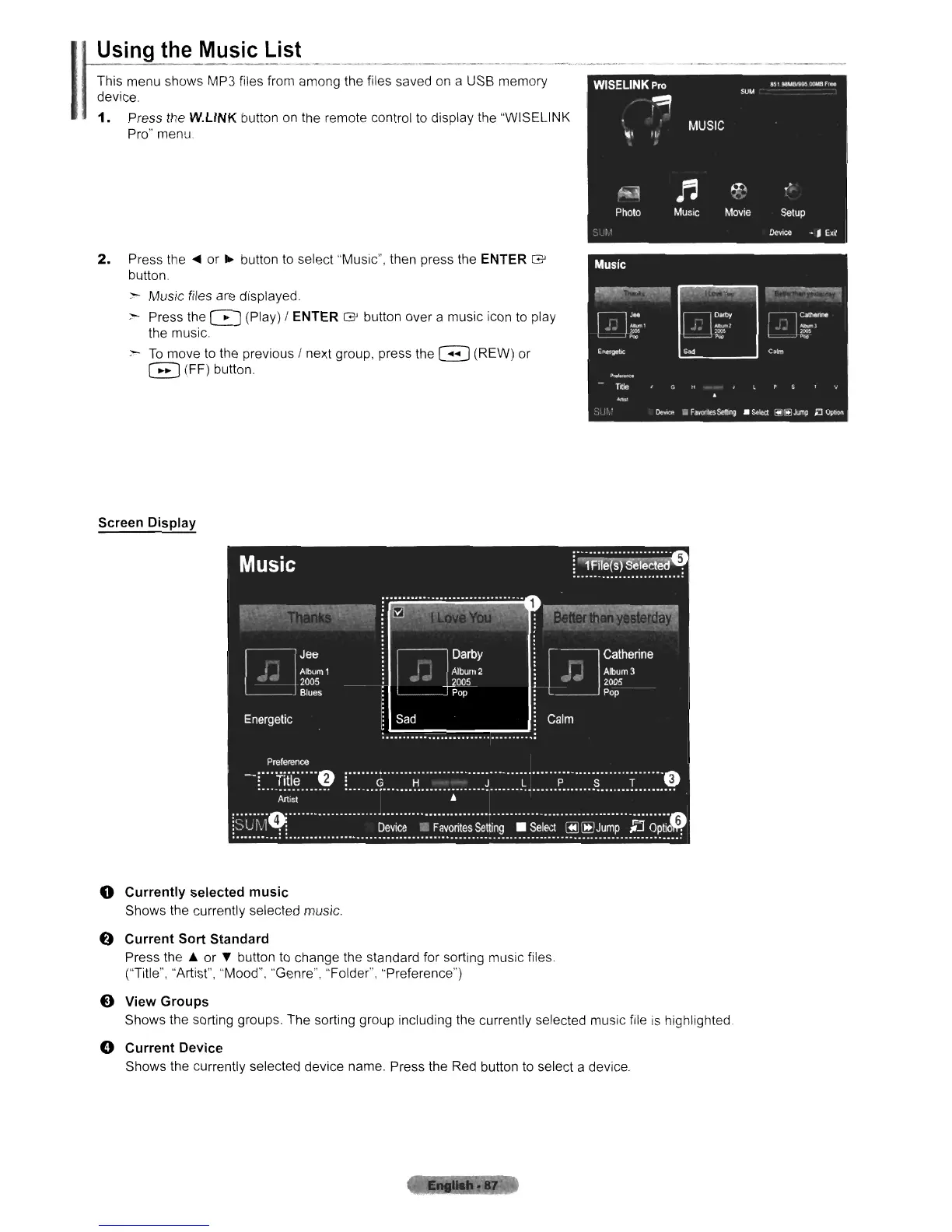
Screen Display
o Currently selected music
Shows the currently selected music.
e Current Sort Standard
Press the
io
or
'Y
button
to
change the standard for sorting music files
("Title", "Artist", "Mood", "Genre". "Folder", "Preference")
o View Groups
Shows the sorting groups. The sorting group including the currently selected music file
is
highlighted.
o Current
DevicE~
Shows the currently selected device name. Press the Red button to select a device.












 To Next Page