1--11
~~8
I
~.MODE) ~ONTEND
[FAVCH)
'-\
~--_
..
_.
__
.
__
.
1
'1,'
E';~:P.ftain;'l~·l:
''loc!p. is not available
In
all resolutions.
';")'1
c?!~
pres>.
!:',<)
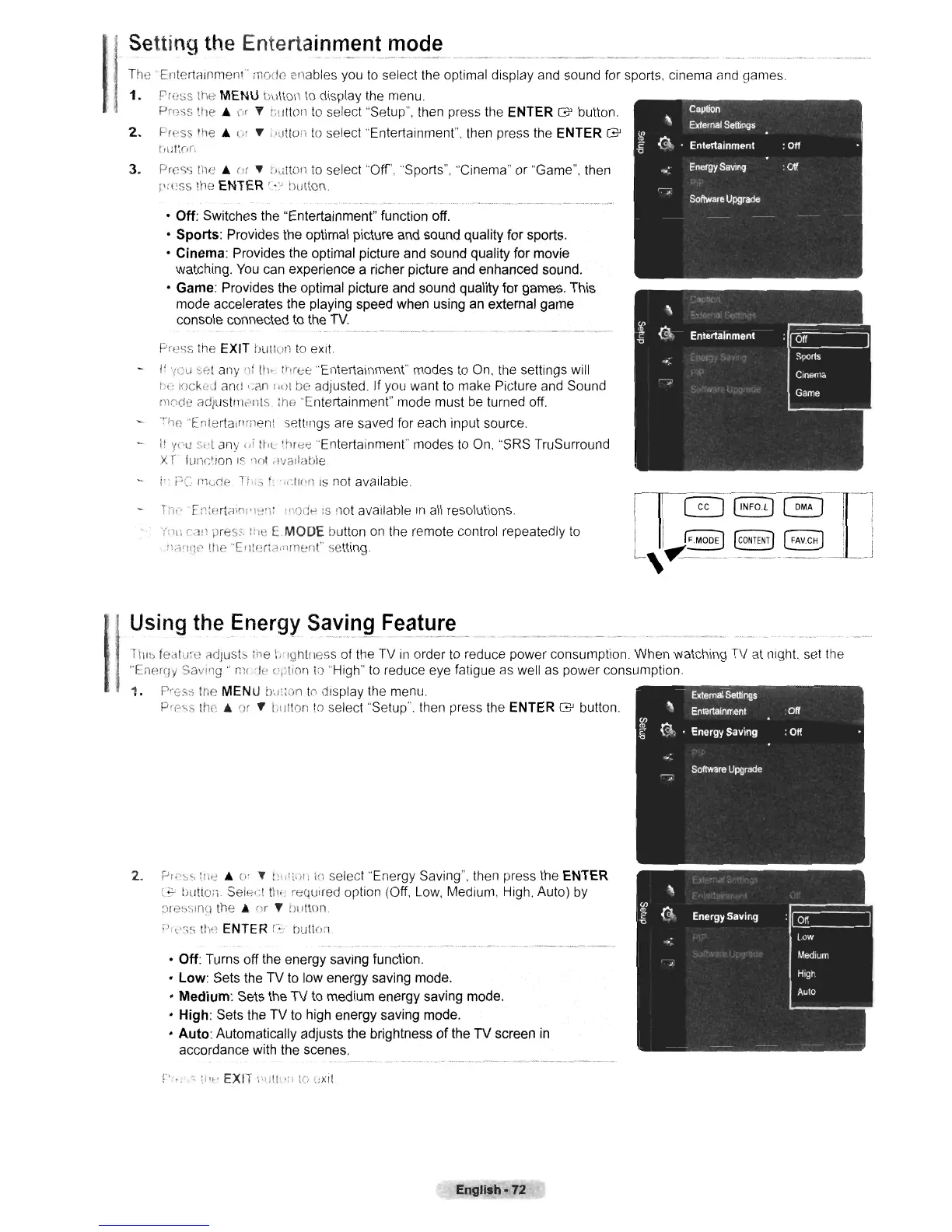
[MODE
button on the remote control repeatedly to
•
:lr""11~P
tile
"El1tl~r;d'f\menr
setting.
Press the EXIT !'Julion
to
exit.
I'
V()U
S0t
any
'If
til
..
(i'ree "Entertainment" modes to On. the settings will
1'(;
lock(!d aml,.Cln
,,<)1
be adjusted. If you want to make Picture and Sound
[lwde
adJustnklllS irle "Entertainment" mode must be turned off.
-
'rhp.
"Entertainment settings are saved for each input source.
I'
YI'U
o.d
any
IIf
tI'L three "Entertainment" modes to On, "SRS TruSurround
X
r funr.tlon
IS
110t d'Ja:labie
i'
t"C
ph"lie
it'"
f.,dlr'n
IS
not available
• Off: Switches the "Entertainment" function off.
• Sports: Provides the optimal picture and sound quality for sports.
•
Cinema:
Provides the optimal picture and sound quality for movie
watching. You can experience a richer picture and enhanced sound.
• Game: Provides the optimal picture and sound quality
for
games. This
mode accelerates the playing speed when using an external game
console connected to the TV.
3.
Pross
tile.
(lr
.,
r'l;tton to select "Off', "Sports". "Cinema"
or
"Game", then
,"~Pse;
the ENTER
'.~."
button
The'
EnteriClinmen
l
mode enables you to select the optimal display and sound for sports, cinema and games.
1.
Pre:;s the MENU tJutton
to
display the menu
Prr:ss
lie.
or T i;!/ttOll
to
select "Setup", then press the ENTER G button.
2.
Pr("ss
the.
(,'
...
;'utlon to select "Entertainment". then press the ENTER G
[,I:II(,n
Using
the
Energy
S~ying
Fe~.t~!~
_
TllI~
fe2llurl~
"djusts
,he l.'lghtrless of the TV
in
order to reduce power consumption. When watching TV at night, set the
"Energy
Savl'lg"
ml
'It'
u::lion
10
"High" to reduce eye fatigue as well as power consumption.
1.
PI::::SS !tie MENU bu!:on
to
display the menu.
Pee,s tho
..
or
T I,tltlon
to
select "Setup". then press the ENTER G button
2.
p".~~
~/1e
• u'
.,
h,r!'\!i
\(l
select "Energy Saving", then press the ENTER
[;;c
bullon
Sel(-:,:I
tlli'
required option (Off. Low, Medium, High. Auto) by
pre~SlnCl
the
..
nr T Dutton
rJ",,;s
tiw
ENTER
r:-c'
bution
• Off: Turns off the energy saving function.
•
Low:
Sets the
TV
to low energy saving mode.
•
Medium:
Sets the
TV
to medium energy saving mode.
•
High:
Sets the
TV
to high energy saving mode.
•
Auto:
Automatically adjusts the brightness
of
the
TV
screen in
accordance with the scenes,
v···.
0
:.""
EXIT
:·'Ilt'·"
:e,
I.;xit
English·72











 To Next Page