Time
Setting
--
_ _
_.
__
..
~-------------------------
---
----
~
~e~~:i
~~
~~~k~'
:!;~:~"
;~
o~de,
'0
""
'he
,~,;o"~met
f."""
of
'he
TV
IAlso, you can check the time while watching the
TV.
(Just press the INFO button.)
Option
1:
Setting the Clock Manually
1.
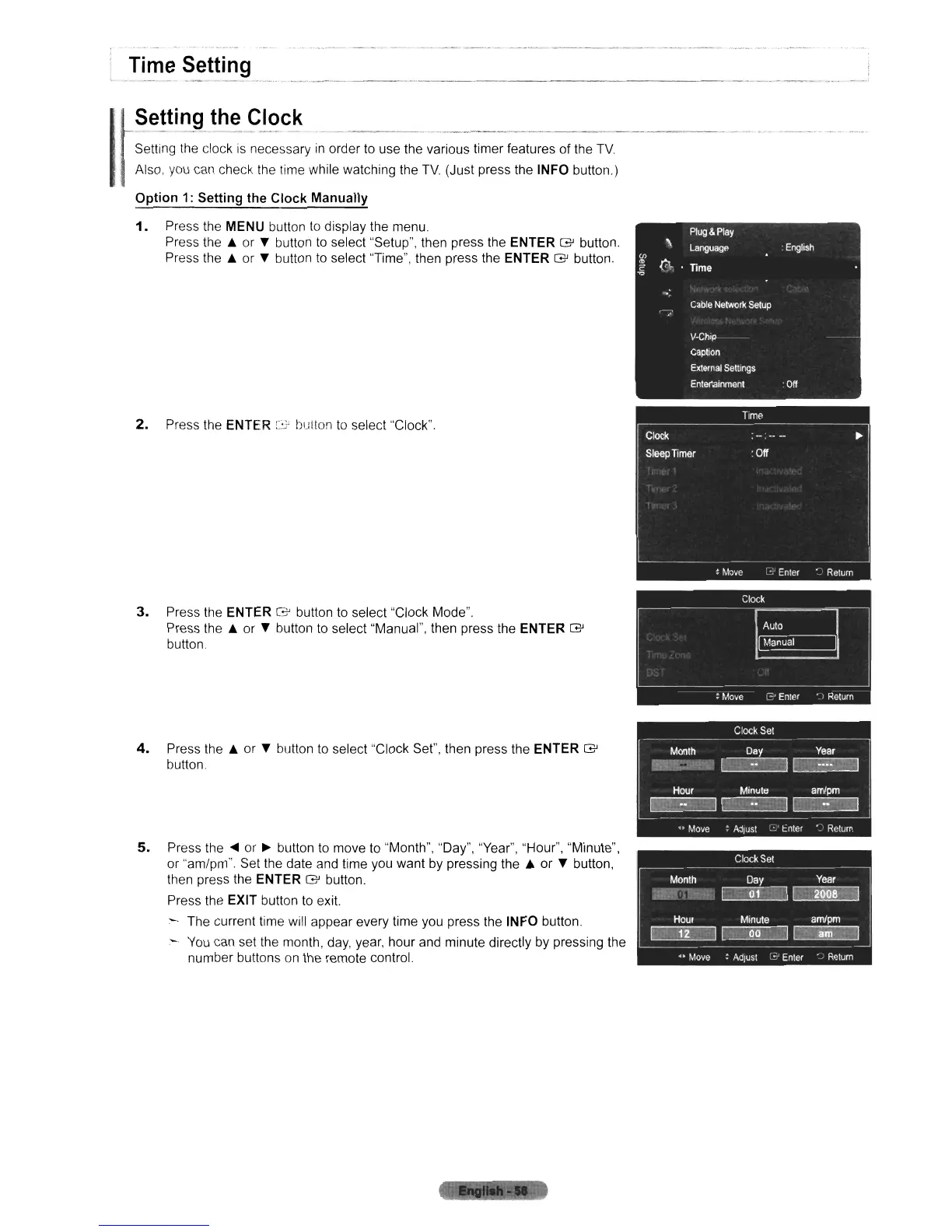
Press the MENU button
to
display the menu.
Press the
.&
or T button
to
select "Setup", then press the ENTER
G'
button.
Press the
.&
or T button
to
select "Time", then press the ENTER
G'
button.
2.
Press the ENTER
:3
button
to
select "Clock".
3.
Press the ENTER
G'
button
to
select "Clock Mode".
Press the
.&
or T button
to
select "Manual", then press the ENTER
G'
button
4.
Press the
.&
or T button
to
select "Clock Set", then press the ENTER
G'
button.
5.
Press
the'"
or
~
button
to
move
to
"Month", "Day", "Year", "Hour", "Minute",
or "am/pm". Set the date and time you want by pressing the A or T button,
then press the
ENTER
G'
button.
Press the
EXIT button
to
exit.
- The current time will appear every time you press the
INFO button.
-
You
can set the month,
day,
year, hour and minute directly by pressing the
number buttons
on
the remote control












 To Next Page