..
--_.~--~._--
-~
..
,
!
_~~~~~E~S~_~tings
a_n_d_ln_fo_L_i._n_k
.
__
,
To
access Samsung's Infolink network feature, you must make one of the connections on the following pages.
t
Network
Connection
-
Cable
-------
._--
---
-
---
LAN Connection
for
a DHCP
Environment
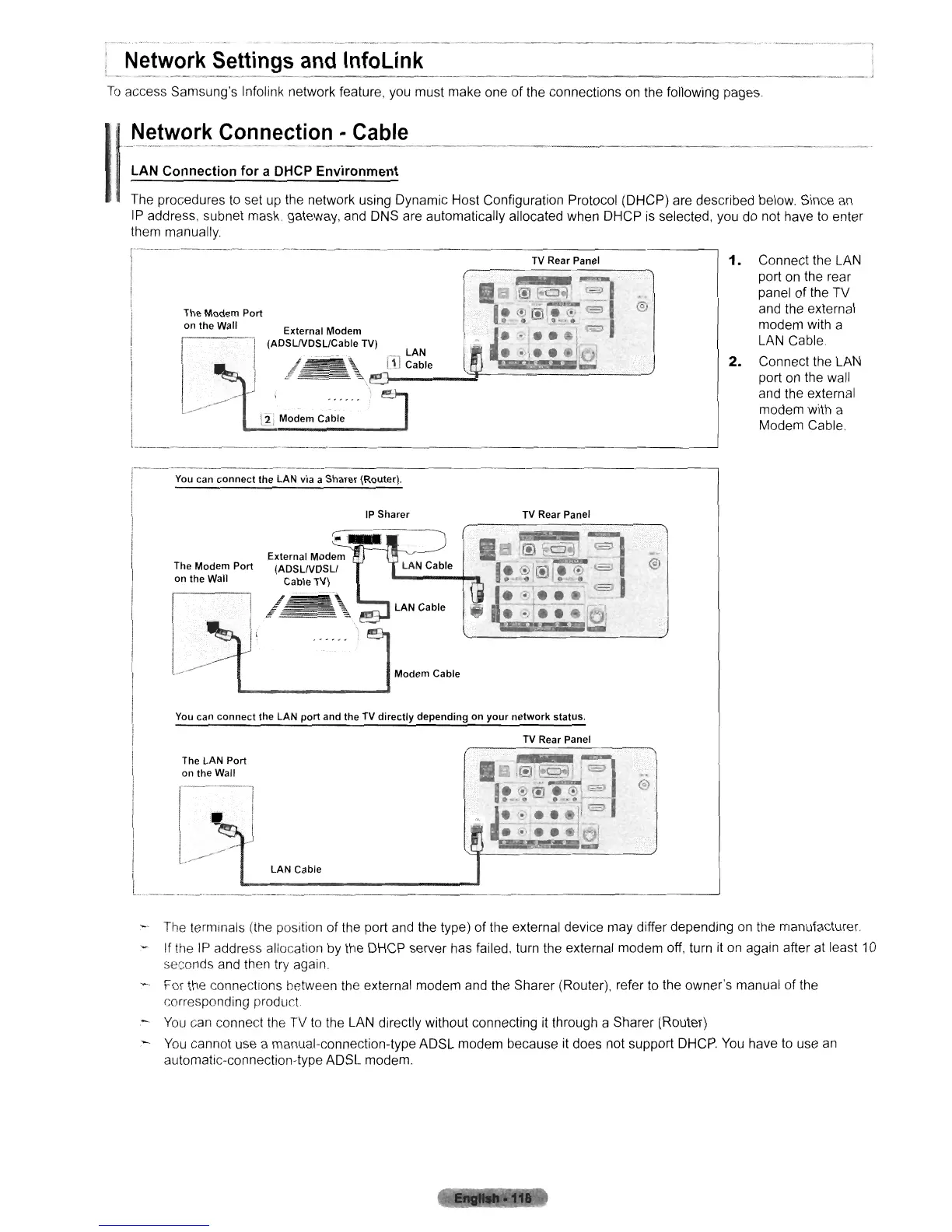
The procedures
to
set
up
the network
uSing
Dynamic Host Configuration Protocol (DHCP) are described below Since
an
IP
address, subnet mask. gateway, and DNS are automatically allocated when DHCP
is
selected, you do not have
to
enter
them manually.
[2, Modem Cable
1.
Connect the
LAN
port on the rear
panel of the TV
and the external
modem with a
LAN
Cable.
2.
Connect the LAN
port on the wall
and the external
modem with a
Modem Cable
TV
Rear Panel
External Modem
1 (ADSLNDSL/Cable TV)
The Modem Port
on the Wall
1------------_·_-_·-
I
-._----------------------------'
TV
Rear Panel
Modem Cable
~---------------------------------------,
I
You
can connect the LAN via a Sharer (Router).
1 ,
..
,,,"',
."om
","""
I
The Modem Port (ADSUVDSLI
on the Wall Cable
TV)
I
You
can connect the LAN
port
and the
TV
directly depending on
your
network status.
TV
Rear Panel
LAN Cable
The LAN Port
on the Wall
1---'
l----
l
'-
_---=::::::::::::::::::::::::::::::::::::::'
---'
:-
The terminals (the position of the port and the type) of the external device may differ depending
on
the manufacturer
If the IP address allocation by the DHCP server has failed, turn the external modem off, turn it on again after at least
10
seconds and then try again.
For the connections hetween the external modem and the Sharer (Router), refer
to
the owner's manual of the
corresponding product.
-
You
can connect the TV
to
the LAN directly without connecting it through a Sharer (Router)
-
You
cannot use a manual-connection-type ADSL modem because it does not support
DHCP.
You
have
to
use
an
automatic-connection-type ADSL modem.












 To Next Page