Sound
Control
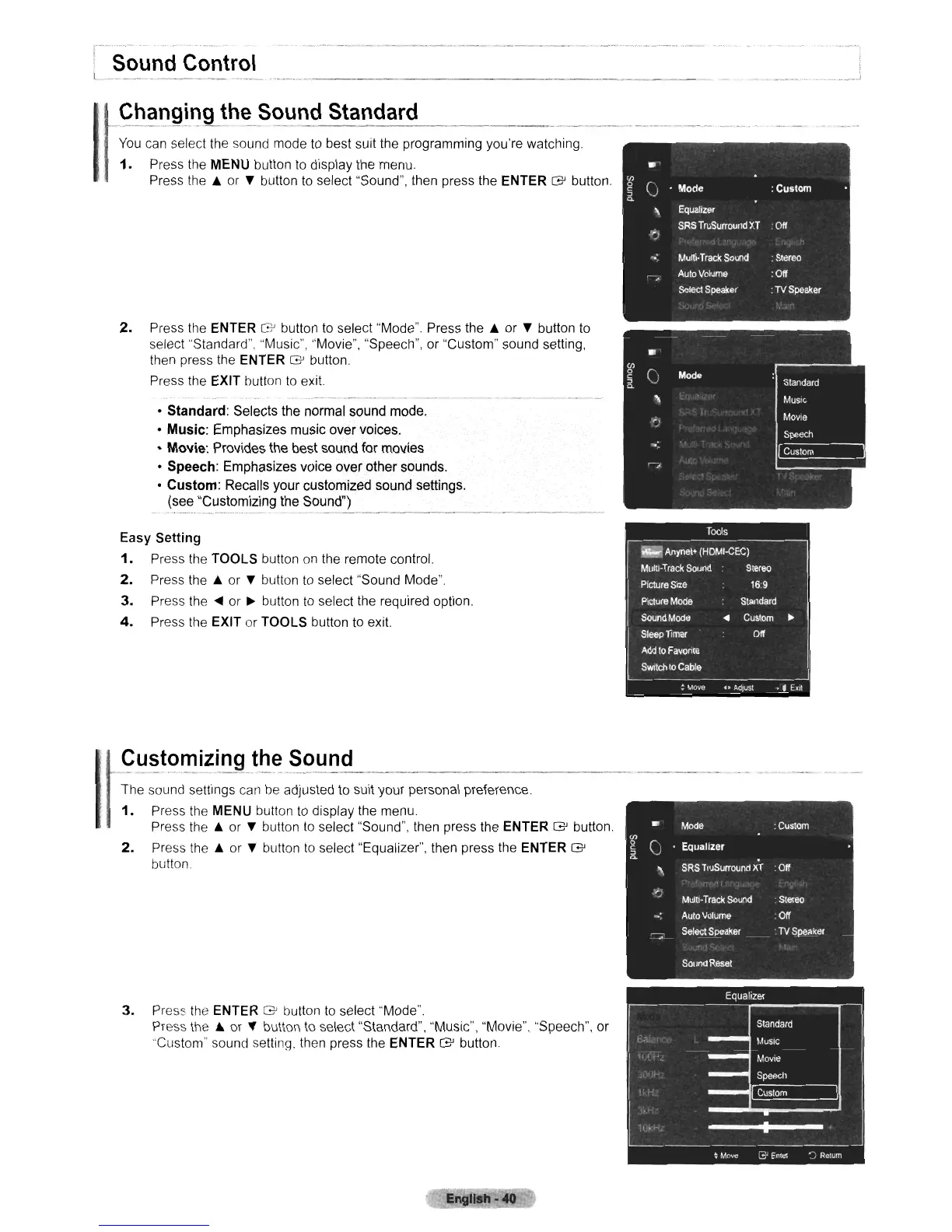
You
can select the sound mode to best suit the programming you're watching
1.
Press the MENU button
to
display the menu
Press
the.
or
~
button to select "Sound", then press the ENTER G button.
2.
Press the ENTER G button
to
select "Mode". Press
the.
or
~
button
to
select "Standard", "Music", "Movie", "Speech", or "Custom" sound setting,
then press the ENTER G button.
Press the EXIT button
to
exit.
•
Standard:
Selects the normal sound mode.
•
Music:
Emphasizes music over voices.
•
Movie:
Provides the best sound
for
movies
•
Speech:
Emphasizes voice over other sounds.
•
Custom:
Recalls your customized sound settings.
(see "Customizing the Sound")
_ ,
_-~..
...•.. -
Easy Setting
1.
Press the TOOLS button
on
the remote control.
2.
Press
the.
or
~
button
to
select "Sound Mode".
3.
Press
the'"
or • button
to
select the required option.
4.
Press the EXIT
or
TOOLS button
to
exit.
~
-~~~~~~~1::~,~~~~:~~~~,~
"it
yo",
pe~ooal
pcefe,eo,"
1.
Press the MENU button
to
display the menu.
Press
the.
or
~
button
to
select "Sound", then press the ENTER G button.
2.
Press
the.
or
~
button
to
select "Equalizer", then press the ENTER G
button
3.
Press the ENTER G button
to
select "Mode".
Press
the.
or
~
button
to
select "Standard", "Music", "Movie", "Speech", or
"Custom" sound setting. then press the
ENTER G button.
English
·40












 To Next Page