Connecting
a
Digital
Audio
System
TV
Rear Panel
Optical Cable (Not supplied)
Digital
Audio
System
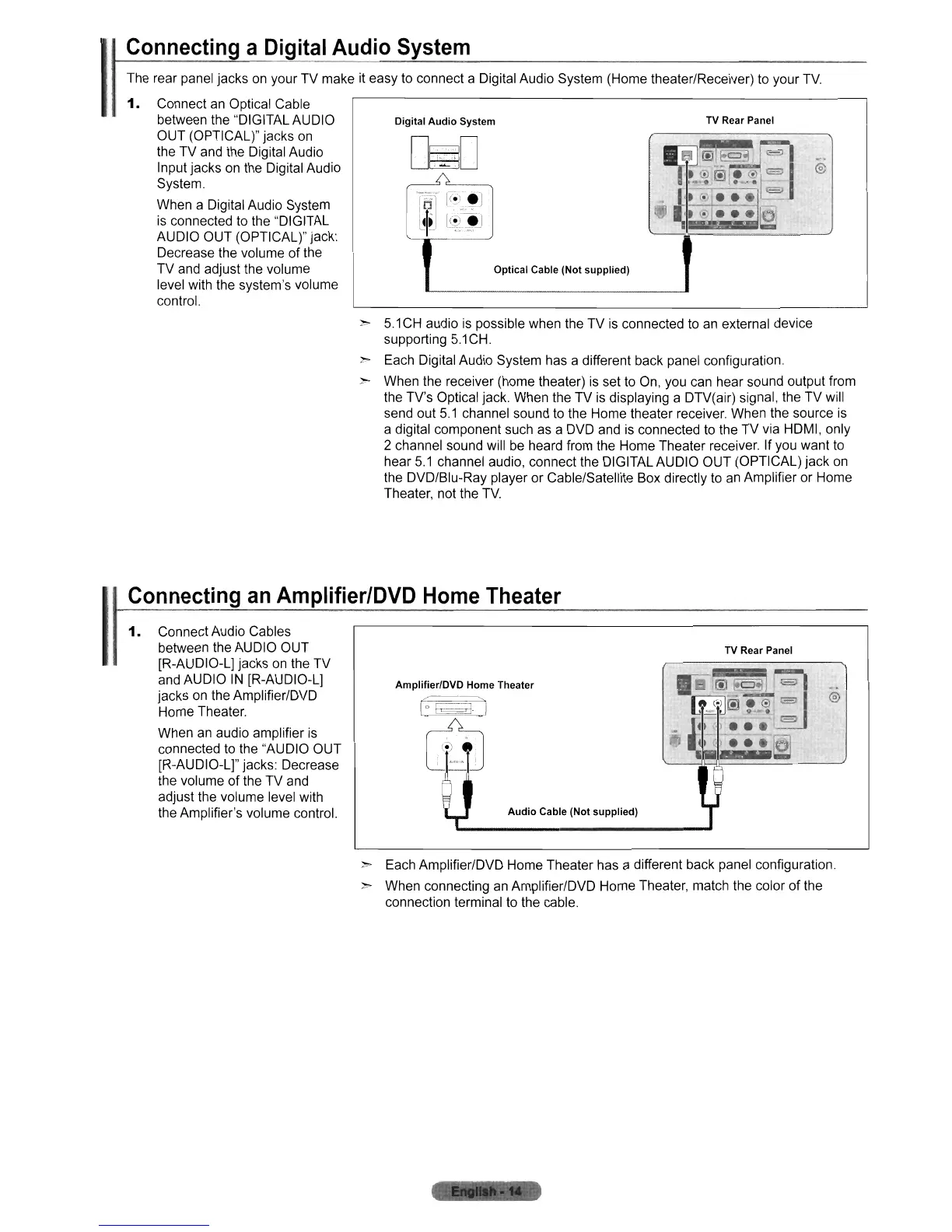
The rear panel jacks
on
your TV make it easy to connect a Digital Audio System (Home theater/Receiver) to your
TV.
1.
Connect
an
Optical Cable
between the "DIGITAL AUDIO
OUT (OPTICAL)" jacks
on
the TV and the Digital Audio
Input jacks on the Digital Audio
System.
When a Digital Audio System
is connected to the "DIGITAL
AUDIO OUT (OPTICAL)" jack:
Decrease the volume of the
TV and adjust the volume
level with the system's volume
control.
:»-
5.1
CH
audio
is
possible when the TV
is
connected to
an
external device
supporting
5.1
CH.
:»-
Each Digital Audio System has a different back panel configuration.
> When the receiver (home theater)
is
set to On, you can hear sound output from
the TV's Optical jack. When the
TV
is displaying a DTV(air) signal, the TV will
send out
5.1
channel sound to the Home theater receiver When the source is
a digital component such as a DVD and is connected to the TV via HDMI, only
2 channel sound will
be
heard from the Home Theater receiver. If you want to
hear
5.1
channel audio, connect the DIGITAL AUDIO OUT (OPTICAL) jack
on
the DVD/Blu-Ray player or Cable/Satellite Box directly
to
an
Amplifier or Home
Theater, not the
TV.
Connecting
an
Amplifier/DVD
Home
Theater
I
1.
Connect Audio Cables
between the AUDIO OUT
[R-AUDIO-L] jacks on the TV
and AUDIO
IN
[R-AUDIO-L]
jacks on the Amplifier/DVD
Home Theater.
When
an
audio amplifier
is
connected to the "AUDIO OUT
[R-AUDIO-L]" jacks: Decrease
the volume
of
the TV and
adjust the volume level with
the Amplifier's volume control.
Amplifier/DVD Home Theater
Audio
Cable (Not supplied)
TV
Rear Panel
@
:»-
Each Amplifier/DVD Home Theater has a different back panel configuration.
> When connecting
an
AmplifierlDVD Home Theater, match the color
of
the
connection terminal
to
the cable.











 To Next Page