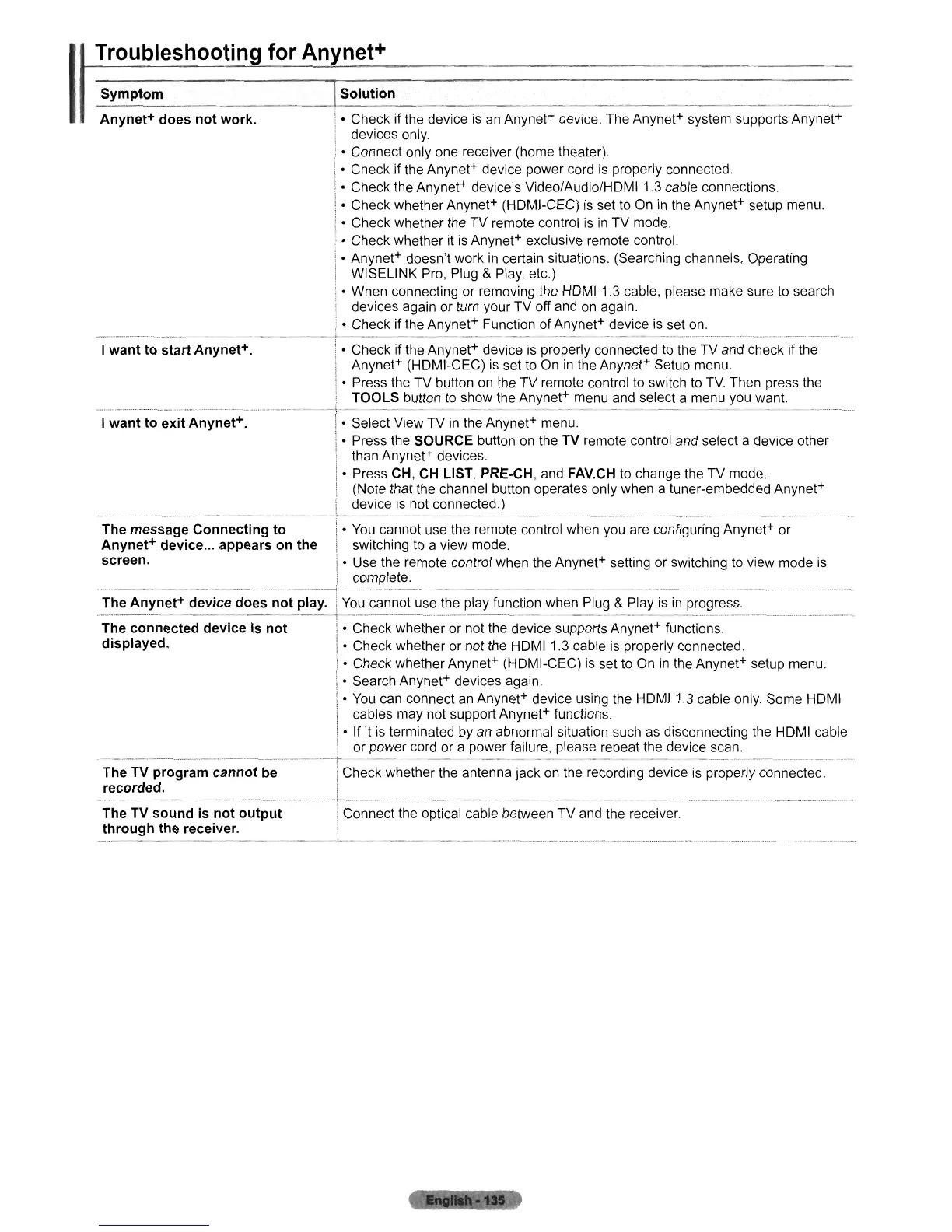
Troubleshooting
for
Anynet+
I
Symptom
Anynet+ does
not
work.
I
want
to start Anynet+.
I want to exit Anynet+.
The message Connecting
to
Anynet+ device
...
appears on the
screen.
ISolution
..
..
.
__
.
__
• Check if the device
is
an
Anynet+ device. The Anynet+ system supports Anynet+
devices only.
• Connect only one receiver (home theater).
• Check if the Anynet+ device power cord is properly connected.
• Check the Anynet+ device's Video/Audio/HOMI 1.3 cable connections.
• Check whether Anynet+ (HOMI-CEC)
is
set to On
in
the Anynet+ setup menu.
• Check whether the TV remote control is
in
TV mode.
• Check whether
it
is Anynet+ exclusive remote control.
• Anynet+ doesn't work in certain situations. (Searching channels, Operating
WISELINK Pro, Plug
& Play, etc.)
• When connecting or removing the HOMI 1.3 cable, please make sure to search
devices again or turn your TV off and on again.
• Check if the Anynet+ Function of Anynet+ device is set on.
---
- . -
----
---
--
--
_.-
- -
--~.~_.
__
._-_
..
~--_._-,
-----_
..
_----_
..
__
..
__
..
_._._--_
.......
-
• Check if the Anynet+ device is properly connected
to
the TV and check if the
Anynet+ (HOMI-CEC)
is
set to On
in
the Anynet+ Setup menu.
• Press the TV button
on
the TV remote control to switch to
TV.
Then press the
TOOLS button to show the Anynet+ menu and select a menu you want.
-
--
---
-
--
- -
--
----
- -
--
-- - -
_.
• Select View TV
in
the Anynet+ menu.
• Press the SOURCE button
on
the TV remote control and select a device other
than Anynet+ devices.
• Press CH, CH LIST, PRE·CH, and FAV.CH to change the TV mode.
(Note that the channel button operates only when a tuner-embedded Anynet+
device is not connected.)
•
You
cannot use the remote control when you are configuring Anynet+ or
switching to a view mode.
• Use the remote control when the Anynet+ setting or switching to view mode is
complete.
-_._---_.
__
.....
--_._-...;...
.....
_
.....
_-_._
..
_--
---_...
-
The Anynet+ device does
not
play.
The connected device is
not
displayed.
You
cannot use the play function when Plug & Play is
in
progress.
...
__
~
•••
..
_.
._
••
_.
'"
..
~
.____
__
_.
_
__._
_
_"_
..
w
._.
__
,
__
,
•.
._
_.
__
•.•
••••••••
• Check whether or not the device supports Anynet+ functions.
I • Check whether or not the HOMI 1.3 cable is properly connected.
• Check whether Anynet+ (HOMI-CEC) is set to On
in
the Anynet+ setup menu.
• Search Anynet+ devices again.
•
You
can connect
an
Anynet+ device using the HOMI 1.3 cable only. Some HOMI
cables may not support Anynet+ functions.
• If
it
is
terminated by
an
abnormal situation such
as
disconnecting the HOMI cable
or power cord or a power failure, please repeat the device scan.
--------
.....
--
......
-
...
--
..
---.--.--.-
..
---r--
--
--
--
---.--
-_
•.
-
---
The
TV
program cannot be
recorded.
The TV
sound
is
not
output
through
the receiver.
Check whether the antenna jack on the recording device is properly connected.
Connect the optical cable between TV and the receiver.












 To Next Page