Viewing
Closed
Captions
(On-Screen
Text
Messages)
-
Analog
The Analog Caption function operates
in
either analog TV channel mode or when a signal
is
supplied from an external
device
to
TV.
(Depending
on
the broadcasting signal, the Analog Caption function may operate on digital channels.)
1.
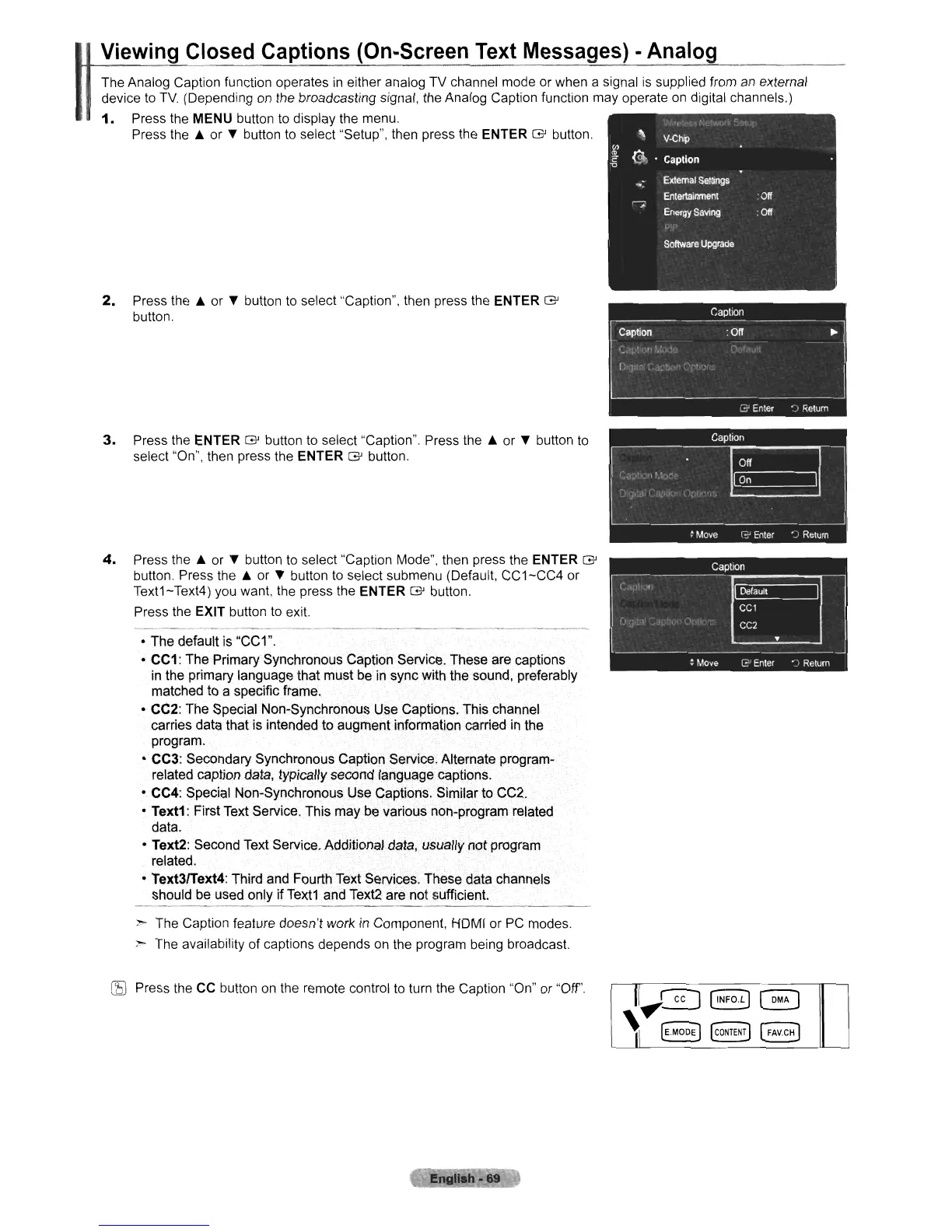
Press the MENU button to display the menu.
Press the
..
or
...
button to select "Setup", then press the ENTER G button.
2.
Press the
..
or
...
button
to
select "Caption", then press the ENTER G
button.
3.
Press the ENTER G button to select "Caption". Press the
..
or
...
button to
select "On", then press the ENTER G button.
4.
Press the
..
or
...
button
to
select "Caption Mode", then press the ENTER G
button. Press the
..
or
...
button to select submenu (Default,
CC1-CC4
or
Text1-Text4) you want, the press the
ENTER G button.
Press the EXIT button
to
exit.
• The default is "CC1".
•
CC1:
The Primary Synchronous Caption Service. These are captions
in
the primary language that must be
in
sync with the sound, preferably
matched to a specific frame.
• CC2: The Special Non-Synchronous Use Captions. This channel
carries data that is intended to augment information carried
in
the
program.
• CC3: Secondary Synchronous Caption Service. Alternate program-
related caption data, typically second language captions.
• CC4: Special Non-Synchronous Use Captions. Similar to CC2.
•
Text1:
First Text Service. This may be various non-program related
data.
• Text2: Second Text Service. Additional data, usually notprogram
related.
•
Text3/Text4:
Third and Fourth Text Services. These data channels
should be used only if Text1 and Text2 are not sufficient.
:>
The Caption feature doesn't work
in
Component, HDMI or
PC
modes.
="'"
The availability of captions depends on the program being broadcast.
lE
Press the
CC
button on the remote control to turn the Caption "On" or "Off'.
~"'h·69
II,
GQ
[INFOL]
~
'I
....
~MODEJ
@ONTEN~
[FAV.CH]












 To Next Page