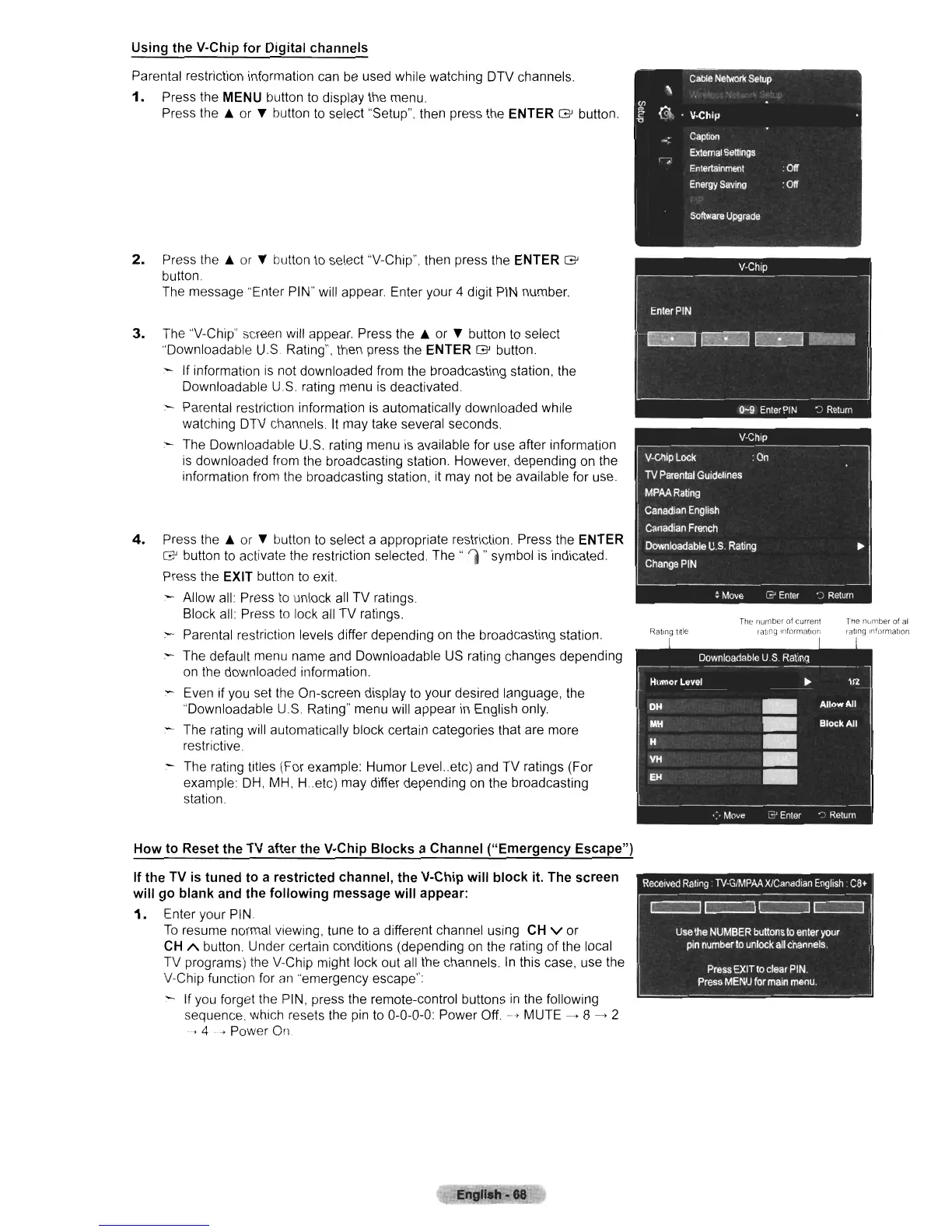
Using the V-Chip for Digital channels
Parental restriction information can
be
used while watching DTV channels.
1.
Press the MENU button to display the menu.
Press
the.
or
...
button
to
select "Setup". then press the ENTER G button.
2.
Press
the.
or
...
button
to
select "V-Chip". then press the ENTER G
button
The message ·'Enter PIN" will appear. Enter your 4 digit
PIN
number.
3.
The "V-Chip" screen will appear. Press
the.
or
...
button
to
select
·'Downloadable U.S Rating", then press the
ENTER G button.
If information
is
not downloaded from the broadcasting station, the
Downloadable U.S. rating menu
is
deactivated.
Parental restriction information
is
automatically downloaded while
watching DTV channels.
It
may take several seconds.
- The Downloadable U.S. rating menu
is
available for use after information
is
downloaded from the broadcasting station. However, depending on the
information from the broadcasting station,
it
may not
be
available for use.
4.
Press
the.
or
...
button
to
select a appropriate restriction. Press the ENTER
G button to activate the restriction selected.
The"
'I"symbol
is
indicated.
Press the EXIT button
to
exit.
- Allow
all
Press
to
unlock all TV ratings.
Block all: Press
to
lock all TV ratings.
- Parental restriction levels differ depending
on
the broadcasting station.
:--
The default menu name
and
Downloadable
US
rating changes depending
on
the downloaded information.
:--
Even if
you
set the On-screen display
to
your desired language, the
"Downloadable
US.
Rating" menu will appear
in
English only.
- The rating will automatically block certain categories that are more
restrictive
- The rating titles (For example: Humor Level
..
etc) and TV ratings (For
example:
DH,
MH,
H.etc)
may differ depending on the broadcasting
station.
Ratltlg title
The
number
of
current
rallng
!nformallOn
Tile Ilvrnber
of
all
rating
Infurmatlon
How
to
Reset the TV after the V-Chip Blocks a Channel ("Emergency Escape")
If the TV
is
tuned
to
a restricted channel, the V-Chip will block it. The screen
will go blank and the following message will appear:
1.
Enter your PIN.
To
resume normal viewing, tune to a different channel using CH v or
CH
'"
button. Under certain conditions (depending
on
the rating of the local
TV programs) the V-Chip might lock out all the channels.
In
this case, use the
V-Chip function for
an·
emergency escape":
If you forget the PIN, press the remote-control buttons
in
the following
sequence. which resets the
pin
to
0-0-0-0: Power Off.
-->
MUTE
--+
8
--+
2
~
4
..
c'
Power
On
Engllah· 88












 To Next Page