How
to
Set
up
Restrictions
Using
the
Canadian
French
1.
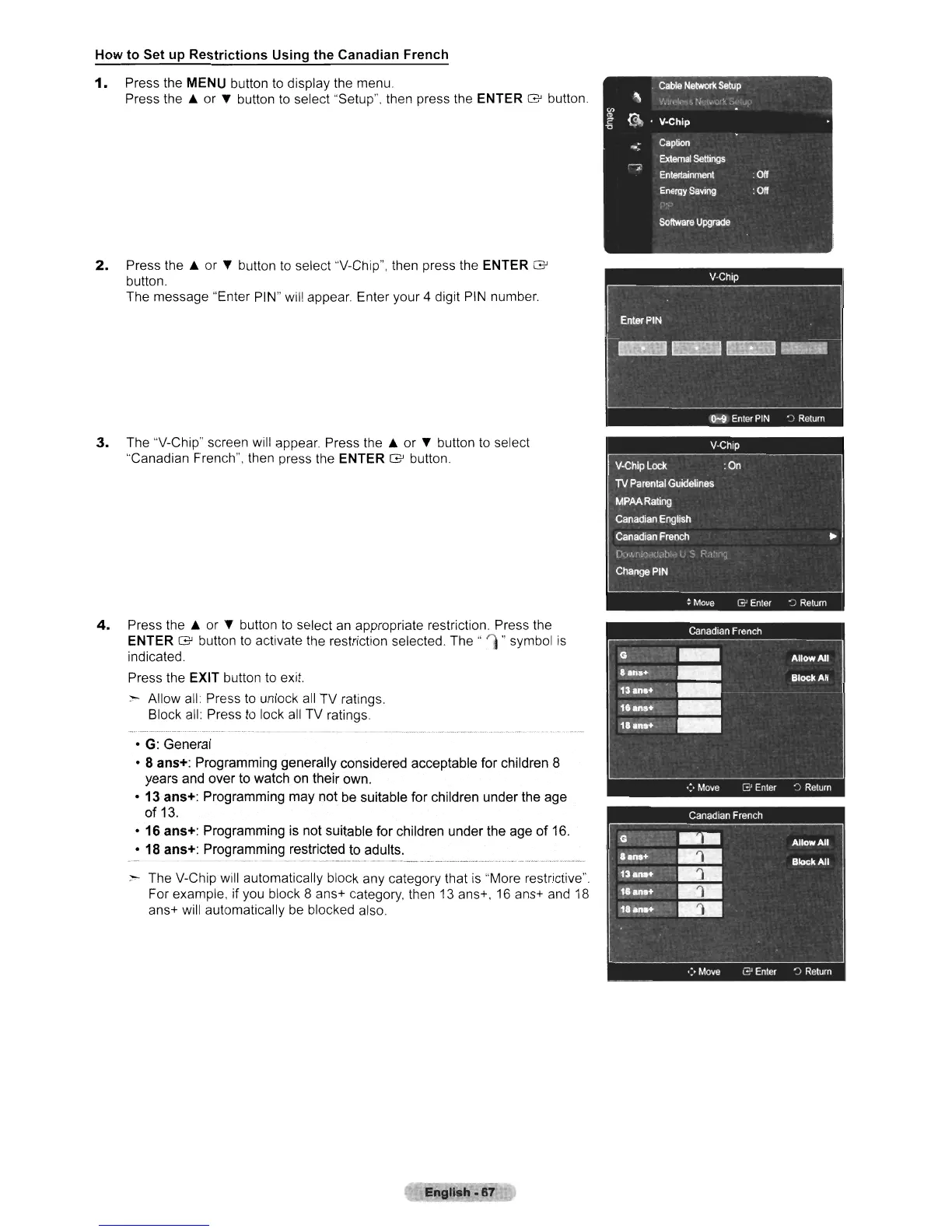
Press the MENU button to display the menu.
Press
the.
or
l'
button
to
select "Setup", then press the ENTER
G'
button.
2.
Press
the.
or
l'
button
to
select ''V-Chip'', then press the ENTER
G'
button.
The message "Enter PIN" will appear. Enter your
4 digit PIN number.
3.
The "V-Chip" screen will appear. Press
the.
or
l'
button to select
"Canadian French", then press the ENTER
G'
button.
4.
Press
the.
or
l'
button
to
select
an
appropriate restriction Press the
ENTER
G'
button to activate the restriction selected.
The"
1"
symbol
is
indicated.
Press the EXIT button to exit.
~
Allow all: Press to unlock all TV ratings.
Block all: Press to lock
all
TV ratings
•
G:
General
• 8 ans+: Programming generally considered acceptable for children 8
years and over to watch on their own.
• 13 ans+: Programming may not be suitable for children under the age
of
13.
• 16 ans+: Programming is not suitable for children under the age
of
16.
• 18 ans+: Programming restricted to adults,
- - --------- -
--
- -_._-------_._----_.---------,---
~ The V-Chip will automatically block any category that
is
"More restrictive".
For example,
jf you block 8 ans+ category, then 13 ans+, 16 ans+ and
18
ans+ will automatically
be
blocked also
Engllsh·67
Cable
Network
Setup
"
,/.:i.·l,h·,t~·'I\.:··
....
\,
I.J~'
en
~
Gt
V-Chip
"0
-;
Caption
External
Settings
~
Entertainment
:
Off
Energy
Saving
:
Off
;.','
Software
Upgrade












 To Next Page