Viewing
the
Connection
Panel
Use the connection panel jacks to connect
NV
components that will
be
connected continuously, such as OVO/Blu-Ray
players or a VCR. For more information on connecting equipment, see pages
9-15.
[TV Rear Panel]
[TV Side Panel]
Mil'·
,
AUDIO
°e
®
VIDEO
.®
10]00
[®c:J®]
lL
JJ
ANT
IN
EX-LINK
.
.
®
.
•
®
00
•
®
II
»
.
O-AUDIO-C)
O-AUDIO-C)
®
•
II
»
•
• •
LAN
•
®
•
•
•
0
••
>- The product color and shape may vary depending on the model.
I
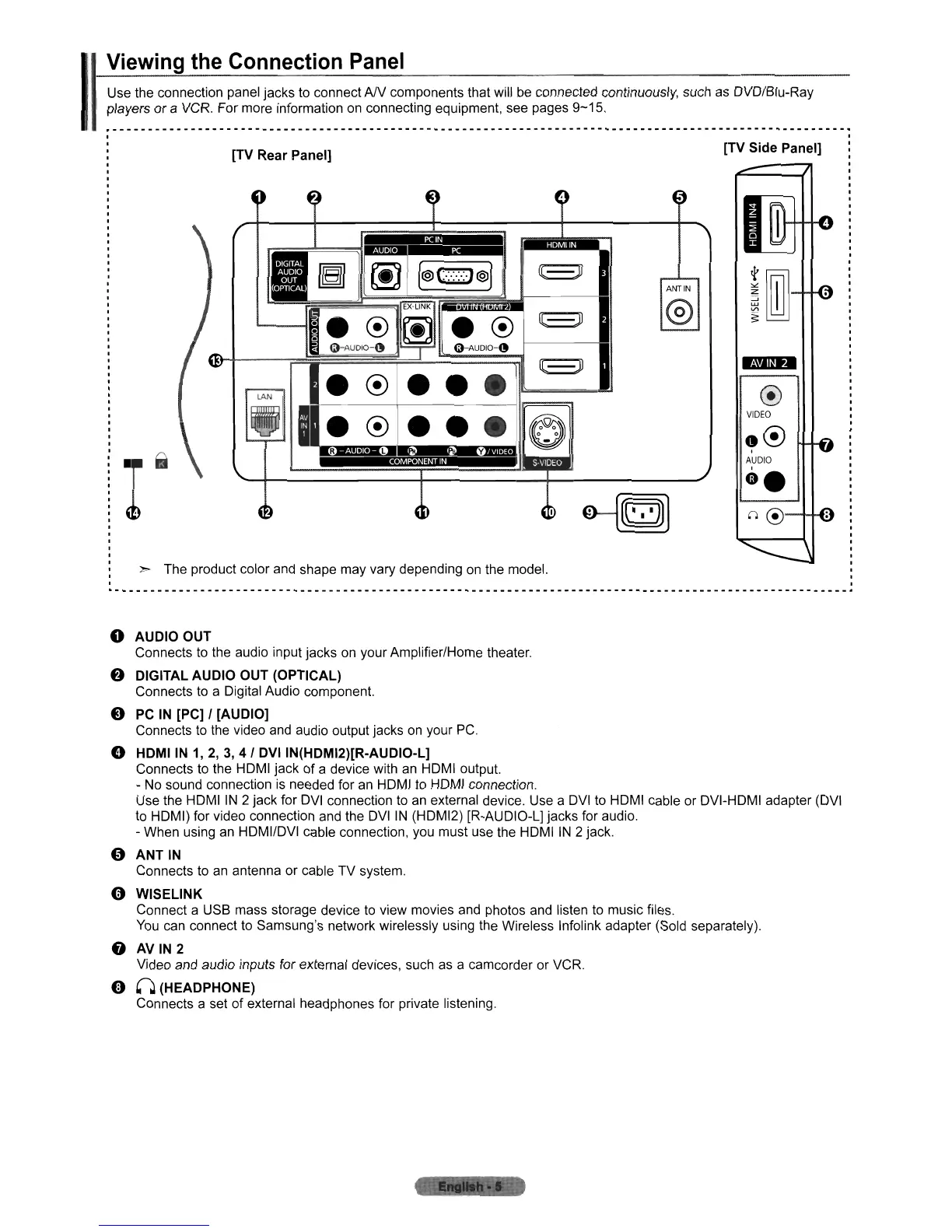
o AUDIO OUT
Connects
to
the audio input jacks
on
your Amplifier/Home theater.
f)
DIGITAL AUDIO OUT (OPTICAL)
Connects
to
a Digital Audio component.
e
PC
IN
[PC] I [AUDIO]
Connects
to
the video and audio output jacks
on
your
PC.
e HDMI
IN
1,
2, 3, 4 I DVI IN(HDMI2)[R-AUDIO-L]
Connects to the HOMI jack of a device with an HOMI output.
- No sound connection is needed for an HOMI to HOMI connection.
Use the HOMI
IN
2 jack for
OVI
connection to
an
external device. Use a
OVI
to HOMI cable or OVI-HOMI adapter
(OVI
to HOMI) for video connection and the
OVI
IN
(HOMI2) [R-AUOIO-L] jacks for audio.
- When using an HOMIIOVI cable connection, you must use the HOMI
IN
2 jack.
o ANT
IN
Connects to an antenna or cable TV system.
o WISELINK
Connect a USB mass storage device to view movies and photos and listen to music files.
You
can connect to Samsung's network wirelessly using the Wireless Infolink adapter (Sold separately).
f)
AV
IN
2
Video and audio inputs for external devices, such as a camcorder or VCR.
9 0 (HEADPHONE)
Connects a set of external headphones for private listening.












 To Next Page