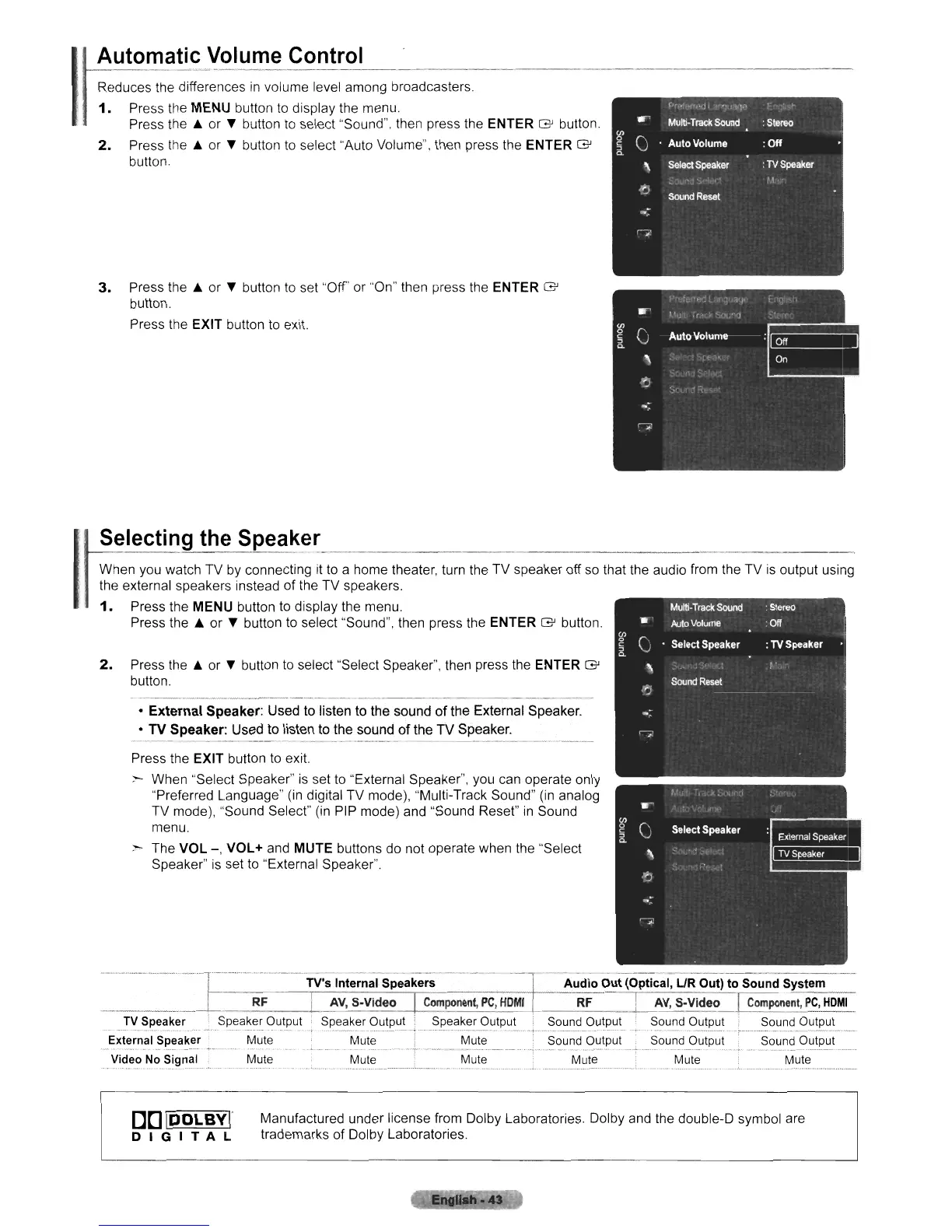
Automatic Volume Control
Reduces the differences
in
volume level among broadcasters.
1.
Press the MENU button
to
display the menu.
Press the A or " button
to
select "Sound", then press the ENTER G button.
2.
Press the A or " button
to
select "Auto Volume", then press the ENTER G
button.
(or",··«,·dl
•
'~
r\-
~."-
....
Multi·
Track
Sound
:
Stereo
(J)
()
0
Auto Volume :
Off
§
a.
'\
Select
Speaker
:
TV
Speaker
't·-
I')
SoundResel
-;
G'
3.
Press the A or " button
to
set "Off" or "On" then press the ENTER G
button,
Press the EXIT button
to
exit.
2.
Press the A or " button
to
select "Select Speaker", then press the ENTER G
button,
--,
Press the EXIT button
to
exit.
:--
When "Select Speaker"
is
set to "External Speaker", you can operate only
"Preferred Language"
(in
digital TV mode), "Multi-Track Sound"
(in
analog
TV mode), "Sound Select"
(in
PIP mode) and "Sound Reset"
in
Sound
menu,
~
The VOL
-,
VOL+ and MUTE buttons do not operate when the "Select
Speaker"
is
set
to
"External Speaker",
• External Speaker: Used to listen to the sound
of
the External Speaker.
• TV Speaker: Used to listen to the sound
of
the TV Speaker.
I
I
Selecting the Speaker
When you watch TV by connecting
it
to
a home theater, turn the TV speaker off
so
that the audio from the TV
is
output using
the external speakers instead of the TV speakers.
1.
Press the MENU button to display the menu, ,
.•
,.
.
.•
Press the A or " button
to
select "Sound", then press the ENTER G button.
TV's Internal Speakers Audio Out (Optical,
UR
Out) to Sound System
RF
...
!~.~p'~~.~er.
...Spea~e_~
Out~ut
External Speaker Mute
"._.-
-
..
-
-_.--"
.-
...
- --
---
Video No Signal Mute
AV,
S-Video
Component,
PC,
HOMI
RF
I
AV,
S-Video_]
Component,
PC
e
HO~!...
Speaker Output I Speaker Output Sound Output
~.?u~d
O.u.tP.t:J
t
..??~~.~.OIJ.!P.lJ~_.
__
·.-.-Mu;;
...--.1-
...
----Mute
....
-'TS.~~~d-O~ip~i·
. Sound
Output'
Sound Output
"'--"M~i~"-
-+.....
Mu'i~-"":
---
M~i~-----·~·-
..
-M~;·-----
..
·
..
M~i~-----·
[
DO
IDOLByr
DIGITAL
Manufactured under license from Dolby Laboratories. Dolby and the double-D symbol are
trademarks of Dolby Laboratories.












 To Next Page