[COnnections
Connecting
VHF
and
UHF
Antennas
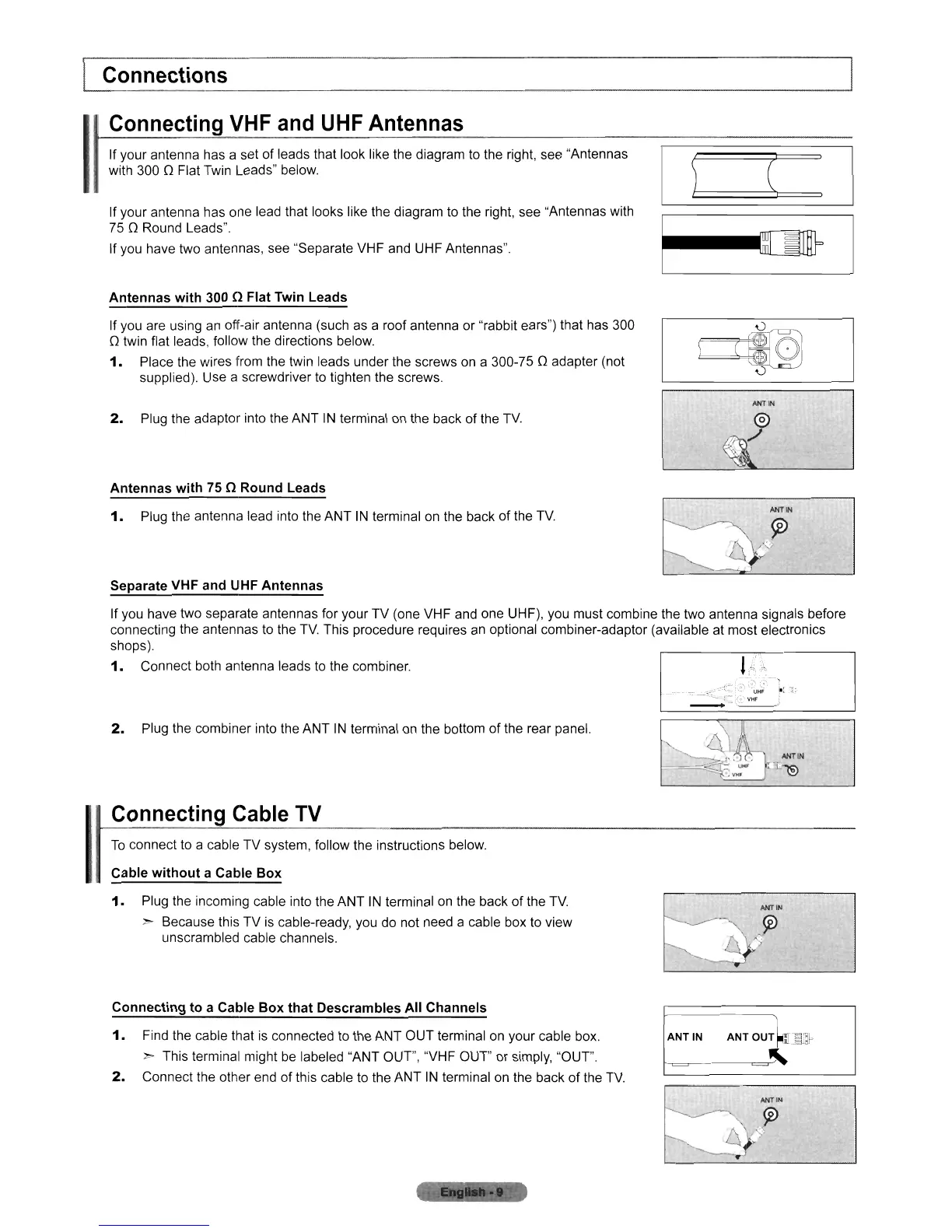
If your antenna has a set of leads that look like the diagram to the right, see "Antennas
with 300 0 Flat
Twin
Leads" below.
If your antenna has one lead that looks like the diagram
to
the right,
see
"Antennas with
750
Round Leads".
If you have two antennas, see "Separate VHF
and
UHF Antennas".
Antennas
with
300 n Flat Twin Leads
If you are using
an
off-air antenna (such as a roof antenna or "rabbit ears") that has
300
o twin flat leads, follow the directions below.
1.
Place the wires from the twin leads under the screws
on
a 300-75 0 adapter (not
supplied). Use a screwdriver
to
tighten the screws.
2.
Plug the adaptor into the ANT
IN
terminal
on
the back of the
TV
Antennas
with
75 n Round Leads
1.
Plug the antenna lead into the ANT
IN
terminal
on
the back of the
TV
--~
ANT
..
Separate VHF and UHF Antennas
If you have two separate antennas for your TV (one VHF
and
one UHF), you must combine the two antenna signals before
connecting the antennas
to
the
TV
This procedure requires
an
optional combiner-adaptor (available at most electronics
shops).
1.
Connect both antenna leads
to
the combiner.
!}
":
-, .7'
~-
~
.
~-UI1F
I.:
1:
--..:.~~:~
2.
Plug the combiner into the ANT
IN
terminal
on
the bottom
of
the rear panel.
Connecting
Cable
TV
To
connect
to
a cable TV system, follow the instructions below.
Cable
without
a Cable
Box
1.
Plug the incoming cable into the ANT IN terminal
on
the back of the
TV
> Because this TV
is
cable-ready, you do not need a cable box to view
unscrambled cable channels.
Connecting
to
a Cable
Box
that
Descrambles All Channels
1.
Find the cable that
is
connected
to
the ANT OUT terminal
on
your cable box.
> This terminal might
be
labeled "ANT OUT", "VHF OUT" or simply, "OUT".
2.
Connect the other
end
of this cable to the ANT
IN
terminal
on
the back of the
TV
ANT
IN
ANT
OUT
'Smr
i--=----=~












 To Next Page