H
~~~g~:-~:~,a:~~:,:~::e::~a~~:~~;m""aaeo",
Ima,m;";oa
of
maay
'"~;o
Imek,
(fO;
e,,~p~---
simultaneous translations of the program into foreign languages).
Select the language you would like
to
hear the audio track
in.
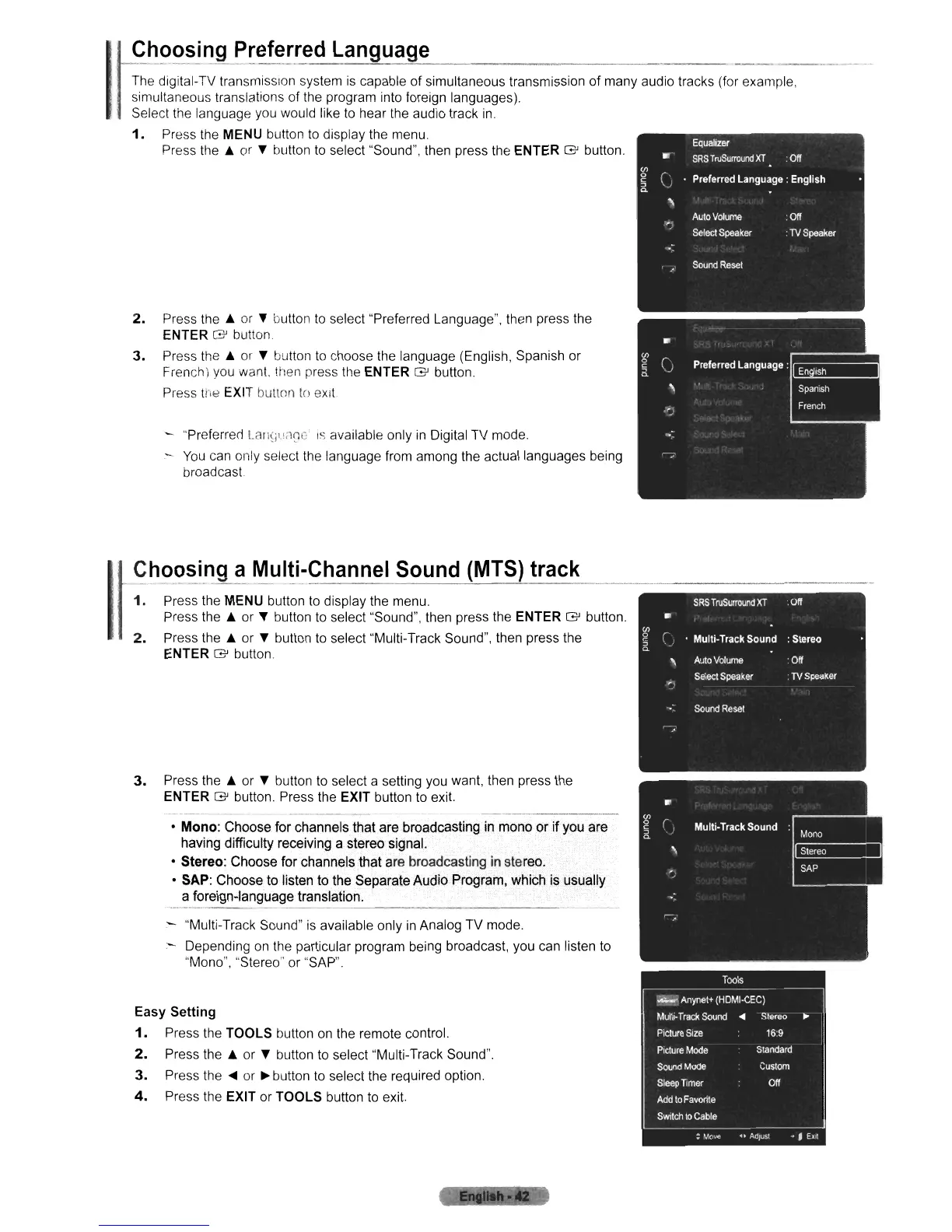
1.
Press the MENU button
to
display the menu.
Press the
& or " button
to
select "Sound", then press the ENTER G button.
2.
Press the &
or
" button
to
select "Preferred Language", then press the
ENTER G button.
3.
Press the &
or
" button
to
choose the language (English, Spanish or
French) you want. then press the
ENTER G button.
Press
tiw
EXIT button
to
eXit
"Preferrerll.ali~jl.!il~C
is
available only
in
Digital TV mode.
-
You
can only select the language from among the actual languages being
broadcast
1
_
~~~~~i.ng
C!
~~I!i.~_Channel
Sound
(MTS)
track
1.
Press the MENU button
to
display the menu.
Press the
& or " button
to
select "Sound", then press the ENTER G button.
2.
Press the & or " button to select "Multi-Track Sound", then press the
ENTER G button
3.
Press the & or " button
to
select a setting you want, then press the
ENTER G button. Press the EXIT button to
exit
.---
--
---_
..
---
• Mono: Choose for channels that are broadcasting in mono or
if
you are
having difficulty receiving a stereo signal.
• Stereo: Choose for channels that are broadcasting
in
stereo.
• SAP: Choose to listen to the Separate Audio Program, which is usually
a foreign-language translation.
----------------
"Multi-Track Sound"
is
available only
in
Analog TV mode.
- Depending
on
the particular program being broadcast, you can listen to
''Mono'', "Stereo" or "SAP".
Easy Setting
1.
Press the TOOLS button on the remote control.
2.
Press the & or " button to select "Multi-Track Sound".
3.
Press the
....
or
~
button
to
select the required option.
4.
Press the EXIT or TOOLS button to exit.












 To Next Page