Connecting
a
DVD/Blu-Ray
player
or
Cable
Box/Satellite
receiver
(Set-Top
Box)
via
HDMI
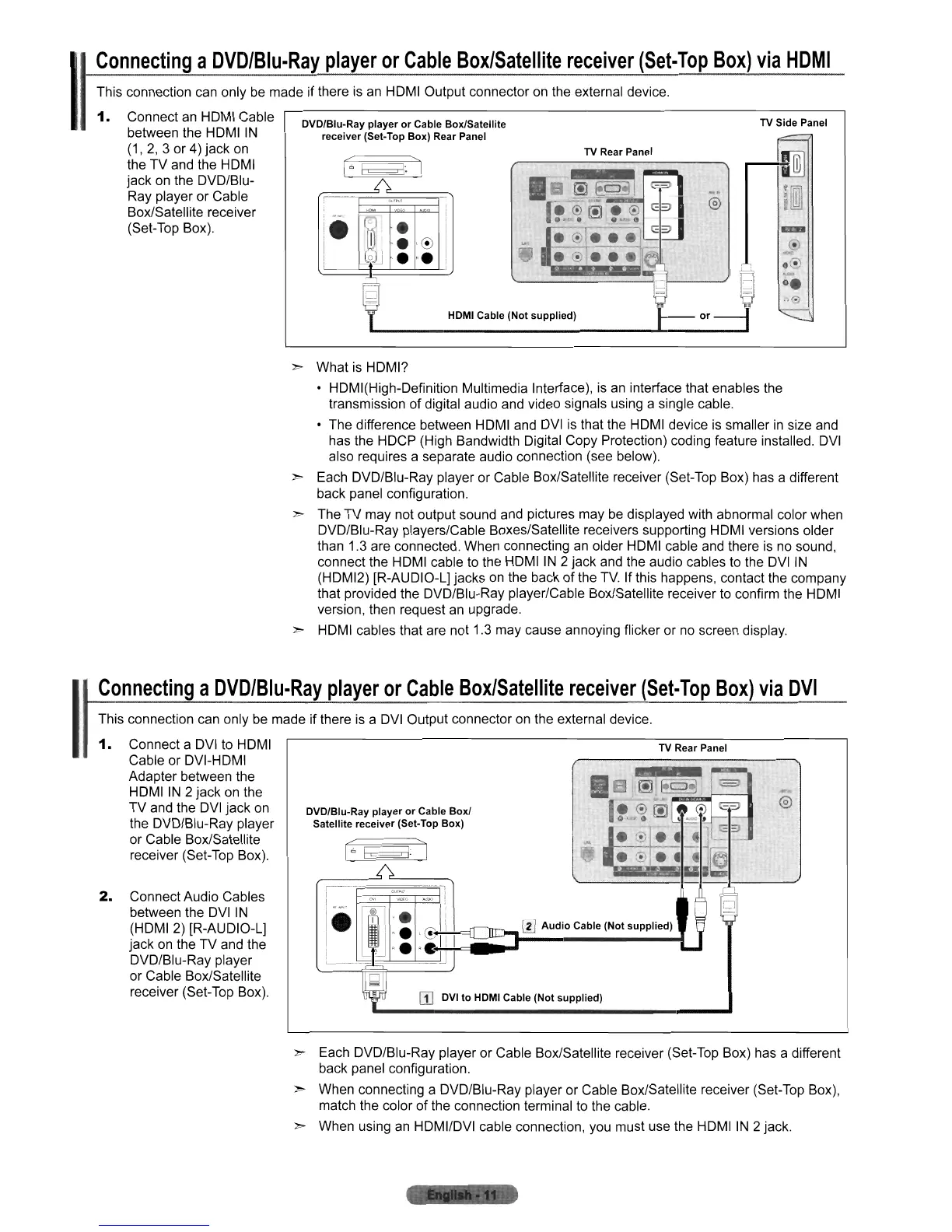
This connection can only be made if there is an HDMI Output connector on the external device.
1.
Connect an HOMI Cable
between the HDMI
IN
(1,
2,
3 or 4) jack on
the TV and the HOMI
jack on the OVD/Blu-
Ray player or Cable
Box/Satellite receiver
(Set-Top Box).
DVD/Blu-Ray player
or
Cable Box/Satellite
receiver (Set-Top Box) Rear Panel
,-
•
.'<!)
•••
HDMI Cable (Not supplied)
TV Rear Panel
.
@
TV
Side Panel
» What is HOMI?
• HOMI(High-Oefinition Multimedia Interface),
is
an interface that enables the
transmission of digital audio and video signals using a single cable.
• The difference between HOMI and
OVI
is that the HOMI device is smaller
in
size and
has the HOCP (High Bandwidth Digital Copy Protection) coding feature installed.
OVI
also requires a separate audio connection (see below).
» Each OVD/Blu-Ray player or Cable Box/Satellite receiver (Set-Top Box) has a different
back panel configuration.
» The
TV
may not output sound and pictures may be displayed with abnormal color when
DVO/Blu-Ray players/Cable Boxes/Satellite receivers supporting HDMI versions older
than 1.3 are connected. When connecting
an
older HDMI cable and there is
no
sound,
connect the HOMI cable to the HOMI
IN
2 jack and the audio cables to the
DVI
IN
(HOMI2) [R-AUOIO-L] jacks
on
the back
of
the
TV.
If this happens, contact the company
that provided the DVO/Blu-Ray player/Cable Box/Satellite receiver to confirm the HDMI
version, then request an upgrade.
» HDMI cables that are not 1.3 may cause annoying flicker or
no
screen display.
Connecting
a
DVD/Blu-Ray
player
or
Cable
Box/Satellite
receiver
(Set-Top
Box)
via
DVI
This connection can only be made if there is a DVI Output connector on the external device.
TV
Rear Panel
rn
Audio
Cable (Not supplied)
CD
DVI to HDMI Cable (Not supplied)
DVD/Blu-Ray player
or
Cable Box/
Satellite receiver (Set·Top Box)
2.
Connect Audio Cables
between the
OVI
IN
(HDMI 2) [R-AUDIO-L]
jack on the
TV
and the
OVO/Blu-Ray player
or Cable Box/Satellite
receiver (Set-Top Box),
1.
Connect a
OVI
to HDMI
Cable or DVI-HOMI
Adapter between the
HDMI
IN
2 jack on the
TV
and the
DVI
jack on
the DVD/Blu-Ray player
or Cable Box/Satellite
receiver (Set-Top Box).
I
» Each OVO/Blu-Ray player or Cable Box/Satellite receiver (Set-Top Box) has a different
back panel configuration.
» When connecting a OVO/Blu-Ray player or Cable Box/Satellite receiver (Set-Top Box),
match the color of the connection terminal to the cable.
» When using an HDMIIDVI cable connection, you must use the HDMI
IN
2 jack.











 To Next Page