Setting the xvYCC
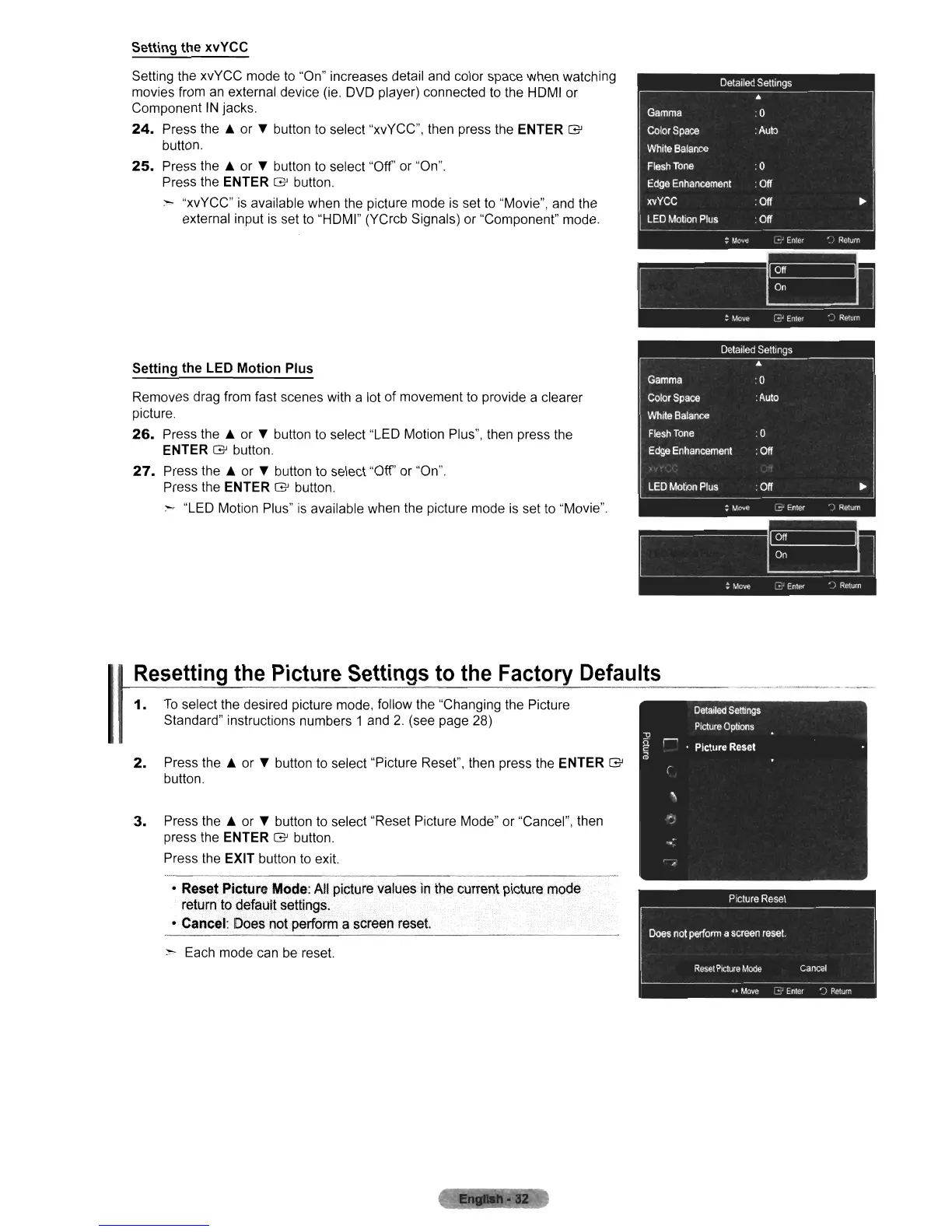
Setting the xvYCC mode to "On" increases detail and color space when watching
movies from an external device (ie.
OVO
player) connected to the HOMI or
Component
IN
jacks.
24.
Press the & or • button
to
select "xvYCC", then press the ENTER G
button.
25.
Press the & or • button
to
select "Off' or "On".
Press the ENTER
G button.
:---
"xvYCC"
is
available when the picture mode is set to "Movie", and the
external input
is
set to "HOMI" (YCrcb Signals) or "Component" mode.
Setting the LED Motion Plus
Removes drag from fast scenes with a lot
of
movement to provide a clearer
picture.
26.
Press the &
or
• button
to
select "LED Motion Plus", then press the
ENTER
G button.
27.
Press the & or • button to select "Off' or "On".
Press the ENTER
G button.
=-
"LED Motion Plus"
is
available when the picture mode
is
set
to
"Movie".
Resetting
the
Picture
Settings
to
the
Factory
Defaults
~----~~--------_=..._-----_----'!~--------
--------
--_.
1.
To
select the desired picture mode, follow the "Changing the Picture
Standard" instructions numbers 1 and
2.
(see page 28)
2.
Press the &
or
• button
to
select "Picture Reset", then press the ENTER G
button.
3.
Press the & or • button to select "Reset Picture Mode"
or
"Cancel", then
press the ENTER
G button.
Press the EXIT button
to
exit.
• Reset
Picture
Mode: All picture values
in
the currentpicture mode
return to default settings.
• Cancel: Does not perform a screen reset.
:-
Each mode can be reset.












 To Next Page