I
To
Select
the
Source
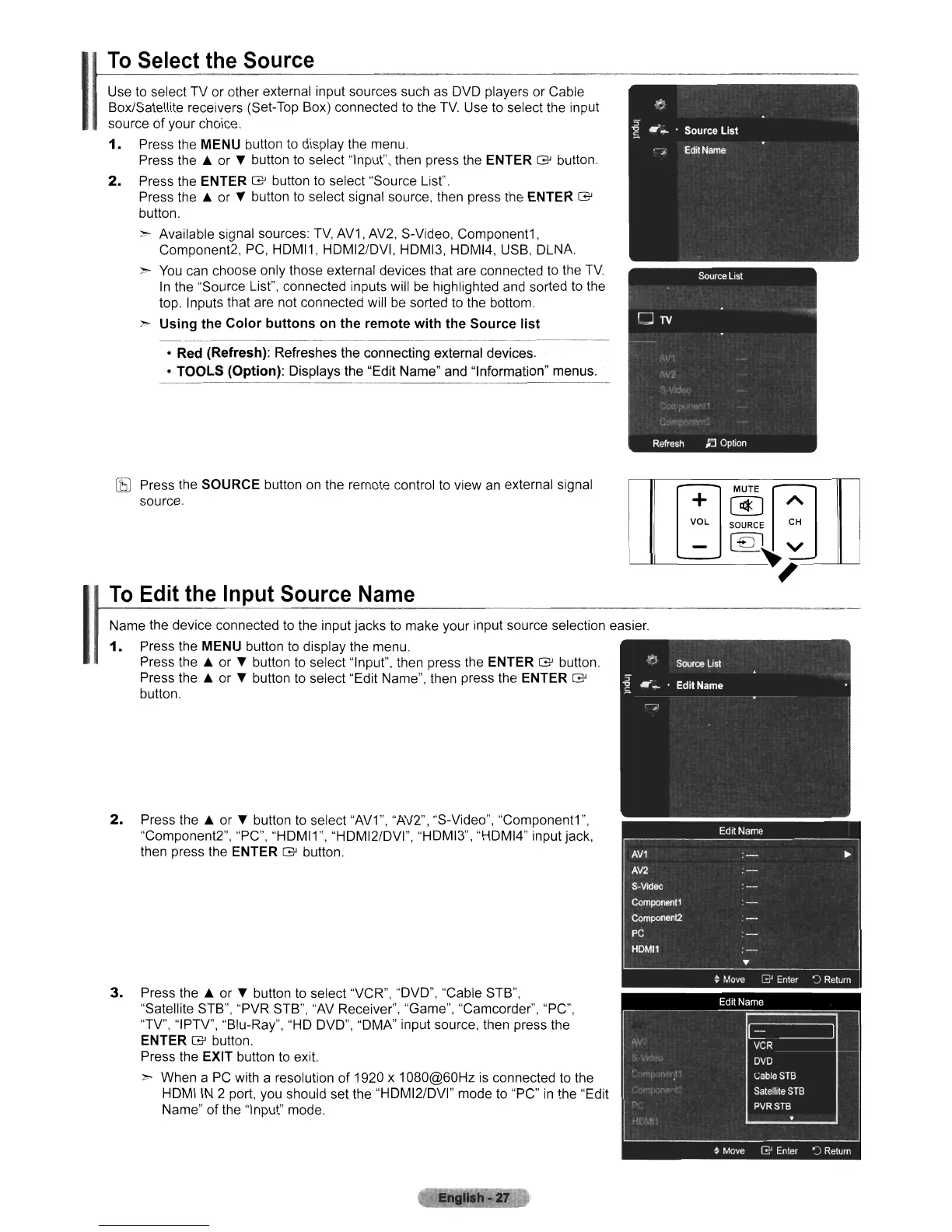
Use to select TV or other external input sources such
as
DVD players or Cable
Box/Satellite receivers (Set-Top Box) connected to the
TV.
Use to select the input
source of your choice.
1.
Press the MENU button to display the menu.
Press
the'"
or T button to select "Input", then press the ENTER G button.
2.
Press the ENTER G button
to
select "Source List".
Press
the'"
or T button to select signal source, then press the ENTER G
button.
>- Available signal sources:
TV,
AV1, AV2, S-Video, Component1,
Component2, PC, HDMI1, HDMI2/DVI, HDMI3, HDMI4, USB, DLNA.
>-
You
can choose only those external devices that are connected to the
TV.
In
the "Source List", connected inputs will
be
highlighted and sorted to the
top. Inputs that are not connected will
be
sorted to the bottom.
>- Using the Color buttons on the remote with the Source list
• Red (Refresh):
Refreshes the connecting external devices.
• TOOLS (Option): Displays
the
"Edit Name" and "Information" menus.
,
[j
Mm
[j
~L
~O~C~
:
-
[€J~
v
To
Edit
the
Input
Source
Name
[bJ
Press the SOURCE button
on
the remote control to view
an
external signal
source.
Name the device connected to the input jacks to make your input source selection easier.
1.
Press the MENU button
to
display the menu.
Press
the'"
or T button to select "Input", then press the ENTER G button.
Press
the'"
or T button to select "Edit Name", then press the ENTER G
button.
2.
Press
the'"
or
..
button to select
"AV1
",
"AV2", "S-Video", "Component1
",
"Component2", "PC", "HDMI1", "HDMI2/DVI", "HDMI3", "HDMI4" input jack,
then press the
ENTER G button.
3.
Press
the'"
or T button to select "VCR", "DVD", "Cable STB",
"Satellite STB", "PVR STB",
"AV
Receiver", "Game", "Camcorder", "PC",
"TV", "IPTV", "Blu-Ray", "HD DVD", "DMA" input source, then press the
ENTER G button.
Press the
EXIT button
to
exit.
>- When a
PC
with a resolution of 1920 x 1080@60Hz
is
connected to the
HOM
I
IN
2 port, you should set the "HDMI2/DVI" mode to "PC"
in
the "Edit
Name"
of
the "Input" mode.












 To Next Page