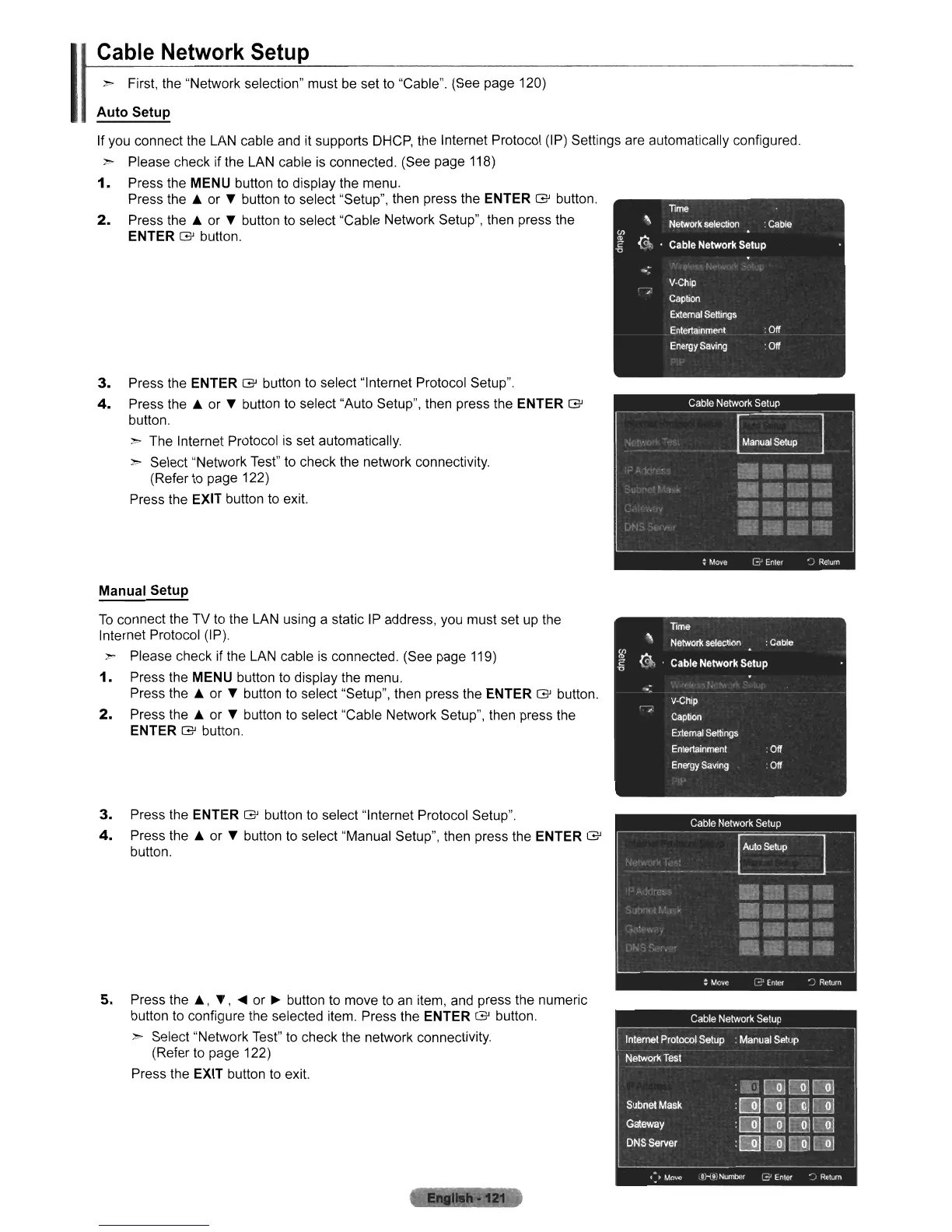
3.
Press the ENTER
G'
button
to
select "Internet Protocol Setup".
4.
Press the
..
or T button to select "Auto Setup", then press the ENTER
G'
button.
>- The Internet Protocol
is
set automatically.
>- Select "Network Test" to check the network connectivity.
(Refer
to
page 122)
Press the
EXIT button
to
exit.
>- First, the "Network selection" must
be
set
to
"Cable". (See page 120)
Auto Setup
If you connect the LAN cable and it supports
DHCP,
the Internet Protocol (IP) Settings are automatically configured.
>- Please check if the LAN cable
is
connected. (See page 118)
1.
Press the MENU button
to
display the menu.
Press the
..
or T button
to
select "Setup", then press the ENTER
G'
button.
2.
Press the
..
or T button
to
select "Cable Network Setup", then press the
ENTER
G'
button.
Cable Network Setup
I
Manual Setup
To
connect the TV
to
the LAN using a static
IP
address, you must set
up
the
Internet Protocol (IP).
>-
Please check
if
the LAN cable
is
connected. (See page 119)
1.
Press the MENU button
to
display the menu.
Press the
..
or T button
to
select "Setup", then press the ENTER
G'
button.
2.
Press the
..
or T button
to
select "Cable Network Setup", then press the
ENTER
G'
button,
3.
Press the ENTER
G'
button to select "Internet Protocol Setup",
4.
Press the
..
or T button
to
select "Manual Setup", then press the ENTER
G'
button,
5.
Press the
..
,
T,
....
or
~
button to move to an item, and press the numeric
button
to
configure the selected item, Press the ENTER
G'
button,
>- Select "Network Test"
to
check the network connectivity.
(Refer
to
page 122)
Press the
EXIT button to exit.












 To Next Page