How to Set up
Restrictions
Using the Canadian English
1.
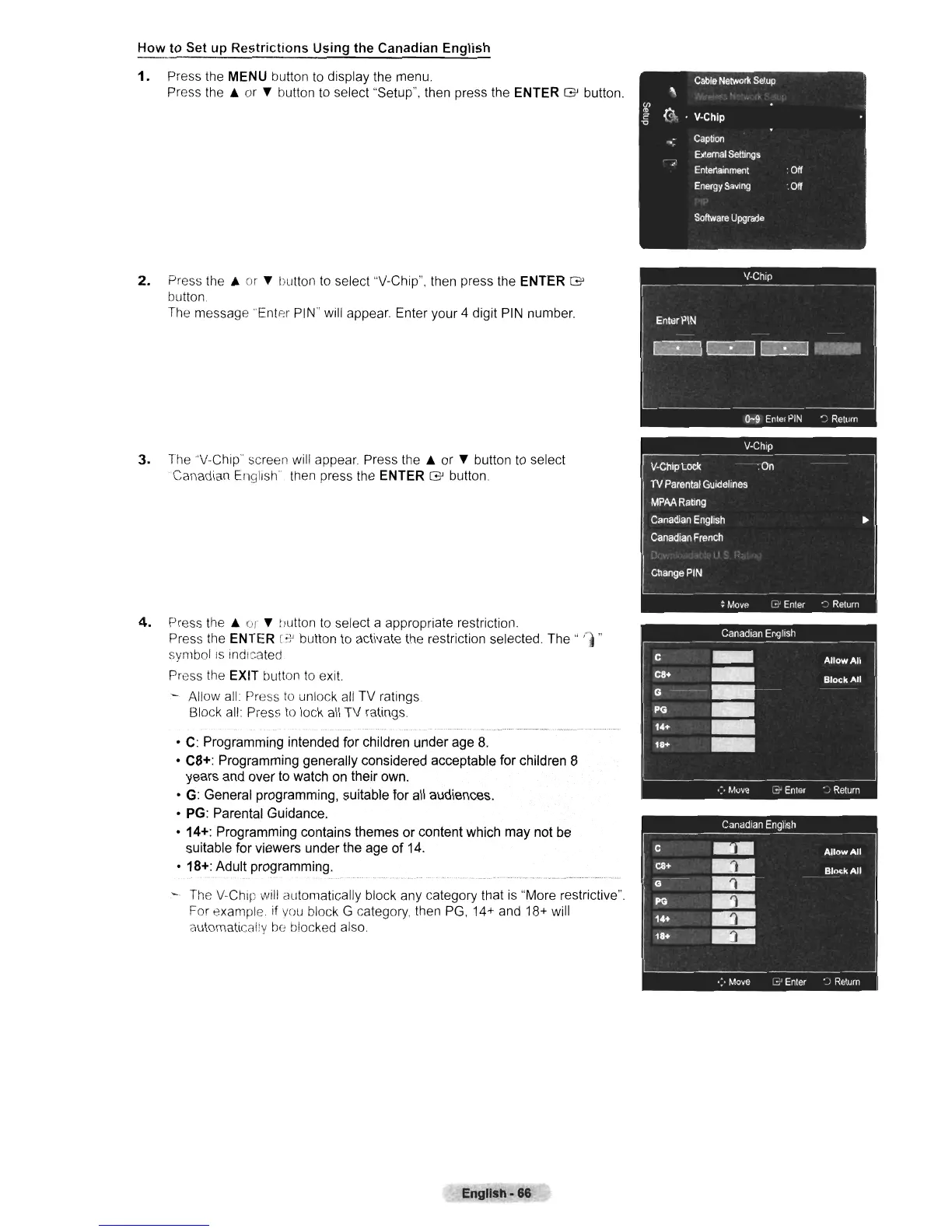
Press the MENU button
to
display the menu.
Press
the.
or T button to select "Setup", then press
the
ENTER
G'
button.
2.
Press
the.
or T button
to
select "V-Chip", then press the ENTER
G'
button
The
message "Enter PIN" will appear Enter your 4 digit
PIN
number.
3.
The
''V-Chip'' screen will appear Press
the.
or T button
to
select
Canadian English' then press the ENTER
G'
button.
4.
Press
the.
or T hutton to select a appropriate restriction.
Press the ENTER
[~
button
to
activate the restriction selected.
The"
rj"
symbol
IS
indicated
Press the EXIT button
to
exit.
- Allow
all
Press
to
unlock
all
TV ratings
Block
all
Press
to
lock
all
TV ratings
•
C:
Programming intended for children under age
8,
• C8+: Programming generally considered acceptable for children 8
years and over to watch on their own.
•
G:
General programming, suitable for
all
audiences.
•
PG:
Parental Guidance,
• 14+: Programming contains themes or content which may not
be
suitable for viewers under the age
of
14.
• 18+: Adult programming.
-
The
V-Chip will automatically block any category that
is
"More restrictive".
For example.
if
you
block G category, then
PG,
14+
and 18+ will
automatical!y
be
blocked also.
English·
86
Cable
Network
Setup
"
Ul
II>
@
<=
V-Chip
'0
",
Caption
External
Settings
.'
Entertainment
:
Off
Energy
Saving
:
Off
Software
Upgrade












 To Next Page