How
to
Set
up
Restrictions
Using
the
MPAA Ratings:
G,
PG,
PG-13,
R,
NC-17,
X,
NR
The MPAA rating system uses the Motion Picture Association of America (MPAA) system and its main application
is
for
movies. When the V-Chip lock
is
on, the TV will automatically block any programs that are coded with objectionable ratings
(either MPAA or TV-Ratings).
1.
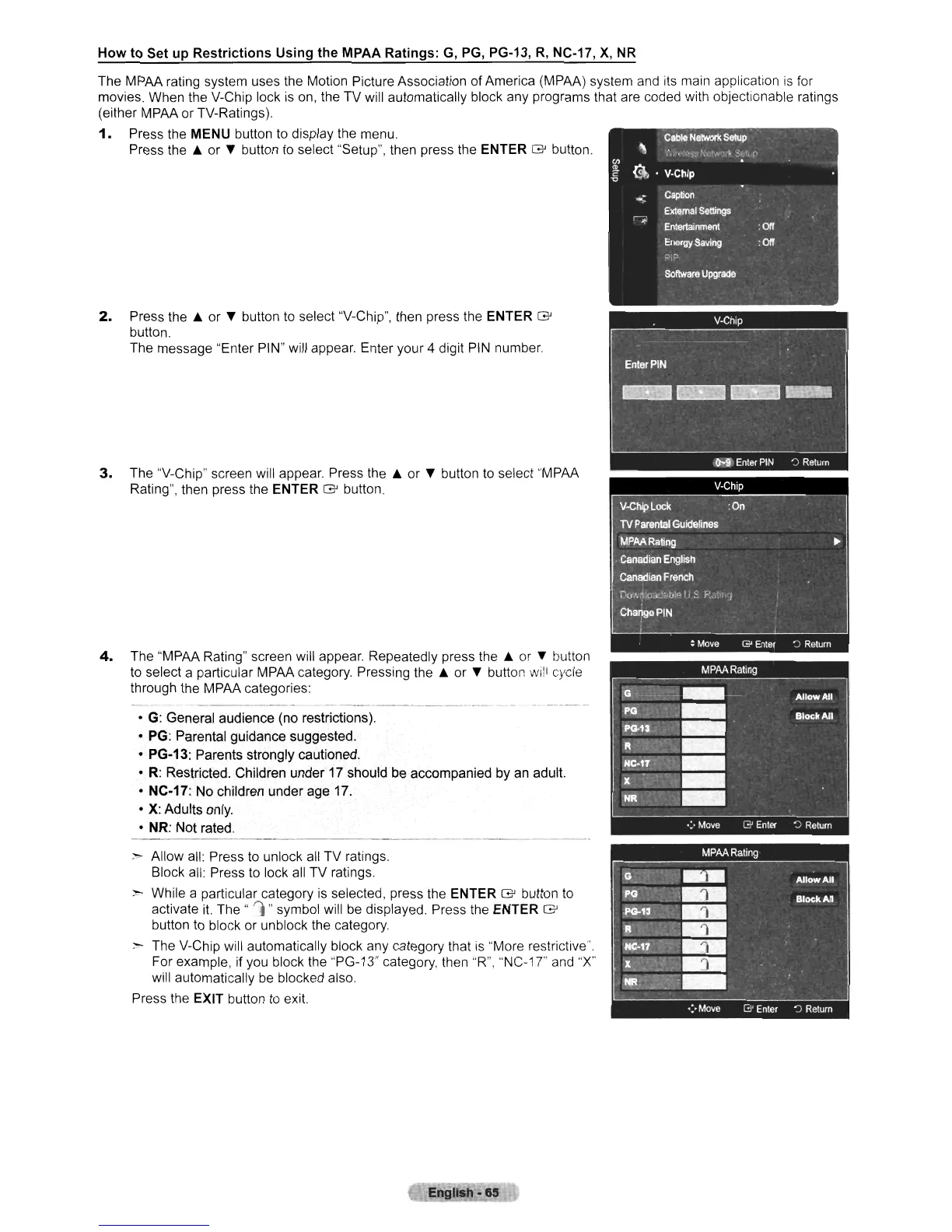
Press the MENU button to display the menu.
Press the A or
~
button to select "Setup", then press the ENTER G button.
2.
Press the A or
~
button to select "V-Chip", then press the ENTER G
button.
The message "Enter PIN" will appear. Enter your 4 digit
PIN
number.
3.
The "V-Chip" screen will appear. Press the A or
~
button to select "MPAA
Rating", then press the ENTER
G button.
4.
The "MPAA Rating" screen will appear. Repeatedly press the A or
~
button
to select a particular MPAA category. Pressing the A or
~
button
wi!!
cycle
through the MPAA categories:
• G: General audience (no restrictions).
• PG: Parental guidance suggested.
• PG-13: Parents strongly cautioned.
•
R:
Restricted. Childrenunder
17
should
be
accompanied by
an
adult.
• NC·17: No children under age 17.
•
X:
Adults only.
• NR: Not rated.
>- Allow all: Press to unlock all TV ratings.
Block all: Press to lock
all
TV ratings.
>-
While a particular category
is
selected, press the ENTER G button
to
activate
it.
The"
'1
"symbol will
be
displayed. Press the ENTER G
button to block or unblock the category.
:-
The V-Chip will automatically block any category that is "More restrictive".
For example, if you block the "PG-13" category, then "R",
"NC-1
T and "X"
will automatically
be
blocked also.
Press the EXIT button
to
exit.
En
'Ish·
65












 To Next Page