I
Tli8
ui
Ital
CaptllJlb
fU("~tl()11
operates on digital channels.
1.
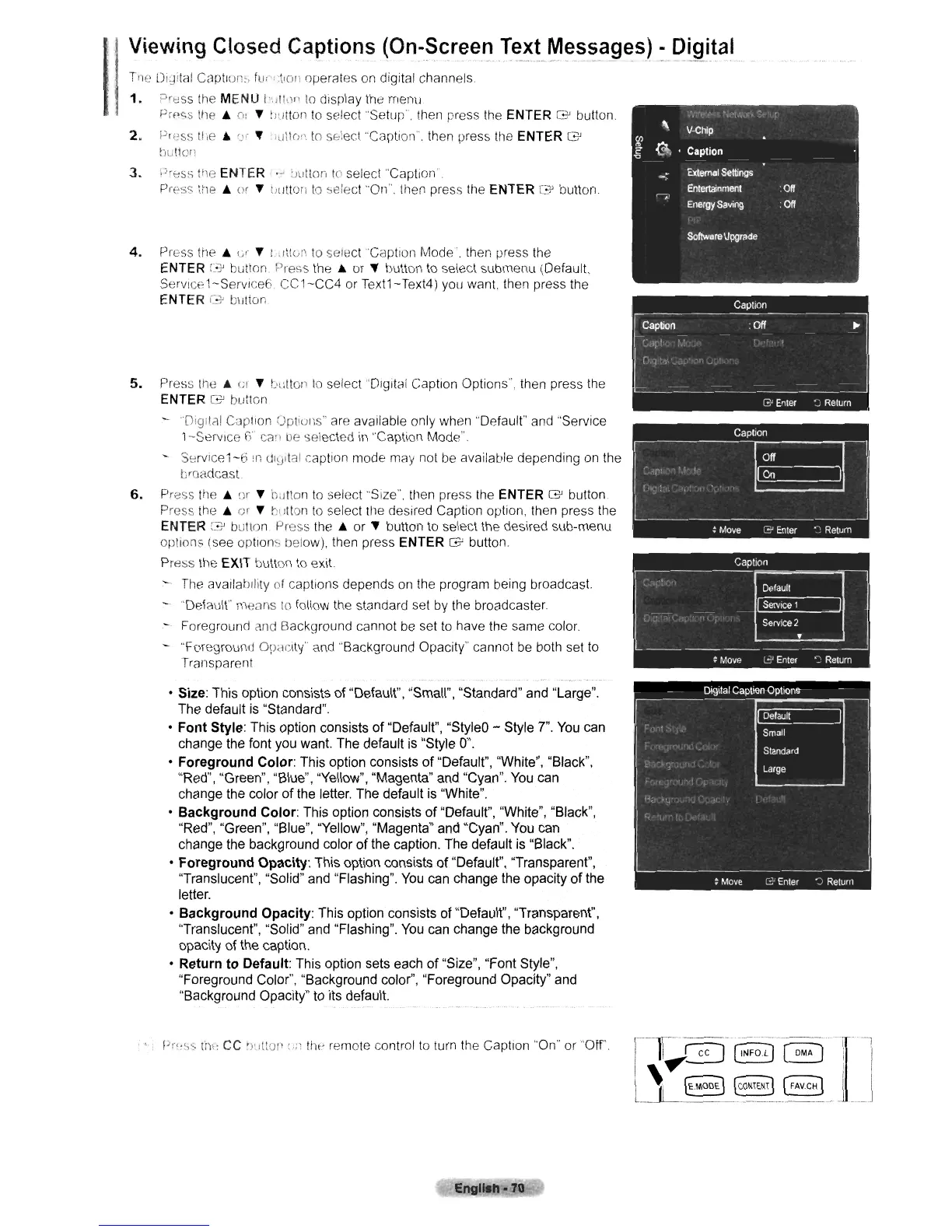
Press the MENU
hJlh)I'
to
display the menu
Prpc;s
tile"
II:
~
!wtton
to
select "Setup'". then press the ENTER
G'
button.
2. Press
tile"
If
~
"e1ltr"1
to
sf:!ecl "Caption'". then press the ENTER
G'
!Jullo'\
3.
PrE::Ss
tile ENTER .- :Jullon
10
select "Caption'.
prpss lile
..
u
r
~
[Hltton
to
select
"On'".
then press
Hie
ENTER
G'
button.
4.
Press
the"
cr
~
l.ittw
to
select "Caption Mode', then
IJress
the
ENTER
C~
bution. Press
the"
or
~
button
to
select submenu (Default,
Servlce1-ServlceE; CC1-CC4 or Text1-Text4) you want. then press the
ENTER
G-'
button
5.
Press
the"
1;1
~
bllllo,"
to
select
"DI9It81
Caption Options', then press
the
ENTER
G'
butt0n
Digitcll Caption
UptIUI1S"
are available only when "Default" and "Service
1--Servlce
f3"
ca"
be
selected
in
"Caption Mode".
-
Service1-6!n
0101tal
caption mode may not
be
available depending
on
the
broadcast
6.
Press
the"
or
~
h~lIon
to
select
'"Size'".
then press the ENTER G button
Press
the"
or
~
~lllton
to
select the desired Caption option, then press the
ENTER G? button. Press
the"
or
~
button
to
select the desired sub-menu
options (see
option~
below), then press ENTER G button.
Press the EXIT button
to
exit
The
availability of captions depends
on
the program being broadcast
~"'Default"
me::lIls
to
follow the standard set by the broadcaster
Foreground and Background cannot
be
set
to
have the same color.
- '"Foreground
OPdClty'
and
"Background Opacity' cannot
be
both set to
Transparent
• Size: This option consists of "Default", "Small", "Standard" and "Large".
The default is "Standard".
•
Font
Style: This option consists
of
"Default", "StyleD - Style
7".
You
can
change the font you want. The default
is
"Style
0".
•
Foreground
Color: This option consists
of
"Default", "White", "Black",
"Red", "Green", "Blue", "Yellow", "Magenta" and "Cyan".
You
can
change the color
of
the letter. The default is "White".
•
Background
Color: This option consists
of
"Default", "White", "Black",
"Red", "Green", "Blue", "Yellow", "Magenta" and "Cyan".
You
can
change the background color
of
the caption. The default is "Black".
•
Foreground
Opacity: This option consists of "Default", ''Transparent'',
"Translucent", "Solid" and "Flashing".
You
can change the opacity of the
letter.
•
Background
Opacity: This option consists of "Default", "Transparent",
"Translucent", "Solid" and "Flashing".
You
can change the background
opacity of the caption.
• Return
to
Default: This option sets each
of
"Size", "Font Style",
"Foreground Color", "Background color", "Foreground Opacity" and
"Background Opacity" to its default.
1'r"~'S
tilt:
CC
')~lltCll
(':'
tilt' remote control
to
turn the Caption
"On'"
or "Off'.
Englleh-70
'i.'.
"
V-Chip
CIl
~
@,
Caption
"<l
.,
External
settings
Entertainment
:
Off
r--;>
Energy
Saving
:
Off
Software
Upgrade
11f~---
--.-----------~
--
-I'[
..
--l
i
I!
.......
~
GNFOLJ
~
i i
I'....
! I
Ll.
~
[CONTEN~
__
[FAVCHJ
__
'
__
J












 To Next Page