Option
2:
Setting the Clock Automatically
The Clock can
be
set automatically if you are receiving a digital signal.
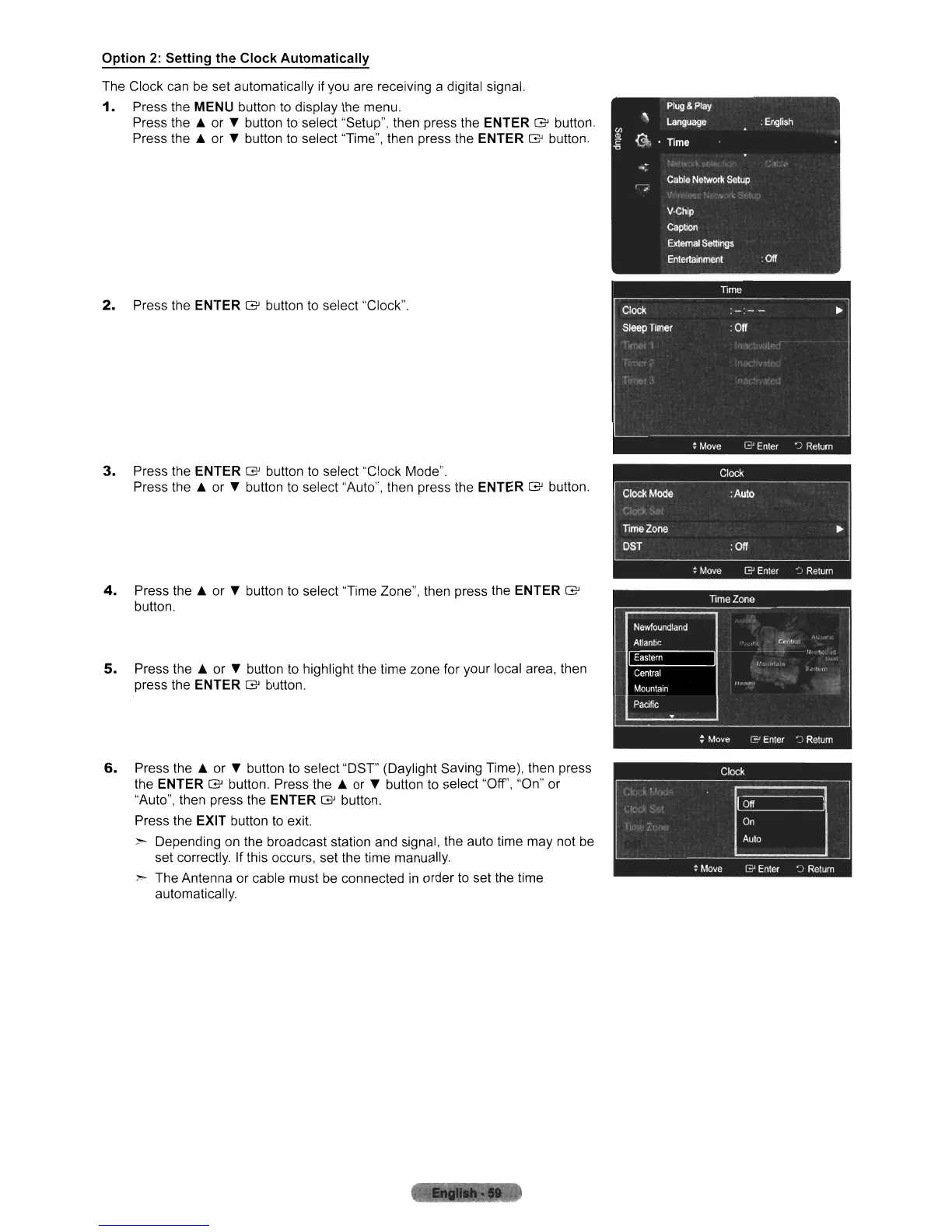
1.
Press the
MENU
button
to
display the menu.
Press the A or button to select "Setup", then press the
ENTER G button.
Press the A or button to select "Time", then press the
ENTER
G button.
2.
Press the ENTER G button
to
select "Clock".
3.
Press the
ENTER
G button
to
select "Clock Mode".
Press the A or
...
button to select "Auto", then press the ENTER G button.
4.
Press the A or
...
button to select "Time Zone", then press the ENTER G
button.
5.
Press the A or
...
button to highlight the time zone for your local area, then
press the
ENTER
G button.
6.
Press the A or
...
button to select "DST" (Daylight Saving Time), then press
the
ENTER
G button. Press the A or
...
button to select "Off', "On" or
"Auto", then press the
ENTER G button.
Press the
EXIT button
to
exit.
r Depending
on
the broadcast station and signal, the auto time may not
be
set correctly. If this occurs, set the time manually.
:-
The Antenna or cable must
be
connected
in
order to set the time
automatically.












 To Next Page