EasyManua.ls Logo

Samsung 950 - Page 158

Samsung 950
182 pages
Print Icon
To Next Page IconTo Next Page
To Previous Page IconTo Previous Page
Loading...
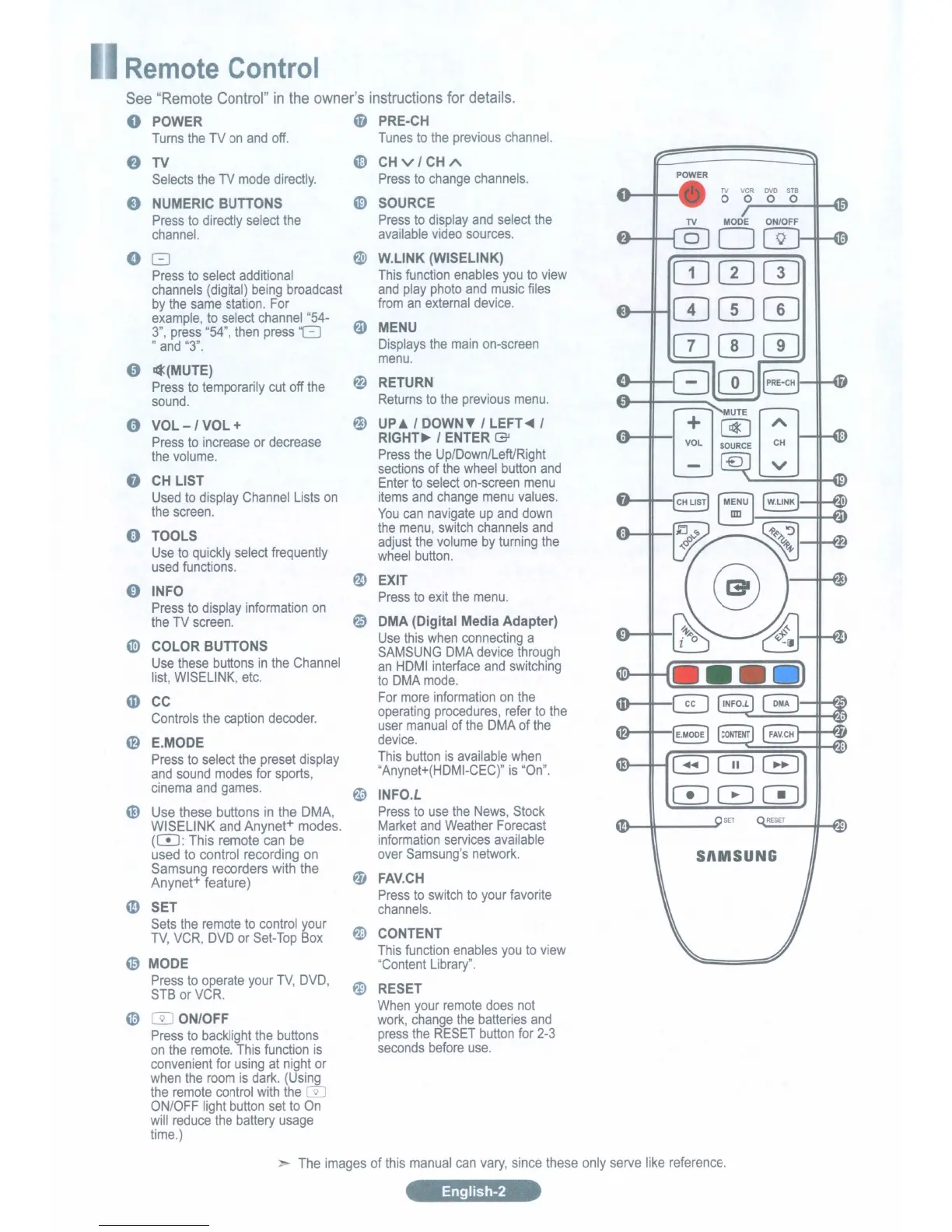
emote
Control
See
"Remote
Control"
in
the
owne(s
instructions
for
details.
POWER
48
PRE·CH
Turns
the
TV
on
and
off.
Tunes
to
the
previous
channel.
f)
TV
G)
CHv/CH
A
Selects
the
TV
mode
directly.
Press
to
change
channels.
POWER
TV
VCR
DVO
STB
e
NUMERIC
BUTTONS
~
SOURCE
0 0
0 0
Press
to
directly
select
the
Press
to
display
and
select
the
TV
MODE
ON/OFF
channel.
available
video
sources.
om
G
~
W.LlNK
(WISELINK)
CDCIJCTI
Press
to
select
additional
This
function
enables
you
to
view
channels
(digital)
being
broadcast
and
play
photo
and
music
files
by
the
same
station.
For
from
an
external
device.
000
example,
to
select
channel
"54-
~
MENU
3",
press
"54",
then
press
'8
"
and
"3".
Displays
the
main
on-screen
[]][I][I]
menu.
"
I¢(MUTE)
~
CD
Press
to
temporarily
cut
off
the
RETURN
sound.
Returns
to
the
previous
menu.
0
VOL-/VOL+
@)
UP~
/
DOWN~
/
LEFT~
/
Press
to
increase
or
decrease
RIGHT~
/
ENTER
(3J
the
volume.
Press
the
Up/Down/LefURight
0
sections
of
the
wheel
button
and
CH
LIST
Enter
to
select
on-screen
menu
Used
to
display
Channel
Lists
on
items
and
change
menu
values.
the
screen.
You
can
navigate
up
and
down
e
TOOLS
the
menu,
switch
channels
and
adjust
the
volume
by
turning
the
Use
to
quickly
select
frequently
wheel
button.
used
functions.
0
INFO
~
EXIT
Press
to
exit
the
menu.
Press
to
display
information
on
~
the
TV
screen.
DMA
(Digital
Media
Adapter)
G>
COLOR
BUTTONS
Use
this
when
connecting
a
SAMSUNG
DMA
device
through
Use
these
buttons
in
the
Channel
an
HDMI
interface
and
switching
list,
WISELlNK,
etc.
to
DMA
mode.
CD
CC
For
more
information
on
the
Controls
the
caption
decoder.
operating
procedures,
refer
to
the
user
manual
of
the
DMA
of
the
0
E.MODE
device.
Press
to
select
the
preset
display
This
button
is
available
when
GGD0
and
sound
modes
for
sports,
"Anynet+(HDMI-CEC)"
is
"On".
cinema
and
games.
~
INFO.L
000
G)
Use
these buttons
in
the
DMA,
Press
to
use
the
News,
Stock
WISELINK
and
Anynet+
modes.
Market
and
Weather
Forecast
(CD:
This
remote
can
be
information
services
available
used
to
control recording
on
over
Samsung's
network.
SAMSUNG
Samsung
recorders
with
the
~
FAV.CH
Anynet+
feature)
4D
SET
Press
to
switch
to
your
favorite
channels.
Sets
the
remote
to
control
your
~
CONTENT
TV,
VCR,
DVD
or
Set-Top
Box
This
function
enables
you
to
view
@
MODE
IlContent
Library".
Press
to
operate
your
TV,
DVD,
~
RESET
STB
or
VCR.
~
m
ON/OFF
When
your
remote
does
not
work,
change
the
batteries
and
Press
to
backlight
the
buttons
press
the
RESET
button
for
2-3
on
the
remote.
This
function
is
seconds
before
use.
convenient
for
using
at
night
or
when
the
room
is
dark.
(Using
the
remote
control
with
the
CiJ
ON/OFF
light
button
set
to
On
will
reduce
the
battery
usage
time.)
The
images
of
this
manual
can
vary,
since
these
only
serve
like
reference.
English-2

Table of Contents

Related product manuals