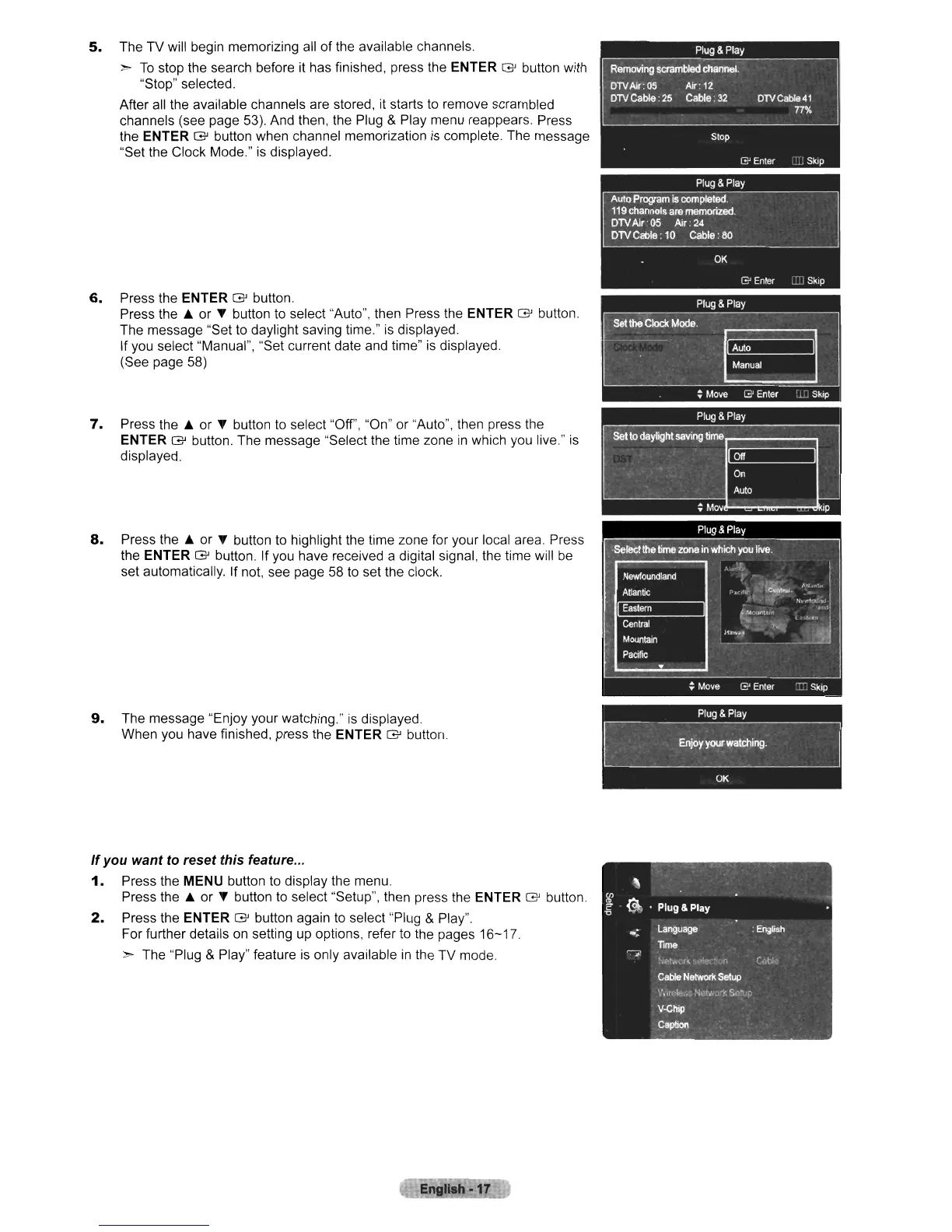
5.
The
TV
will begin memorizing all
of
the available channels.
>
To
stop the search before it has finished, press the ENTER
G'
button with
"Stop" selected.
After all the available channels are stored, it starts to
remove
scrambled
channels (see page 53). And then, the Plug & Play menu reappears. Press
the ENTER
G'
button
when
channel memorization is complete.
The
message
"Set the Clock Mode." is displayed.
6.
Press the ENTER
G'
button.
Press the l..
or
'Y
button to select "Auto", then Press the ENTER
G'
button.
The
message
"Set to daylight saving time." is displayed.
If you select "Manual", "Set current date and time" is displayed.
(See page 58)
7.
Press the l..
or
'Y
button to select "Off", "On"
or
"Auto", then press the
ENTER
G'
button.
The
message
"Select the time
zone
in
which you live." is
displayed.
8.
Press the l..
or
'Y
button to highlight the time
zone
for
your
local area. Press
the ENTER
G'
button. If you
have
received a digital signal, the time will be
set automatically. If not, see page 58 to set the clock.
9.
The
message
"Enjoy
your
watching." is displayed.
When
you have finished, press the ENTER
G'
button.
If
you want
to
reset this feature...
1.
Press the MENU button to display the menu.
Press the l..
or
'Y
button to select "Setup", then press the ENTER
G'
button
2.
Press the ENTER
G'
button again to select "Plug & Play".
For
further details on setting up options, refer to the pages
16-17.
> The "Plug & Play" feature is only available
in
the
TV
mode.
Engllah-17












 To Next Page