DVD STB
o 0
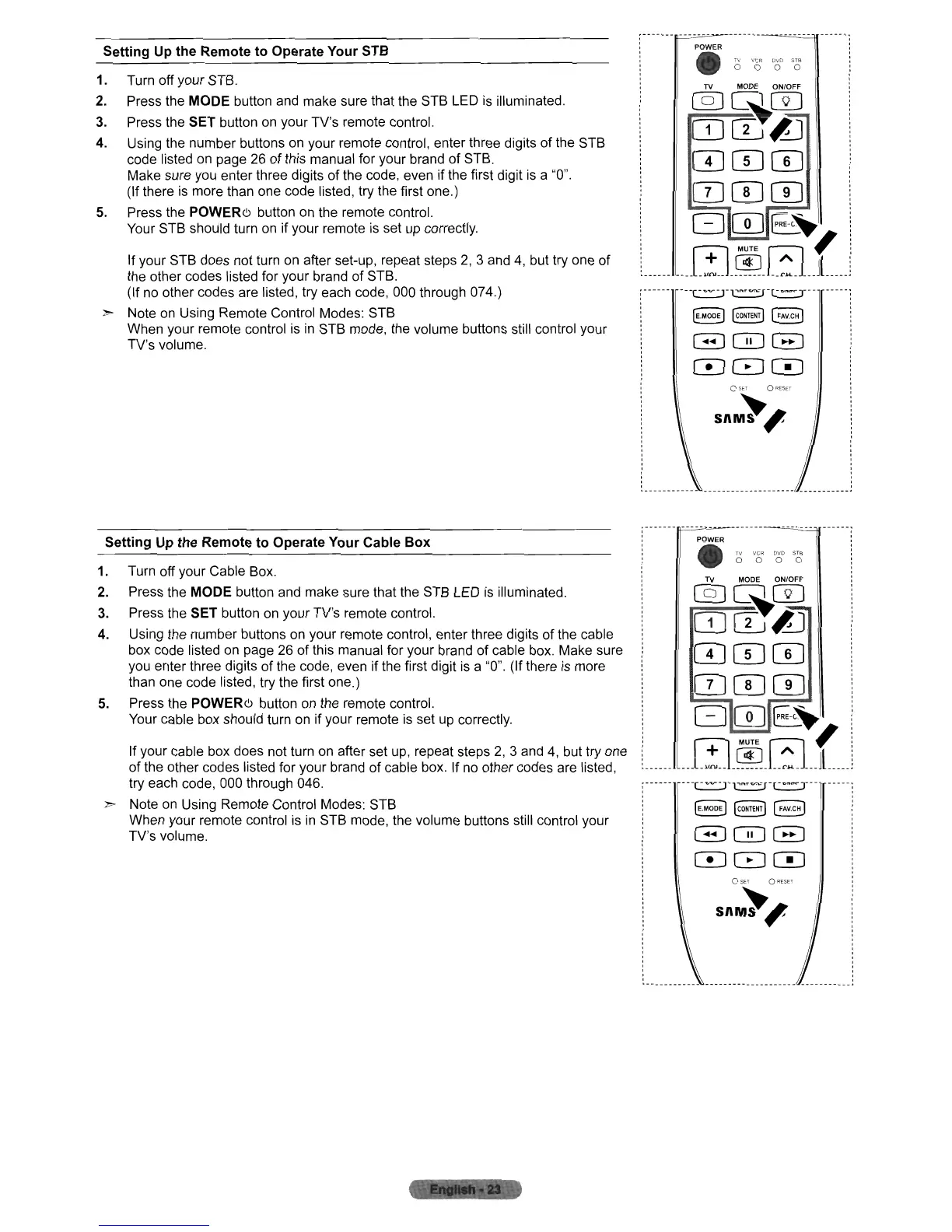
Setting Up the Remote to Operate Your STB
1. Turn off your STB.
2.
Press the MODE button and make sure that the STB LED
is
illuminated.
3.
Press the SET button
on
your TV's remote control.
4. Using the number buttons on your remote control, enter three digits
of
the STB
code listed on page 26
of
this manual for your brand of STB.
Make sure you enter three digits
of
the code, even if the first digit
is
a
"0".
(If there
is
more than one code listed, try the first one.)
5.
Press the
POWERe>
button on the remote control.
Your STB should turn on if your remote
is
set
up
correctly.
If your STB does not turn on after set-up, repeat steps
2,
3 and
4,
but try one of
the other codes listed for your brand
of
STB.
(If
no
other codes are listed, try each code, 000 through 074.)
2'> Note
on
Using Remote Control Modes: STB
When your remote control
is
in
STB mode, the volume buttons still control your
TV's volume.
,-------,,-=-~-------~=
POWER
•
TV VCR
o 0
TV
MODE ON/OFF
@]~0
CDCIJ£J
CD CD
0
CDCD0
G0E:.~
____
~_~_~
__
f .
--T-~-Tr"'=rl-··-T--
OSET
O~ESET
snM~'
TV MODE ON/OFF
@]~0
CDCIJ£J
CDCD0
CDCD0
G0E:.~
___
~_~_~
__
f
__
Setting Up the Remote to Operate Your Cable Box
1.
Turn off your Cable Box.
2.
Press the MODE button and make sure that the STB LED
is
illuminated.
3.
Press the SET button on your TV's remote control.
4. Using the number buttons on your remote control, enter three digits
of
the cable
box code listed
on
page 26 of this manual for your brand
of
cable box. Make sure
you enter three digits
of
the code, even if the first digit
is
a "0". (If there
is
more
than one code listed, try the first one.)
5.
Press the
POWERe>
button on the remote control.
Your cable box should turn
on
if your remote
is
set
up
correctly.
If your cable box does not turn on after set up, repeat steps
2,
3 and
4,
but try one
of the other codes listed for your brand
of
cable box. If
no
other codes are listed,
try each code, 000 through 046.
2'> Note
on
Using Remote Control Modes: STB
When your remote control
is
in
STB mode, the volume buttons still control your
TV's volume.
POWER
•
" vee
o 0
DVD
STB
o 0
OSE'
QRESET
snM~'
:_-----------"--------------------,,----------_.












 To Next Page