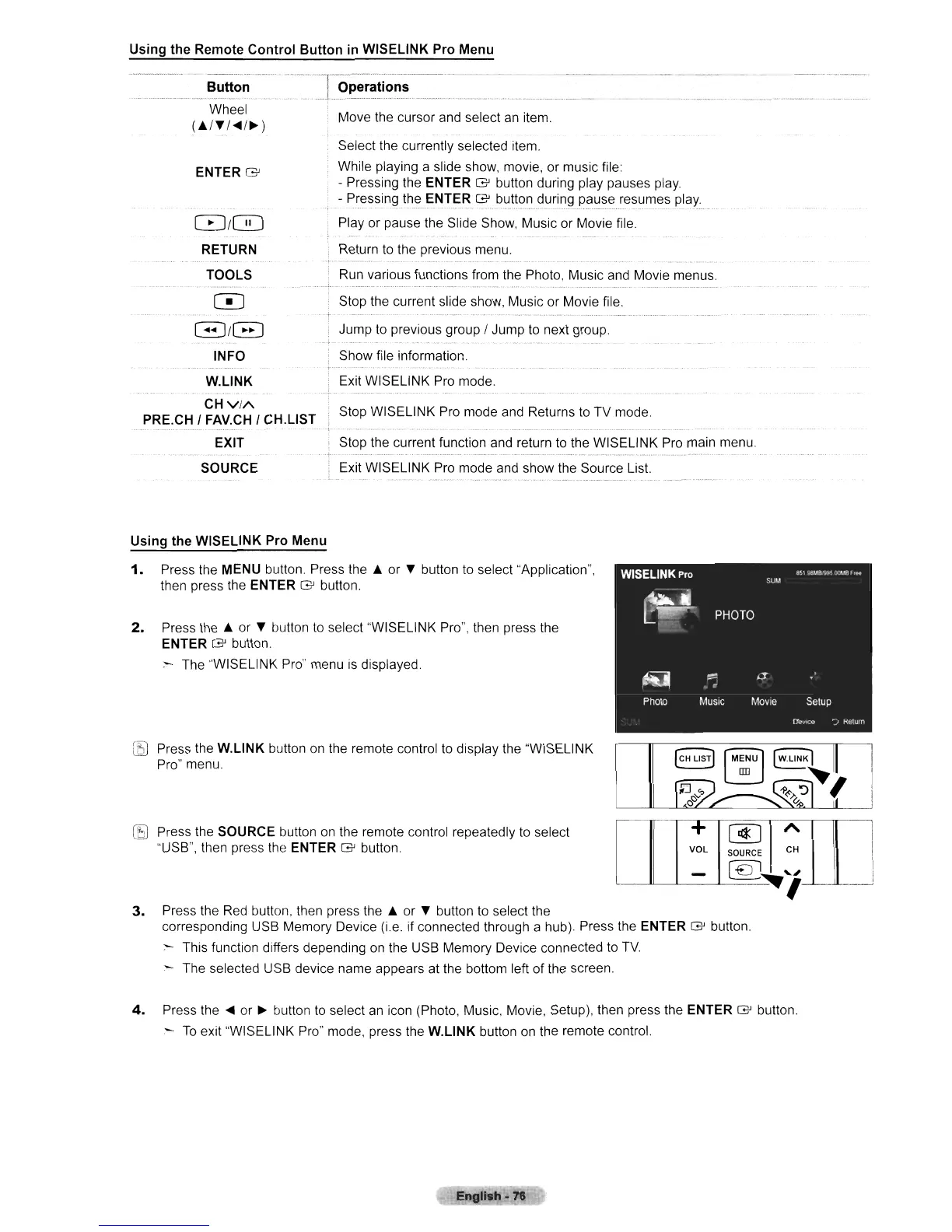
Using the Remote Control Button
in
WISELINK Pro Menu
--_._._- -
--_
..
_
.....
_-_
..
-
....
-._._
....
,-_
..
__
._._---_.
__
...•..
Stop the current function and return
to
the WISELINK Pro main menu.
Stop WISELINK Pro mode and Returns
to
TV mode.
Select the currently selected item.
While playing a slide show, movie, or music file:
• Pressing the
ENTER G button during play pauses play.
-
Pressin~lhe
ENTER G button during pauseresumes play
Play or pause the Slide Show, Music or Movie file.
Return
to
the previous menu.
Run various functions from the Photo, Music and Movie menus.
Stop the current slide show, Music or Movie file.
Move the cursor
and
select
an
item.
Operations
Exit WISELINK Pro mode and show the Source List.
L _
ENTER G
8/0
RETURN
TOOLS
o
G/B
INFO
W.L1NK
CH
VIA
PRE.CH I FAV.CH I CH.L1ST
EXIT
SOURCE
Button
-_.
--~.---.-
...
_'-'.-.-
_._-
-"-
_
..
_.
- -
_.
Wheel
(./T/"4/~)
Using the WISELINK Pro Menu
1.
Press the MENU button. Press
the.
or T button to select "Application",
then press the
ENTER G button.
2.
Press
the.
or T button
to
select "WISELINK Pro", then press the
ENTER G button
- The "WISELINK Pro" menu
is
displayed.
[EJ
Press the
W.L1NK
button on the remote control to display the "WISELINK
Pro" menu.
I
+
@]
A
I
VOL
SOURCE
CH
[€l
h.'""
I
-
!
3.
Press the
Red
button, then press
the.
or T button to select the
corresponding USB Memory Device (i.e. if connected through a hub). Press the
ENTER G button.
:-
This function differs depending on the USB Memory Device connected to
TV.
- The selected USB device name appears at the bottom left of the screen.
[5J
Press the SOURCE button
on
the remote control repeatedly
to
select
"USB", then press the ENTER G button.
4.
Press the
"4
or
~
button
to
select
an
icon (Photo, Music, Movie, Setup), then press the ENTER G button.
--
To
exit "WISELINK Pro" mode, press the W.L1NK button on the remote control.












 To Next Page