J-Link / J-Trace (UM08001) © 2004-2017 SEGGER Microcontroller GmbH & Co. KG
169
4.6 J-Link USB identification
In general, when using USB, there are two ways in which a J-Link can be identified:
•By serial number
• By USB address
Default configuration of J-Link is: Identification by serial number. Identification via
USB address is used for compatibility and not recommended.
Background information
"USB address" really means changing the USB-Product ID (PID).
The following table shows how J-Links enumerate in the different identification
modes.
4.6.1 Connecting to different J-Links connected to the same
host PC via USB
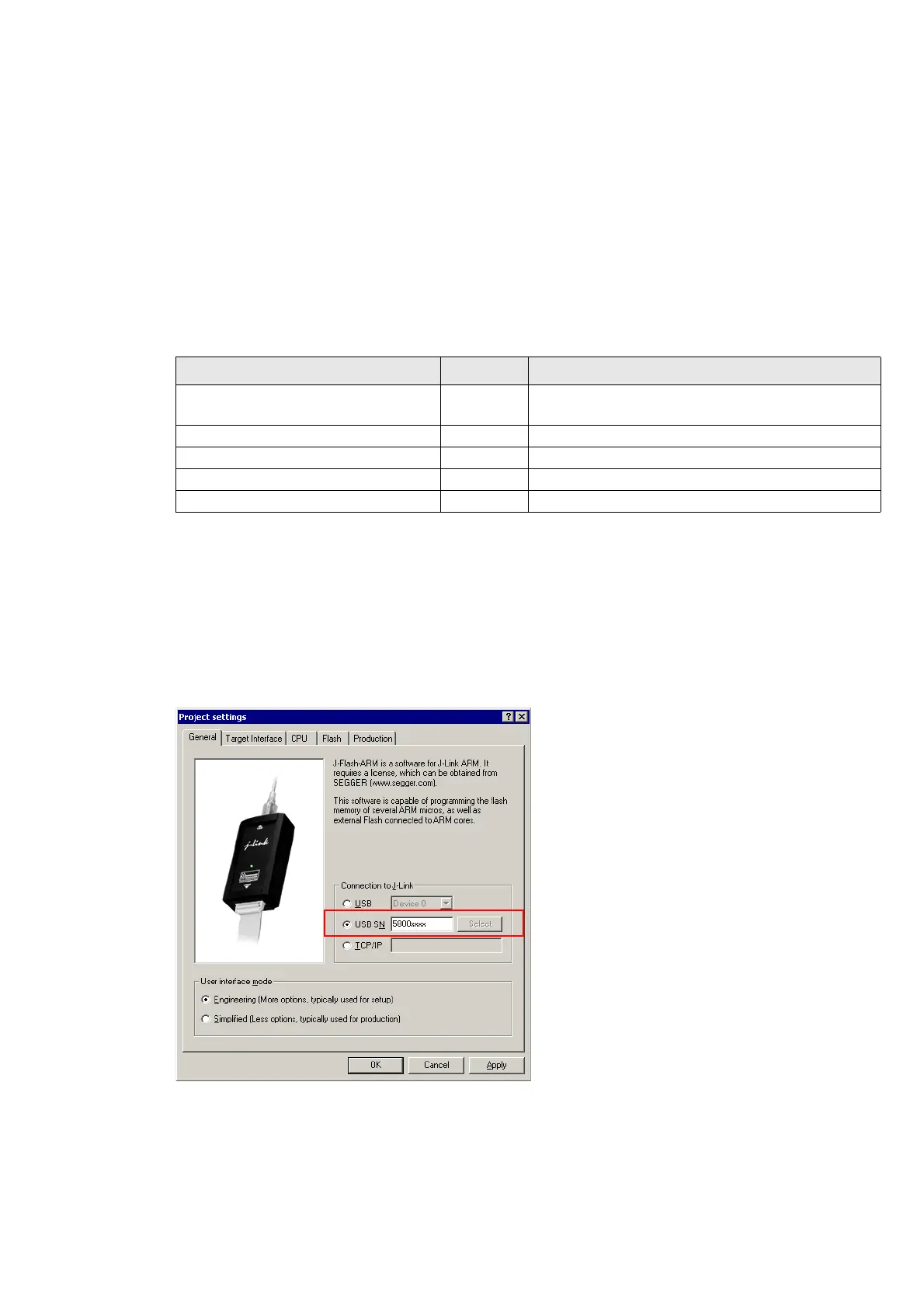
In general, when having multiple J-Links connected to the same PC, the J-Link to
connect to is explicitly selected by its serial number. Most software/debuggers pro-
vide an extra field to type-in the serial number of the J-Link to connect to.
The following screenshot shows the connection dialog of the J-Flash software:
Identification PID Serial number
Serial number (default) 0x0101
Serial number is real serial number of the
J-Link or user assigned.
USB address 0 (Deprecated) 0x0101 123456
USB address 1 (Deprecated) 0x0102 123456
USB address 2 (Deprecated) 0x0103 123456
USB address 3 (Deprecated) 0x0104 123456
Table 4.1: J-Link enumeration in different identification modes



 To Next Page