J-Link / J-Trace (UM08001) © 2004-2017 SEGGER Microcontroller GmbH & Co. KG
251
6.4 Setup for various debuggers (internal flash)
The J-Link flash download feature can be used by different debuggers, such as IAR
Embedded Workbench, Keil MDK, GDB based IDEs, ... For different debuggers there
are different steps required to enable J-Link flash download. In this section, the
setup for different debuggers is explained.
6.4.1 IAR Embedded Workbench
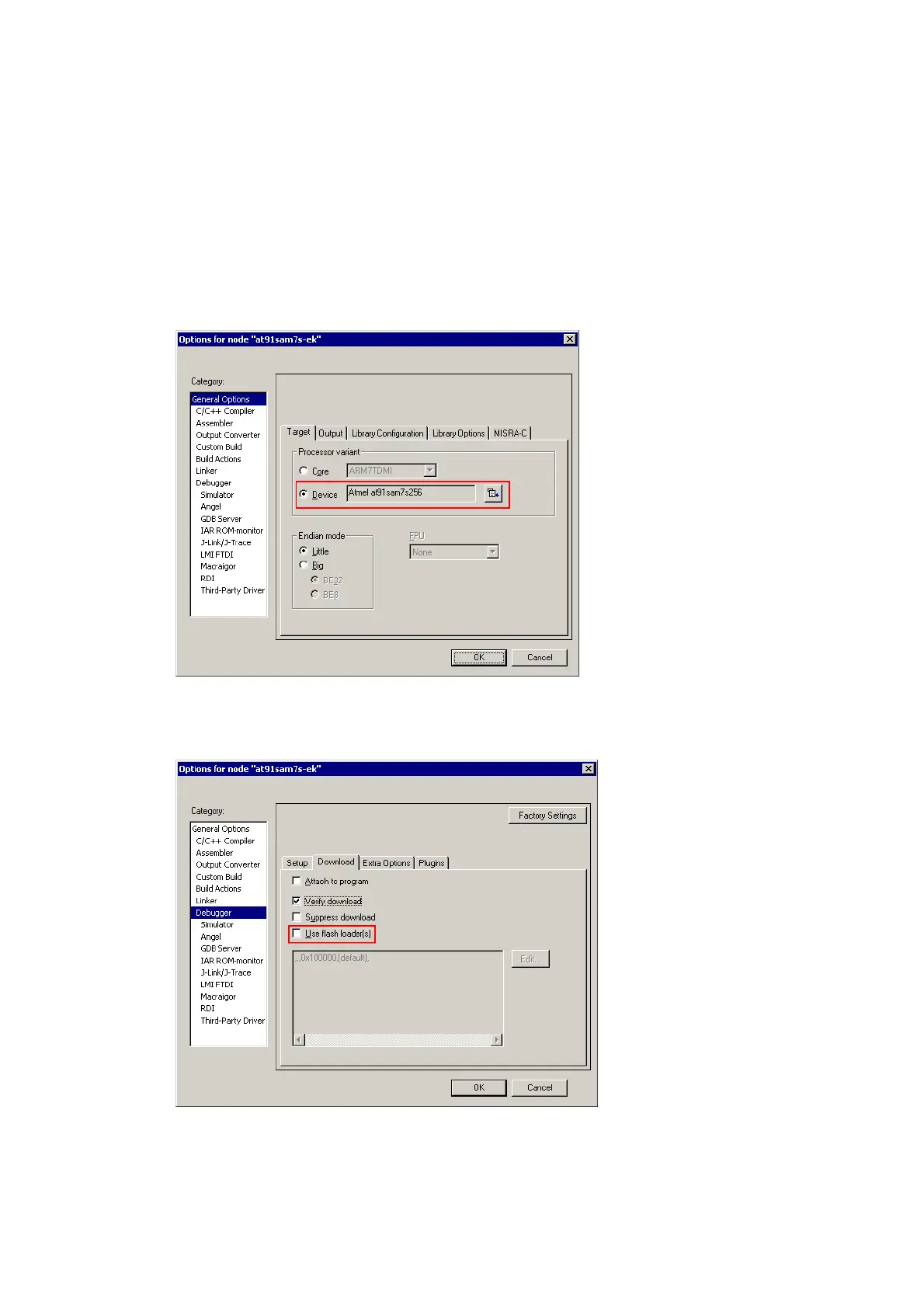
Using the J-Link flash download feature in IAR EWARM is quite simple:
First, choose the right device in the project settings if not already done. The device
settings can be found at Project->Options->General Options->Target.
To use the J-Link flash loaders, the IAR flash loader has to be disabled. To disable the
IAR flash loader, the checkbox Use flash loader(s) at Project->Options->Debug-
ger->Download has to be disabled, as shown below.
6.4.2 Keil MDK
To use the J-Link flash download feature in Keil MDK, the following steps need to be
performed:



 To Next Page