J-Link / J-Trace (UM08001) © 2004-2017 SEGGER Microcontroller GmbH & Co. KG
339
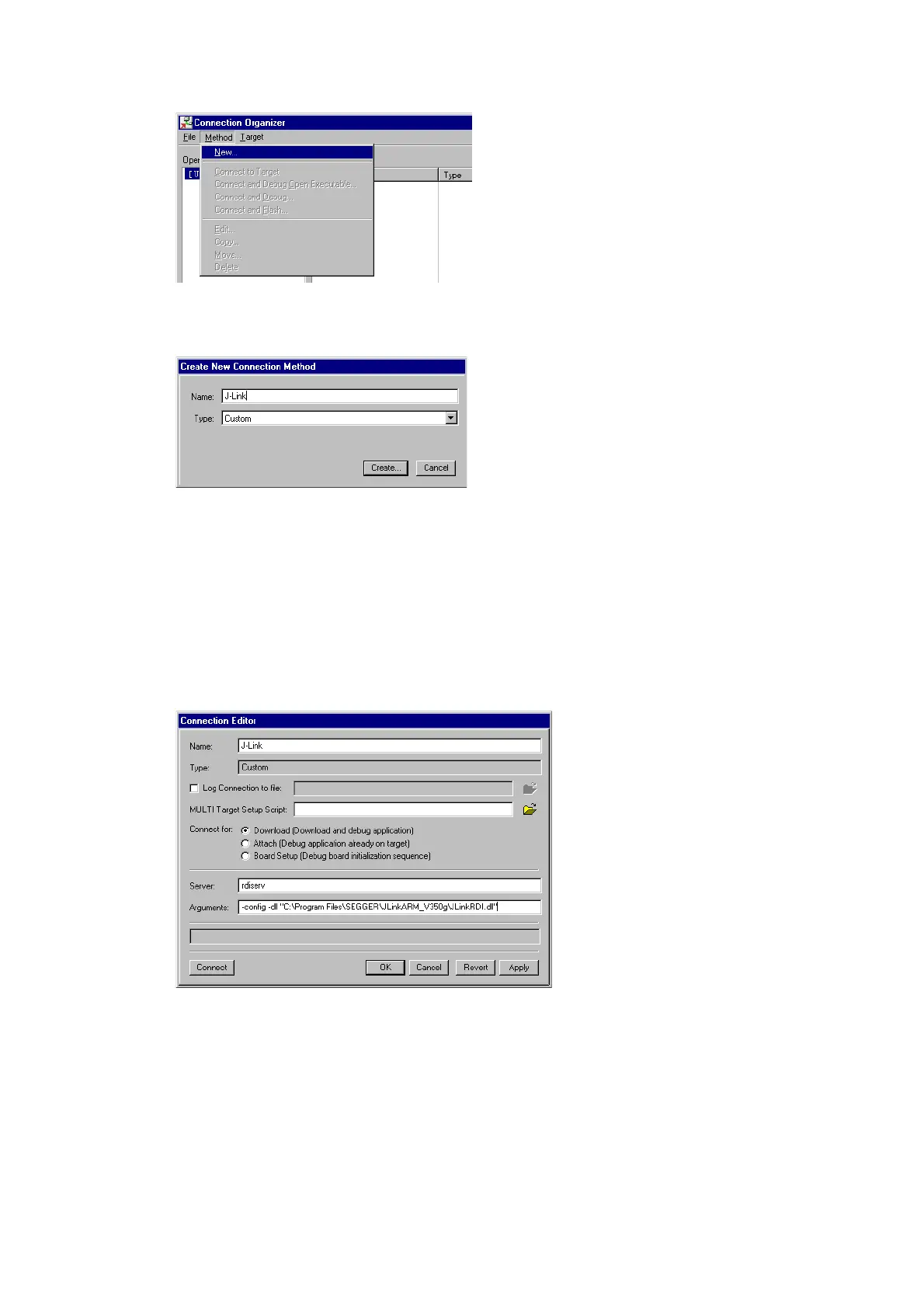
2. Click Method | New in the Connection Organizer dialog.
3. The
Create a new Connection Method will be opened. Enter a name for your
configuration in the
Name field and select Custom in the Type list. Confirm your
choice with the
Create... button.
4. The
Connection Editor dialog will be opened. Enter rdiserv in the Server field
and enter the following values in the
Arguments field:
-config -dll <FullPathToJLinkDLLs>
Note that JLinkRDI.dll and JLinkARM.dll must be stored in the same directory.
If the standard J-Link installation path or another path that includes spaces has
been used, enclose the path in quotation marks.
Example:
-config -dll "C:\Program Files\SEGGER\JLinkARM_V350g\JLinkRDI.dll"
Refer to GHS manual "MULTI: Configuring Connections for ARM Targets", chapter
"ARM Remote Debug Interface (rdiserv) Connections" for a complete list of pos-
sible arguments.



 To Next Page