◼ Perform an action and measure the resonance (oscillation frequency) of the current command
(ICMD):
⚫ In the Range screen, right-click the ICMD plot.
⚫ Select FFT and Differentiation.
⚫ Select FFT tracking.
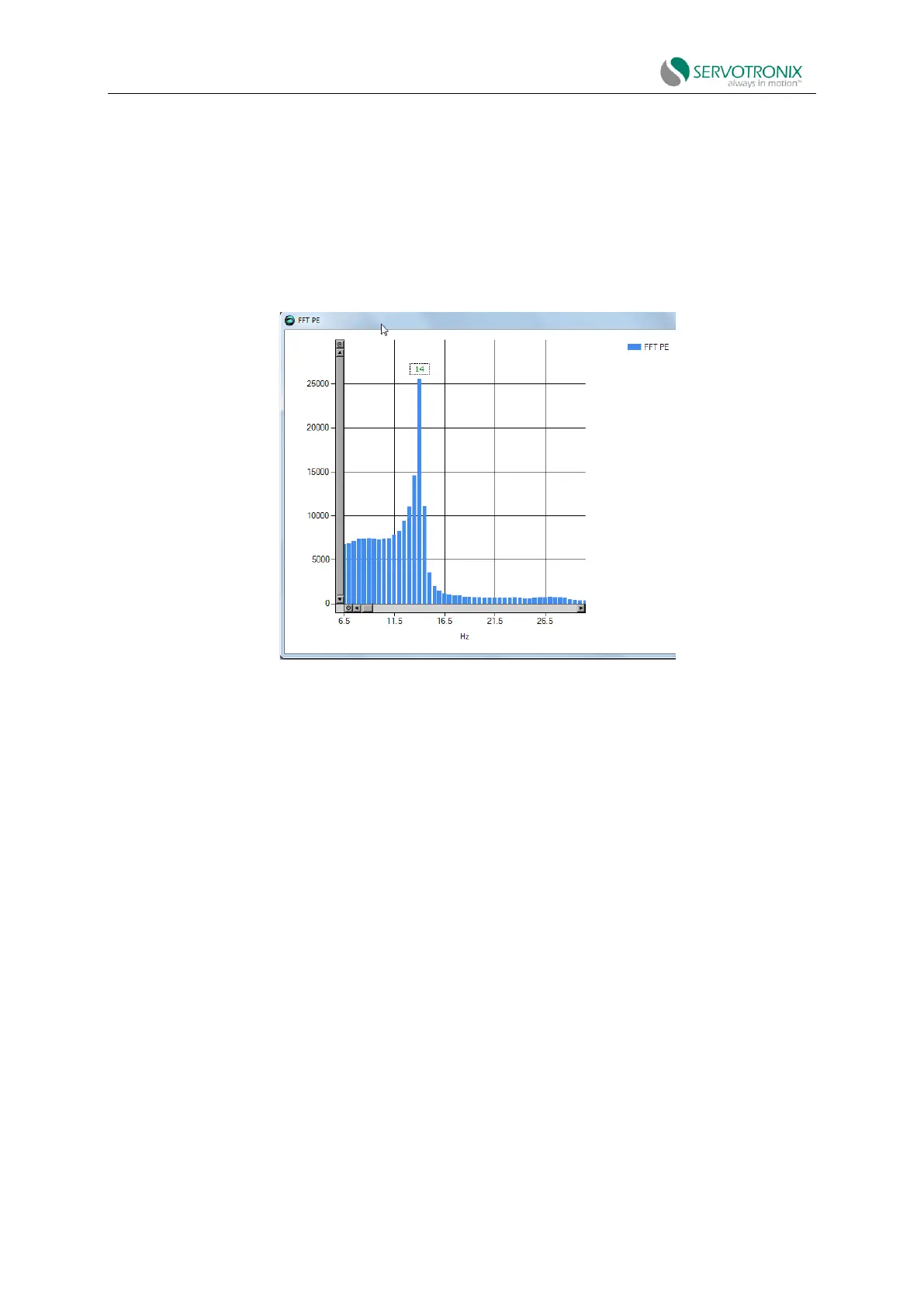
The FFT tracking will look like this, for example:
Figure 8-27 FFT tracking
◼ Set the value of parameter NLANTIVIBHZn to the peak or dominant resonance (in
Hertz). In the example shown here, the value is 14Hz.
2. Set the narrowband center sharpness (width).
◼ Set the value of parameter NLANTIVIBSHARPn according to the resonance sharpness
(width) of the narrowband filter.
Estimate the width by comparing the plot in the FF Traking dialog box to the plot below, which
shows the NBF frequency response as a function of the NLANTIVIBSHARPn value. Typical setting
range is 0.1 to 1.0.
The figure below shows the narrowband filter frequency response.



 To Next Page