8.4 PC-based Autotuning
If no electronic motor nameplate is detected at power-up, ServoStudio2 will activate the PC-
based autotuning wizard.
The PC-based Autotuning wizard overrides the user's unit settings and works with the following
units:
⚫ Position: count
⚫ Velocity: rpm/s for rotary motors, mm/s for linear motors
⚫ Acceleration/deceleration: rpm/s2 for rotary motors, mm/s2 for linear motors
Step - Load/Motor inertia ratio (LMJR) estimation
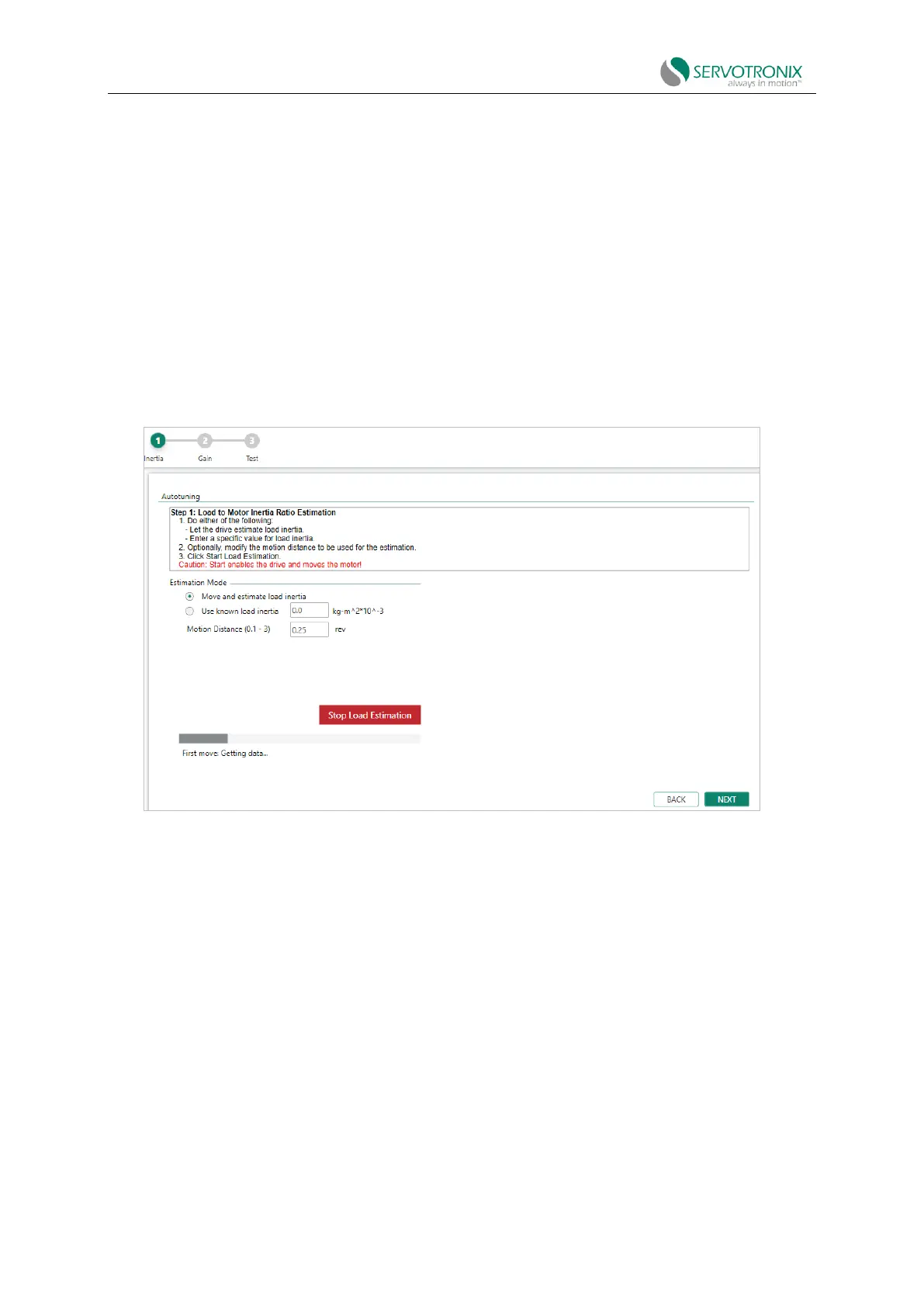
Figure 8-11 PC-based autotuning wizard - load/motor inertia ratio (LMJR) estimation
1. For automatic estimation, select "Move and estimate load inertia”. Or
if you know the load inertia connected to the motor, select “Use known load inertia” and enter
the value.
2. Modify the number of motor revolutions used as motion distance during load estimation
(optional).
3. Click "Start Load Estimation".
Start enabling the drive and running the motor repeatedly!
ServoStudio2 estimates the current load of the motor and displays the results.
4. Click OK to send the calculated parameters to the drive.



 To Next Page