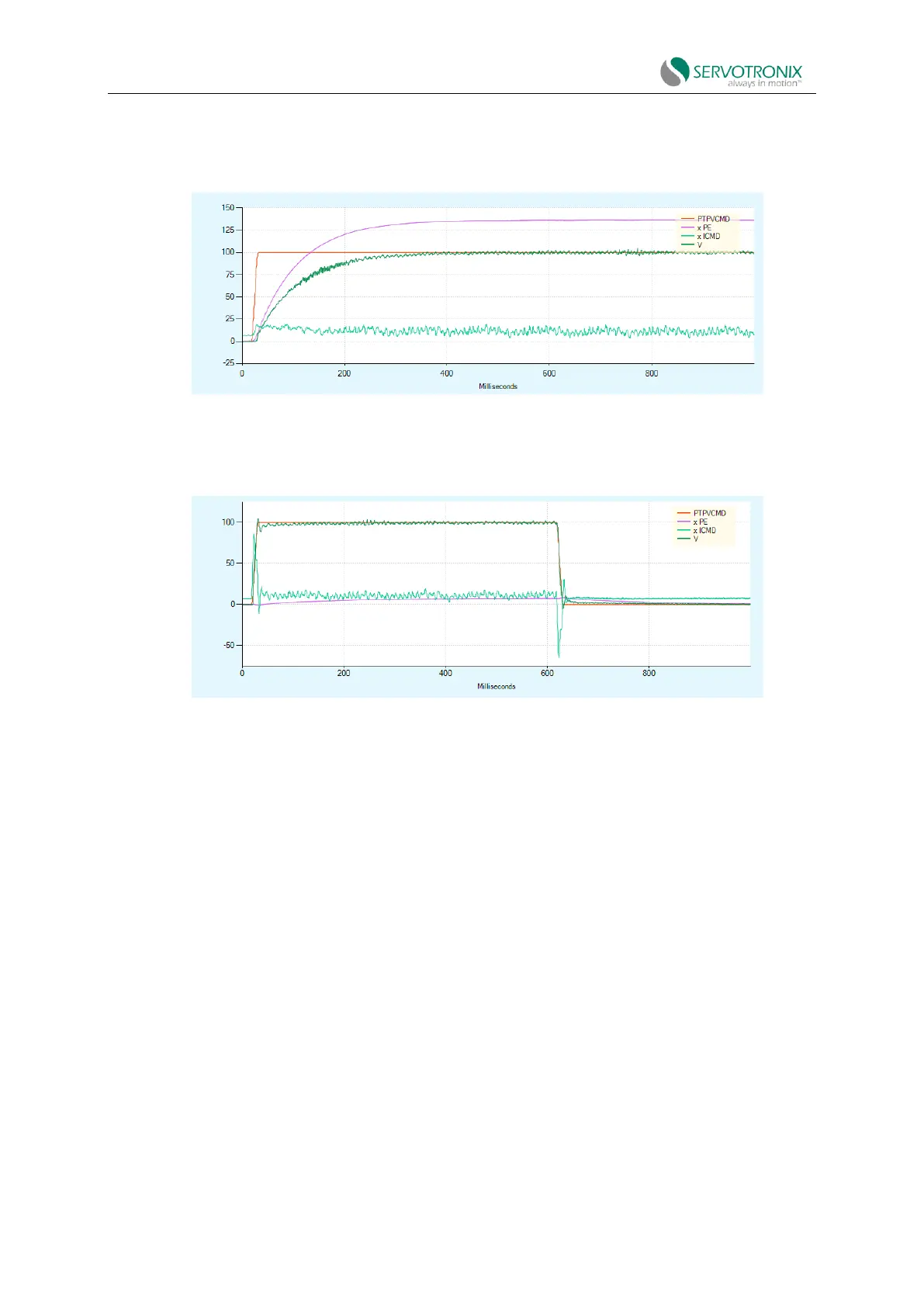
Best adjustment: Gradually increase the KNLDUALLOOPKP value until ICMD oscillates, or noise
is heard. Then reduce the KNLDUALLOOPKP value by 10%.
Figure 8-42 Dual feedback - tune position controller (KNLDUALLOOPKP) - example
d. Set the velocity feedforward to 100% (KNLDUALLOOPVFF):
Figure 8-43 Dual feedback - tune position controller (KNLDUALLOOPVFF) - example
8.15 Gantry Tuning
Note: The tuning process (movement/recording) of the gantry system is performed by the
gantry main drive.
All motion commands of the gantry system must be issued by the gantry main drive.
The gantry differential drive will reject the motion command.
Procedure: Tune the gantry system
1. Make sure you have completed the gantry system setup described in the Gantry Setup
section.
2. Open ServoStudio2 operation mode screen.
Select serial position (OPMODE8, COMMODE0) operation mode for each drive.
3. Open ServoStudio2 Control>Position Loop screen.
Select position controller method 5 - HD Controller for each drive.



 To Next Page