Black plate (105,1)
一般Model "A8170GE-A" EDITED: 2011/ 7/ 3
. For models with “keyless access
with push-button start system”, when
the “
” button on the access key is
pressed while the access key is placed
too close to the vehicle body, unlock-
ing by the keyless access functions
may not work. In such a case, the
functions wil l recover by unlocking
using the remote keyless entry system.
& Locking and unlocking doors
S02AE10
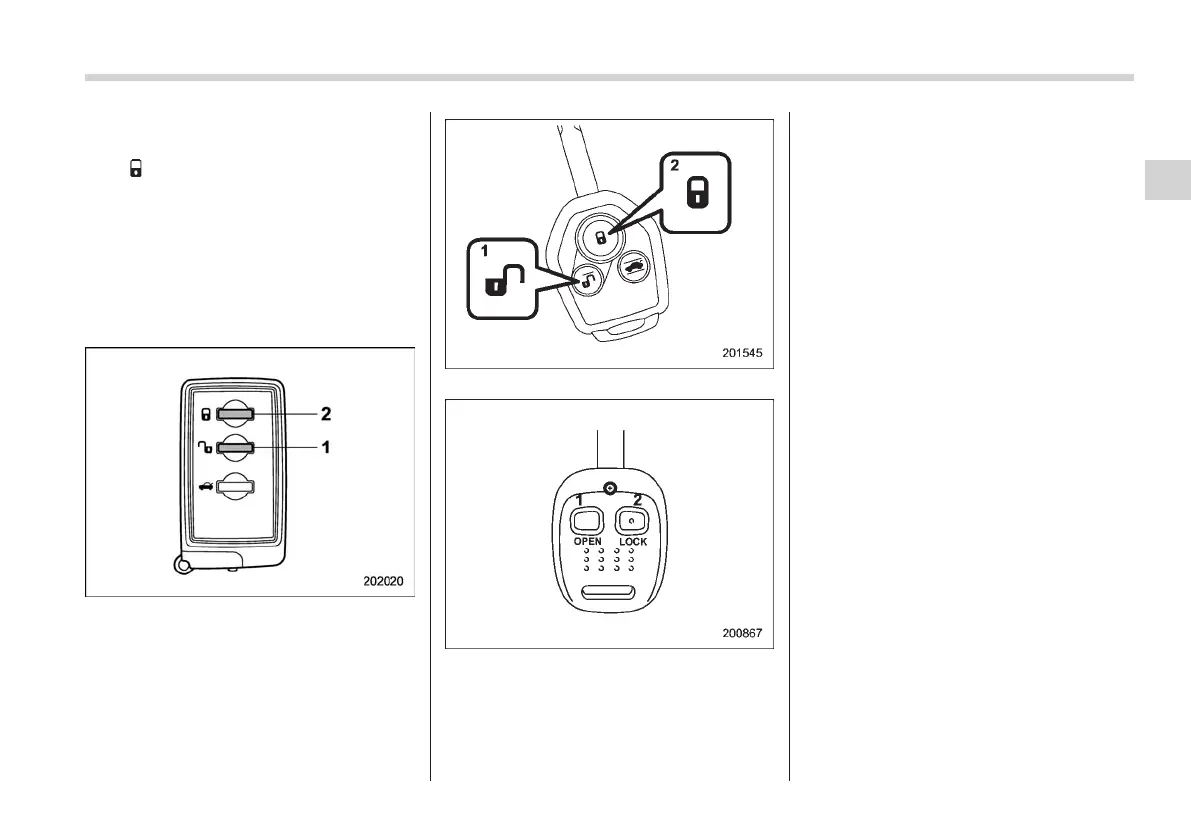
Access key
Type A transmitter
Type B transmitter
1) Unlock button
2) Lock button
! Unlocking
S02AE1003
Press the unlock button on the access
key/transmitter near the vehicle.
Models with double locking system:
1. Only the driver’s door will be unlocked.
Also, the hazard warning flashers will flash
twice.
2. If you press the “OPEN” button again
within 5 seconds of unlocking the driver’s
door, all of the other doors and the rear
gate will be unlocked.
Models without double locking system:
All doors and the rear gate will be
unlocked. Also, the hazard warning
flashers will flash twice.
For details about the factory setting
(default setting), refer to “
s00afFunction set-
tings” F27. For further details, we recom-
mend that you consult a SUBARU dealer.
! Locking
S02AE1004
Pressing the lock button on the access
key/transmitter locks all doors and the rear
gate. Also, the hazard warning flashers
will flash once. When leaving the vehicle,
pull the door handle to make sure that the
doors have been locked.
For details about the factory setting
(default setting), refer to “
s00afFunction set-
tings” F27. For further details, we recom-
Keys and doors 2-17
– CONTINUED –
2















 To Next Page