Black plate (208,1)
一般Model "A8170GE-A" EDITED: 2011/ 7/ 3
5-22 Audio
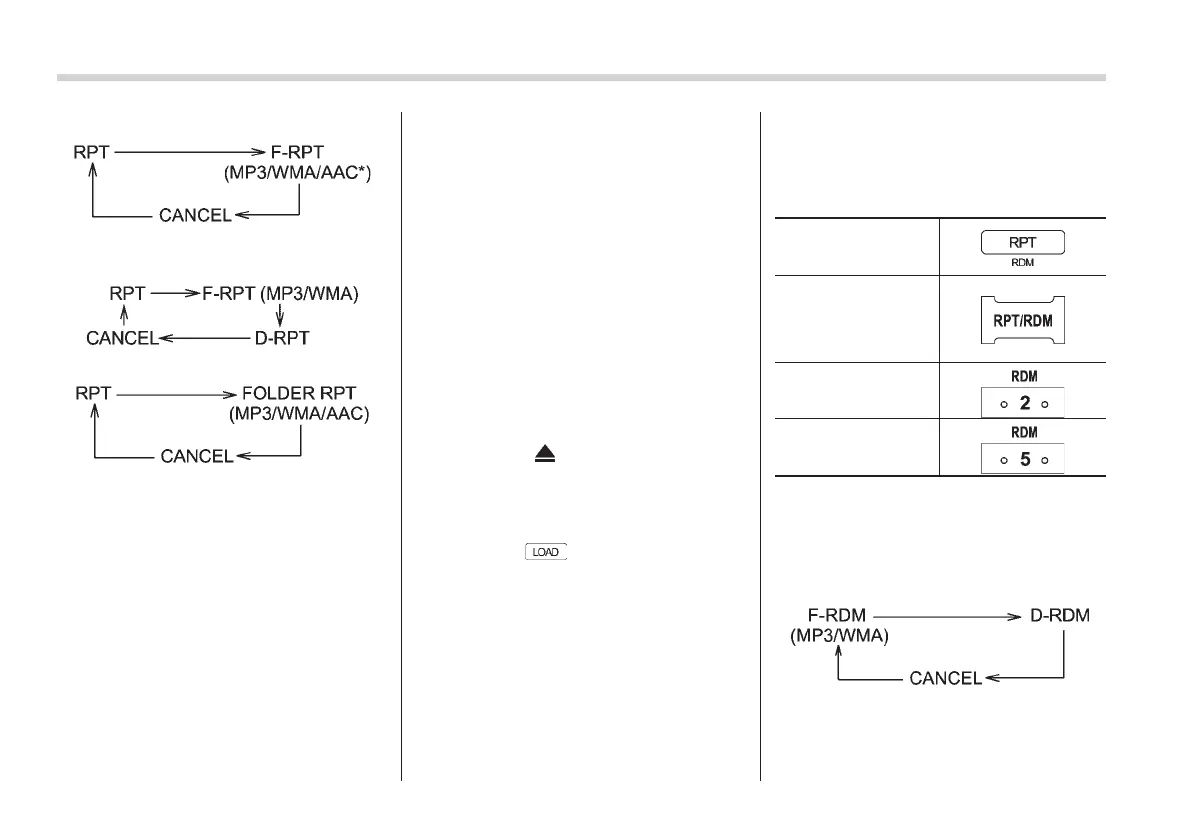
Type A, C and D audio:
*: Type D audio only
Type B audio:
Type E audio:
NOTE
. The “RPT” (type A, B, C and D
audio)/“ONE RPT” (type E audio) in-
dication refers to the repeat playback
of a single track. It repeats the track
that is playing.
. The “F-RPT” (type A, B, C and D
audio)/“Folder RPT” (type E audio)
indication refers to the repeat playback
of a folder. It repeats the all of the
tracks in the folder. It is possible to
select the function when the MP3/WMA/
AAC format track is playing.
. The “D-RPT” indication refers to the
repeat playback of a disc. It repeats all
of the tracks on the CD. It is only
possible to select this function for type
B audio.
To cancel the track/file (track) repeat-play
mode, briefly press the “RPT” button and
select CANCEL. The “RPT” indication will
turn off, and the normal playback mode
will be resumed.
NOTE
The repeat-play mode will be cancelled
if you perform any of the following
steps.
. Press the “RPT” button and select
CANCEL.
. Press the “
” button.
. Press the disc select button (type B
audio).
. Press the “SCAN” button (type A, B,
C and D audio).
. Press the
button when there is
free space in the CD magazine (type B
audio).
& Random playback
S05AV07
To play back a track/file(s) at random,
press the following button (random button)
while the track/file is playing.
Type A, B and C
audio*
1
Type D audio*
1
Type E audio (left-
hand drive models)*
2
Type E audio (right-
hand drive models)*
2
*1: Press the button for 0.5 second or longer.
*2: Press the button briefly.
Each time you press the button, the mode
changes in the following sequences.
Type A, B and C audio:















 To Next Page