Black plate (340,1)
一般Model "A8170GE-A" EDITED: 2011/ 7/ 3
9-16 In case of emergency
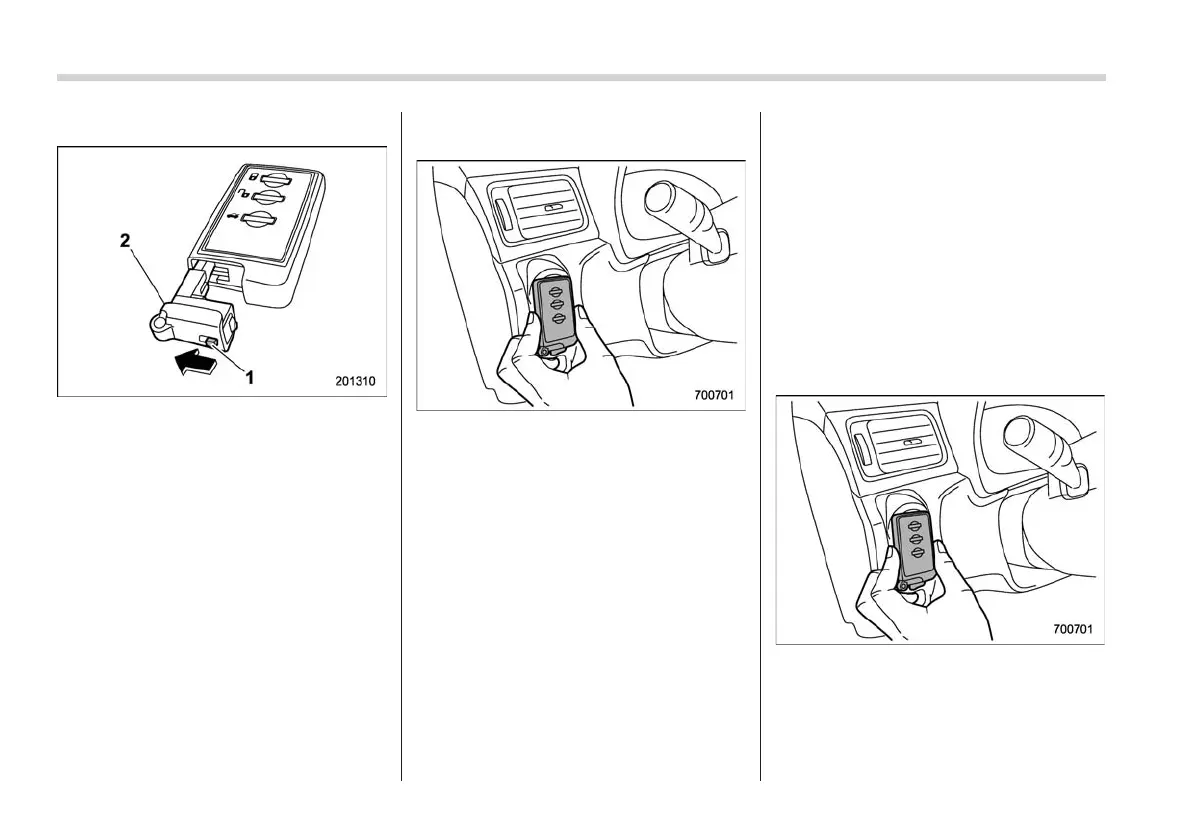
& Locking and unlocking
S09AP01
1) Knob
2) Mechanical key
While pulling the knob of the access key,
take out the mechanical key.
Lock or unlock the driver’s door with the
mechanical key.
NOTE
After locking or unlocking, be sure to
attach the mechanical key back to the
access key.
& Switching power
S09AP02
1. Apply the parking brake.
2. Shift the shift lever in neutral (MT
models) or the select lever in the “P”
position (AT models).
3. Depress the clutch pedal (MT models)
or brake pedal (AT models).
4. Hold the access key with the buttons
facing you, and touch the push-button
ignition switch with it.
When the communication between the
access key and the vehicle is completed,
a chime (ding) will sound, and the opera-
tion indicator on the push-button ignition
switch will illuminate in green.
5. Within 5 seconds after the operation
indicator illuminates in green, release the
clutch pedal (MT models) or brake pedal
(AT models) and press the push-button
ignition switch.
NOTE
If the power does not switch even
though the above procedure was fol-
lowed precisely, we recommend that
you contact your SUBARU dealer.
& Starting engine
S09AP03
1. Apply the parking brake.
2. Shift the shift lever in neutral (MT
models) or the select lever in the “P”
position (AT models).
3. Depress the brake pedal.
4. Depress the clutch pedal (MT models).
5. Hold the access key with the buttons
facing you, and touch the push-button
ignition switch with it.
When the communication between the
access key and the vehicle is completed,















 To Next Page