UTT Technologies Firewall Menu
http://www.uttglobal.com Page 148
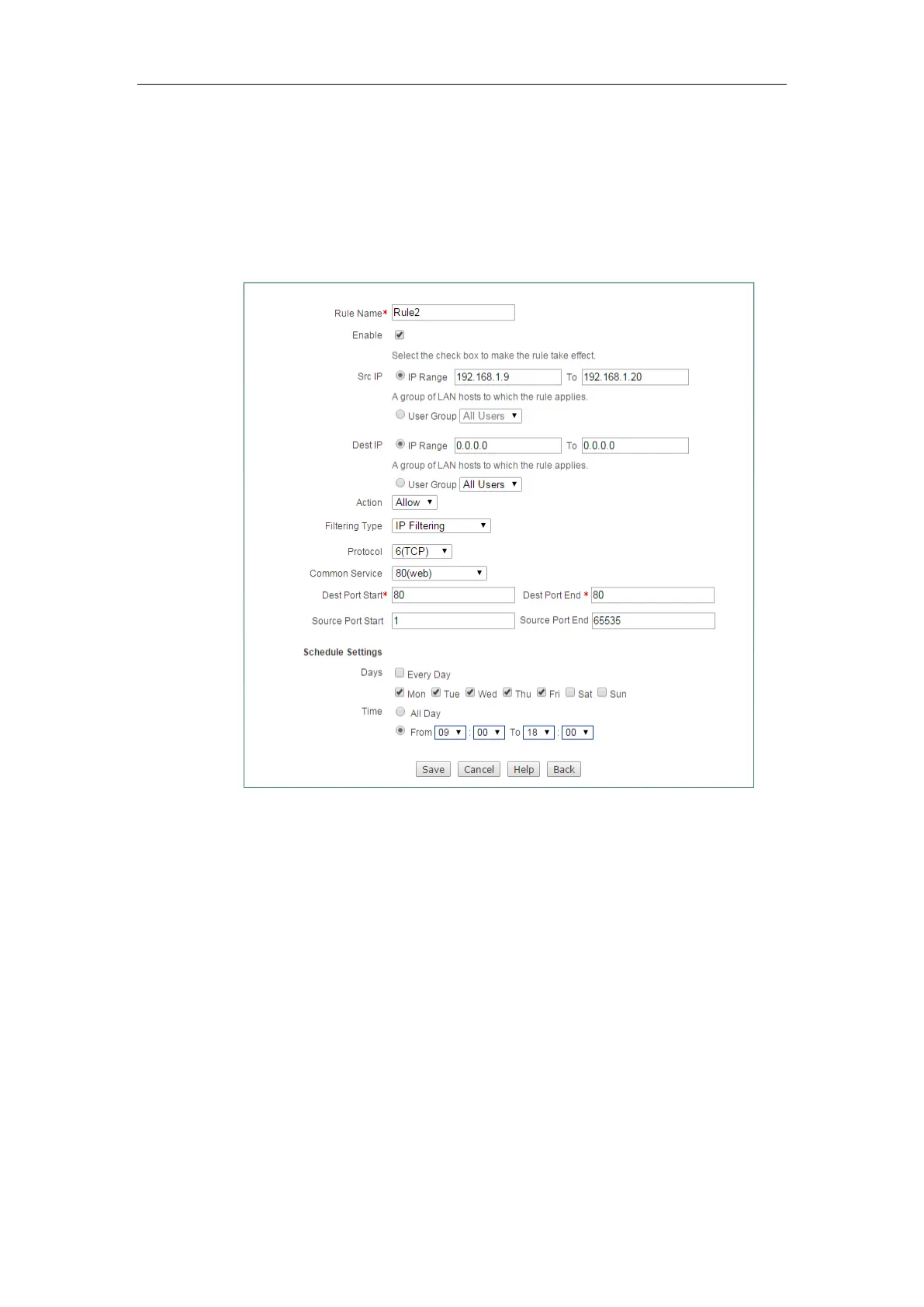
Step 2 Configuring Access Control Rule 2
Go to Firewall > Access Control page. Set the Src IP from 192.168.1.9 to
192.168.1.20, select
Allow from the Action, select IP Filtering from Filtering Type,
select 6(TCP) from Protocol , select 80(web) from Common Service, select
Mon to Fri
from the Days, select
9:00 to 18:00 from Time, lastly click the Save button to save the
settings.
Figure 12-9 Access Control _Example 1_step 2
Step 3 Configuring Access Control Rule 3
Go to Firewall > Access Control page. Set the Src IP from 192.168.1.9 to
192.168.1.20, select
Deny from the Action, select IP Filtering from Filtering Type,
select all(All) from Protocol , select
Mon to Fri from the Days, select 9:00 to 18:00 from
Time, lastly, click the Save button to save the settings.



 To Next Page