6 Create Methods, Sample Sets, and Sample Templates
176 July 29, 2013, 715003794 Rev. B
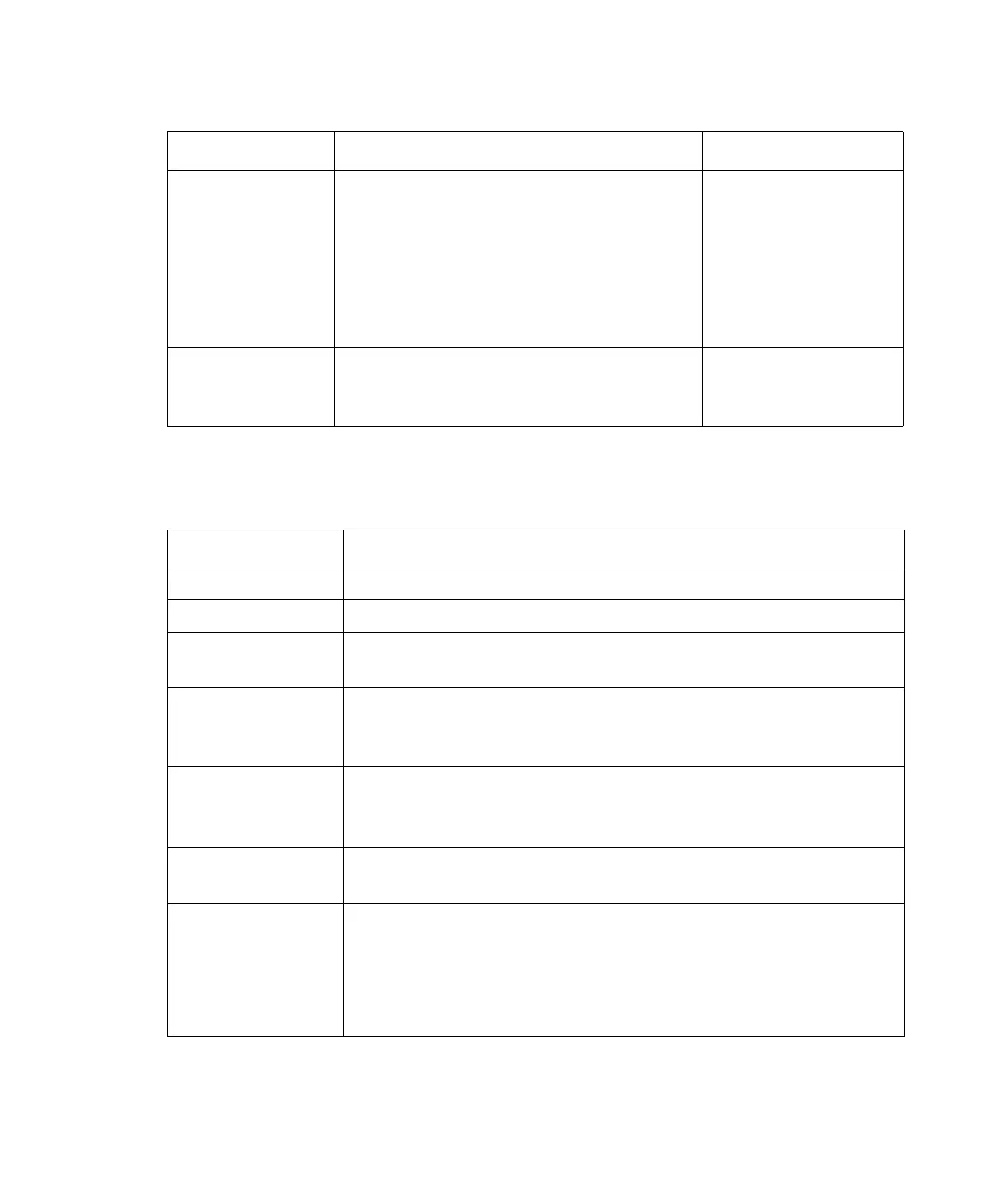
µL Amount of sample (or standard) to
inject from the current vial.
0.1 to 2000 in 0.1
µL increments (You
can enter amounts
greater than 100
µL if you install
larger sample
loops.)
Min Time in minutes before the next line
is executed.
0.1 to 999.99 in
0.01 min
increments
Sample Set functions:
Function name Description
Sample Injects a sample from the selected vial.
Standard Injects a standard from the selected vial.
AutoStds Programs the repetition of standards over the course of a
run. See “Auto Standards”, below.
Prime Wet primes the solvent management system at the
specified rate for the specified period. Press the Row
Details screen key to enter additional prime parameters.
System Prep Performs the System Prep function using the parameters
from the separation method. For more information on
System Prep, see “Run System Prep” on page 128.
Purge Purges the sample management system. Press the Row
Details screen key to enter additional purge parameters.
Equil Delivers solvent through the system for the specified
period of time using the initial conditions in the specified
separation method. Press the Row Details screen key to
display the Equilibrate dialog box
1
to enter additional
Equil parameters.
Sample Set table parameters: (Continued)
Parameter Function Value range



 To Next Page