6 Create Methods, Sample Sets, and Sample Templates
178 July 29, 2013, 715003794 Rev. B
time delay to allow the sample to passively mix once sample from all vials is in
the sample loop.
To use the Auto Add function:
1. In the Sample Set screen, select AutoAdd from the drop-down list of
functions, and then press the Row Details screen key to display the Auto
Add dialog box.
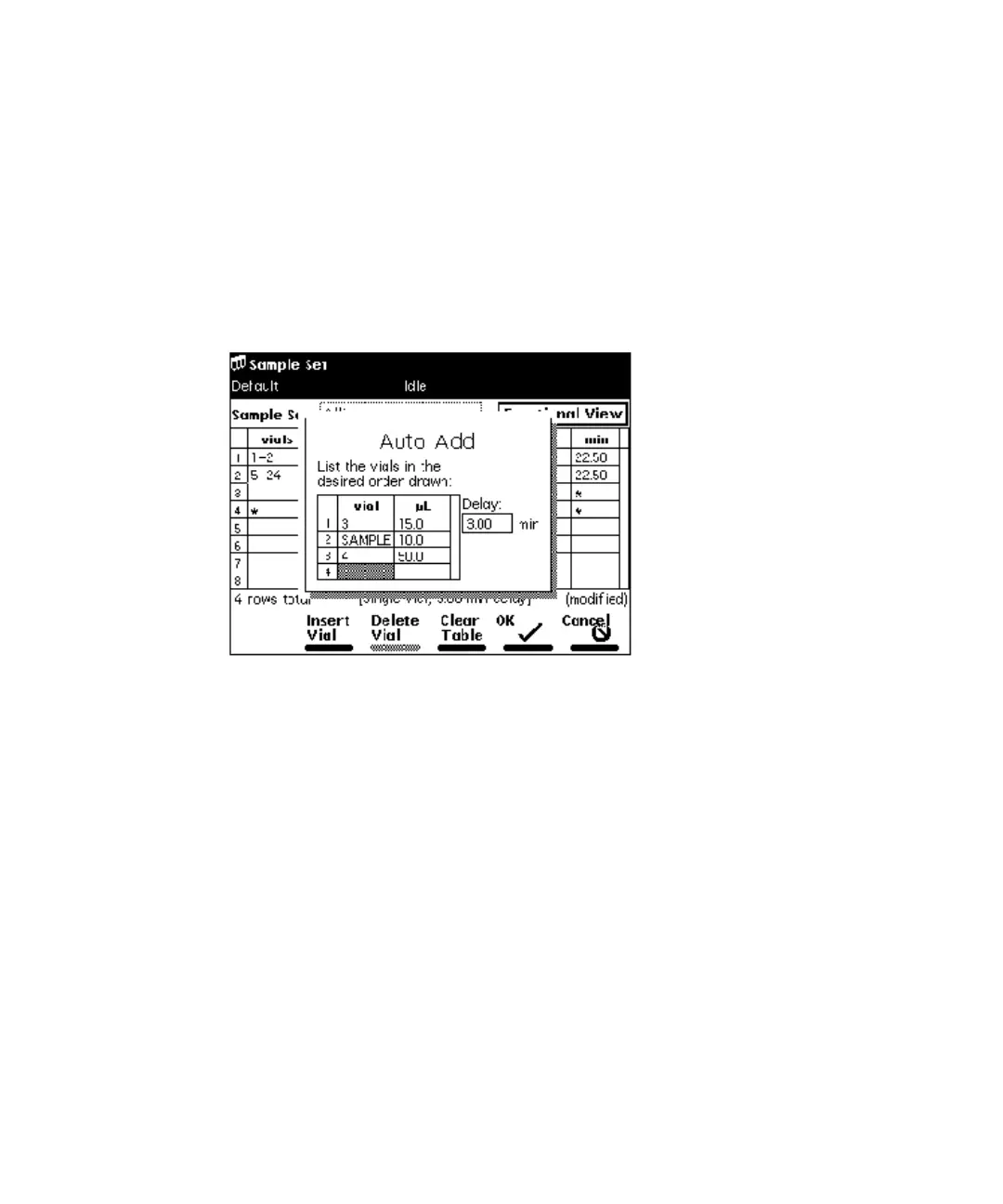
Auto Add dialog box:
In this example, vials 3 and 4 are “reagents” that react with compounds
in the sample vial. In the figure “Linked rows in a sample set:” on
page 179, vials 25 to 30 are the sample vials used for Auto Add. The
separations module draws 15 µL from vial 3, 10 µL from vial 25, 50 µL
from vial 4, then holds the three aliquots in the sample loop for the
specified 3.00 minutes before making the injection. The process is
repeated for vials 26 to 30.
2. Enter the vial from which you want to withdraw the first portion of the
sample.
Tip: Press Clear to set the vial to “sample.”
3. Enter the volume (in µL) of the sample you want to withdraw.
4. Repeat step 2 and step 3 for subsequent portions of the sample.
5. Enter the time delay (in minutes) to allow the combined sample to mix.
6. Press OK to return to the Sample Set screen.



 To Next Page