CLUTCH
5-48
EAS25080
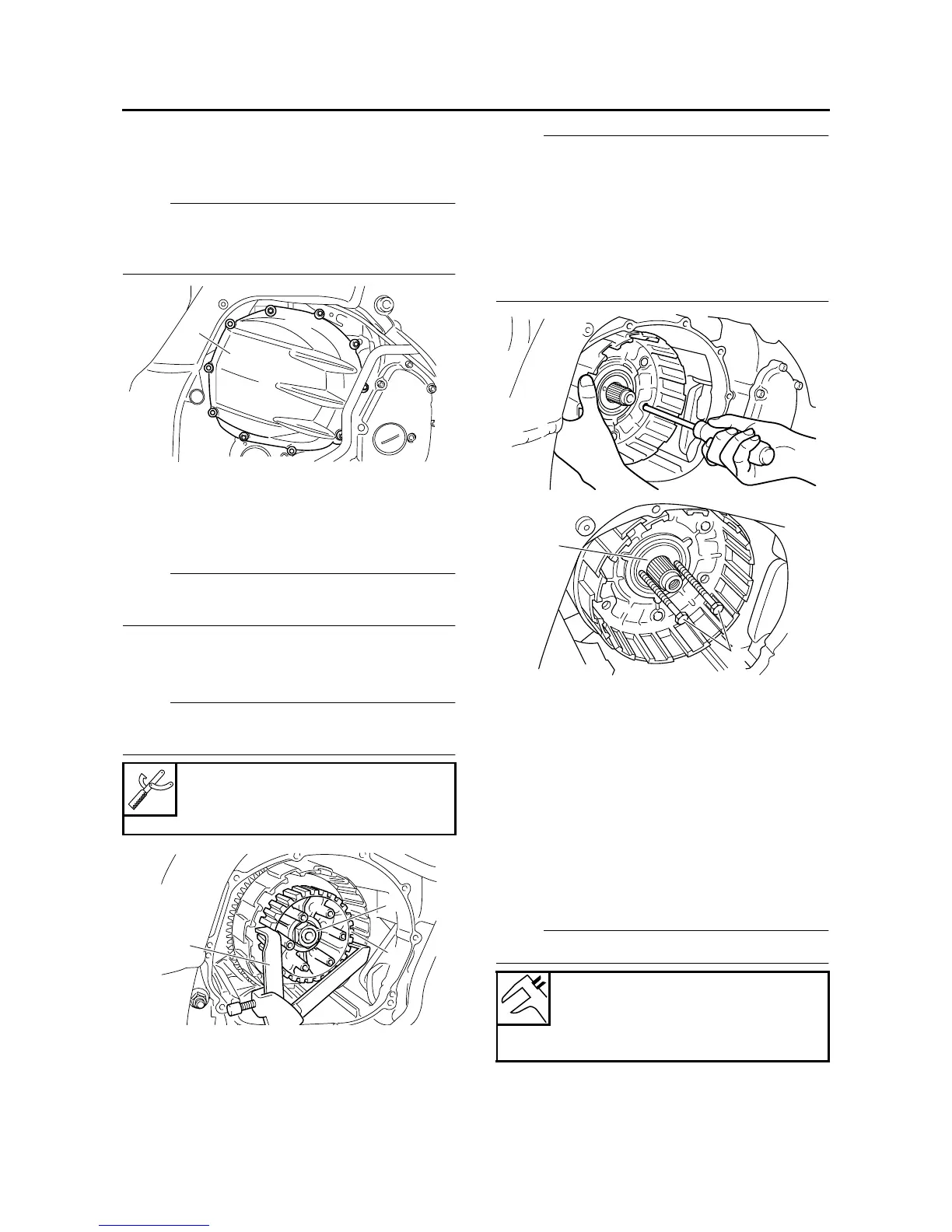
REMOVING THE CLUTCH
1. Remove:
• Clutch cover “1”
NOTE:
Loosen each bolt 1/4 of a turn at a time, in stag-
es and in a crisscross pattern. After all of the
bolts are fully loosened, remove them.
2. Remove:
• Rear balancer weight
Refer to “BALANCERS” on page 5-103.
3. Remove:
• Clutch spring bolt
NOTE:
Loosen the clutch spring bolts in stages and in a
crisscross pattern.
4. Straighten the lock washer tab.
5. Loosen:
• Clutch boss nut “1”
NOTE:
While holding the clutch boss “2” with the univer-
sal clutch holder “3”, loosen the clutch boss nut.
6. Remove:
• Spacer “1”
• Clutch housing
NOTE:
• Insert a cross-headed screwdriver into one of
the holes of the clutch housing and primary
driven gear, and then rotate the inner primary
driven gear until both primary drive gears are
aligned. The teeth of both primary driven gears
must be aligned for installation.
• Insert two 5 mm bolts “2” into the spacer and
then remove the spacer by pulling on the bolts.
EAS25100
CHECKING THE FRICTION PLATES
The following procedure applies to all of the fric-
tion plates.
1. Check:
• Friction plate
Damage/wear → Replace the friction plates
as a set.
2. Measure:
• Friction plate thickness
Out of specification → Replace the friction
plates as a set.
NOTE:
Measure the friction plate at four places.
Universal clutch holder
90890-04086
YM-91042
1
1
2
3
Friction plate thickness
2.90–3.10 mm (0.114–0.122 in)
Wear limit
2.80 mm (0.110 in)
1
2








 To Next Page