MODULE 6: CALIBRATION
6-14 AEROSET
®
Customer Training Guide
94858-103 — July 2003
4. Select the return arrow.
NOTE: The System does not allow the Sample Carousel
to be used for calibrators and patient samples at the same
time. If the Set 1, Set 2, or Set 3 options are selected, the
Operator can only place a checkmark (;) by either the
Patient or Calibration option. The other option is
automatically deselected.
Example: The RUN OPTIONS screen has a checkmark
(;) by the Calibration option and Set 1 configuration is
selected. If the Operator selects the Patient option, the Cal-
ibration option is no longer selected.
If the blank (_______) Calibration option is selected, then
only patient samples can be loaded in the Sample Carou-
sel and calibrators can only be loaded in the Calibrator/
Control Carousel. The System then allows both the Cali-
bration and the Patient options to be selected.
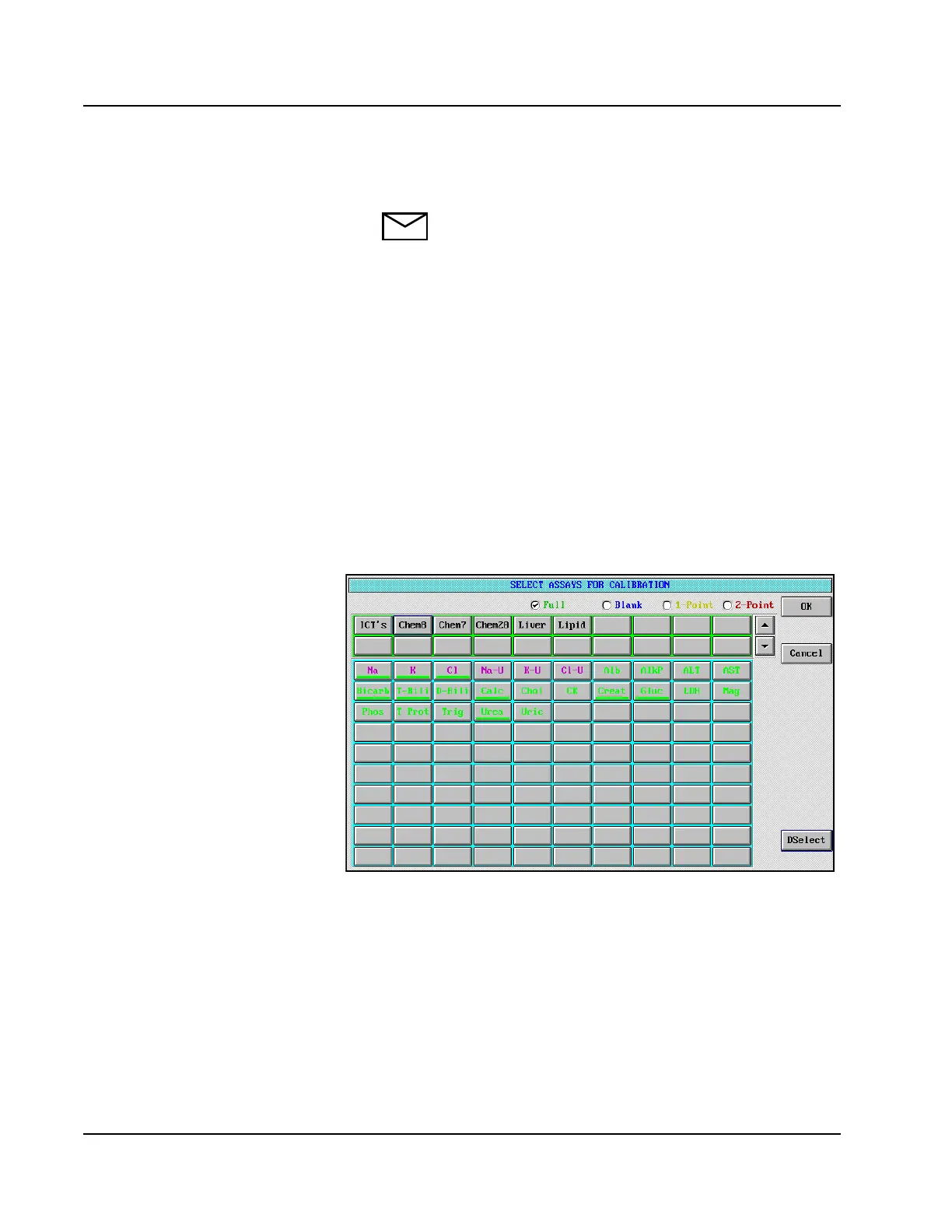
5. Select <Order> to the right of the Calibration option. The
SELECT ASSAYS FOR CALIBRATION screen is displayed.
Figure 6.2: SELECT ASSAYS FOR CALIBRATION Screen
6. Select the full calibration option.
7. Select the assay button for the assays to be calibrated. Individual
assays or panels may be selected.
• The assays last selected and saved
are highlighted. Deselect, then
select new ones.



 To Next Page