MODULE 6: CALIBRATION
6-18 AEROSET
®
Customer Training Guide
94858-103 — July 2003
System-Initiated Calibration
When the AEROSET System determines that a calibration is required at
the time a patient run is initiated and the Calibration option is not
selected on the RUN OPTIONS screen, the System displays a screen to
inform the Operator of this condition. The Operator must determine if
the calibration is required, based on anticipated or current samples to be
processed.
Procedure for System-Initiated Calibration
1. Select <Start> in the RUN OPTIONS screen to initiate a run. The
System determines that a calibration is required, and a screen is
displayed indicating which calibrations are required.
2. Select <OK>. The SELECT ASSAYS FOR CALIBRATION
screen is displayed. Four options are available.
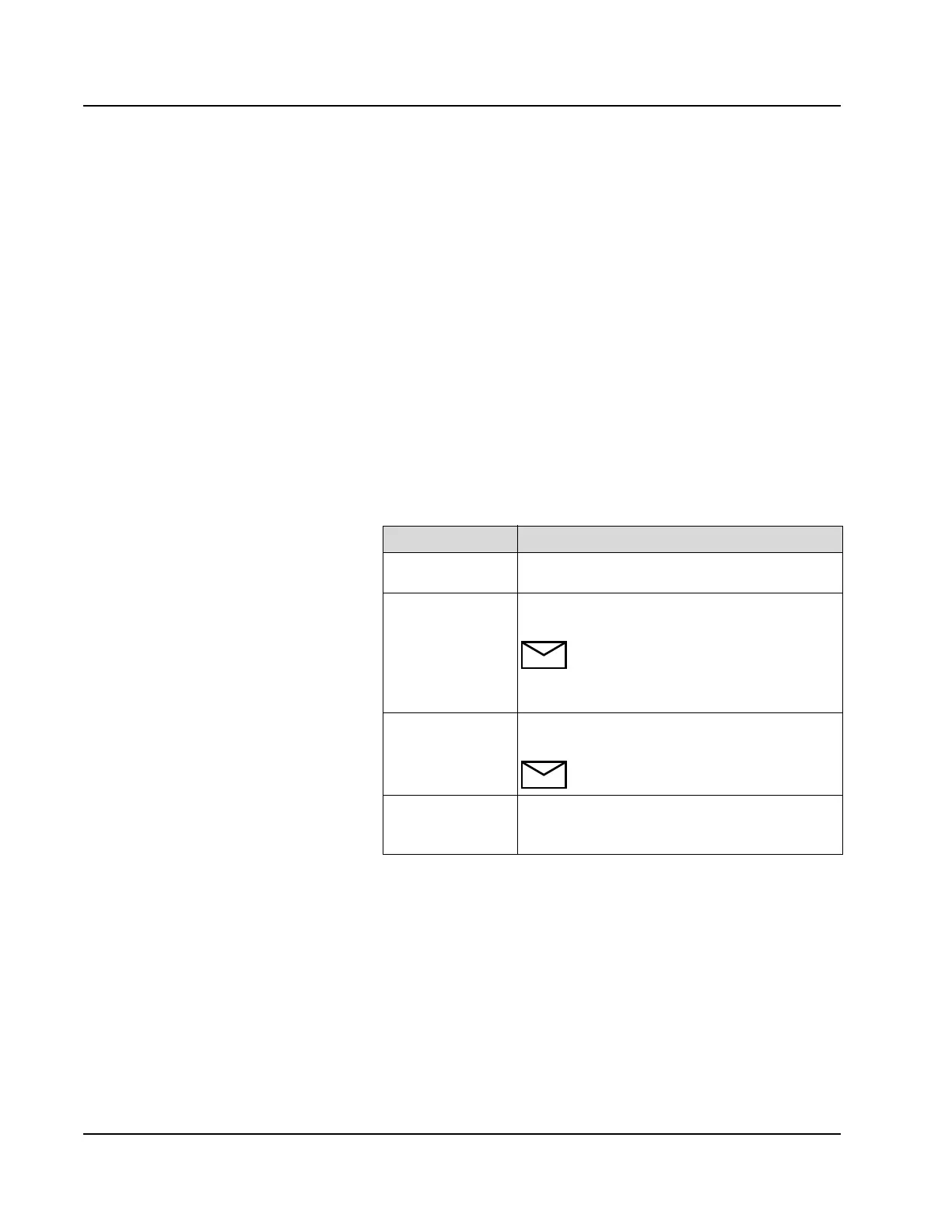
3. Select the desired option:
4. The Operator must load any necessary calibrators.
Option Description
<OK> All suggested calibrations and automatic
calibrations are performed.
<Cancel> No displayed calibrations or automatic
calibrations are performed.
NOTE: Selecting <Cancel> does NOT
prevent the AEROSET System from
running. <Cancel> refers only to the
Calibration option being displayed.
<DSelect> All assays are deselected. Only automatic
calibrations are performed.
NOTE: After selecting <DSelect> the
Operator must then select <OK>.
Manual Selection Select or deselect the desired assay(s). All selected
calibrations and automatic calibrations are
performed.



 To Next Page