MODULE 11: COMPONENT REPLACEMENT AND TROUBLESHOOTING
11-14 AEROSET
®
Customer Training Guide
94858-103 — July 2003
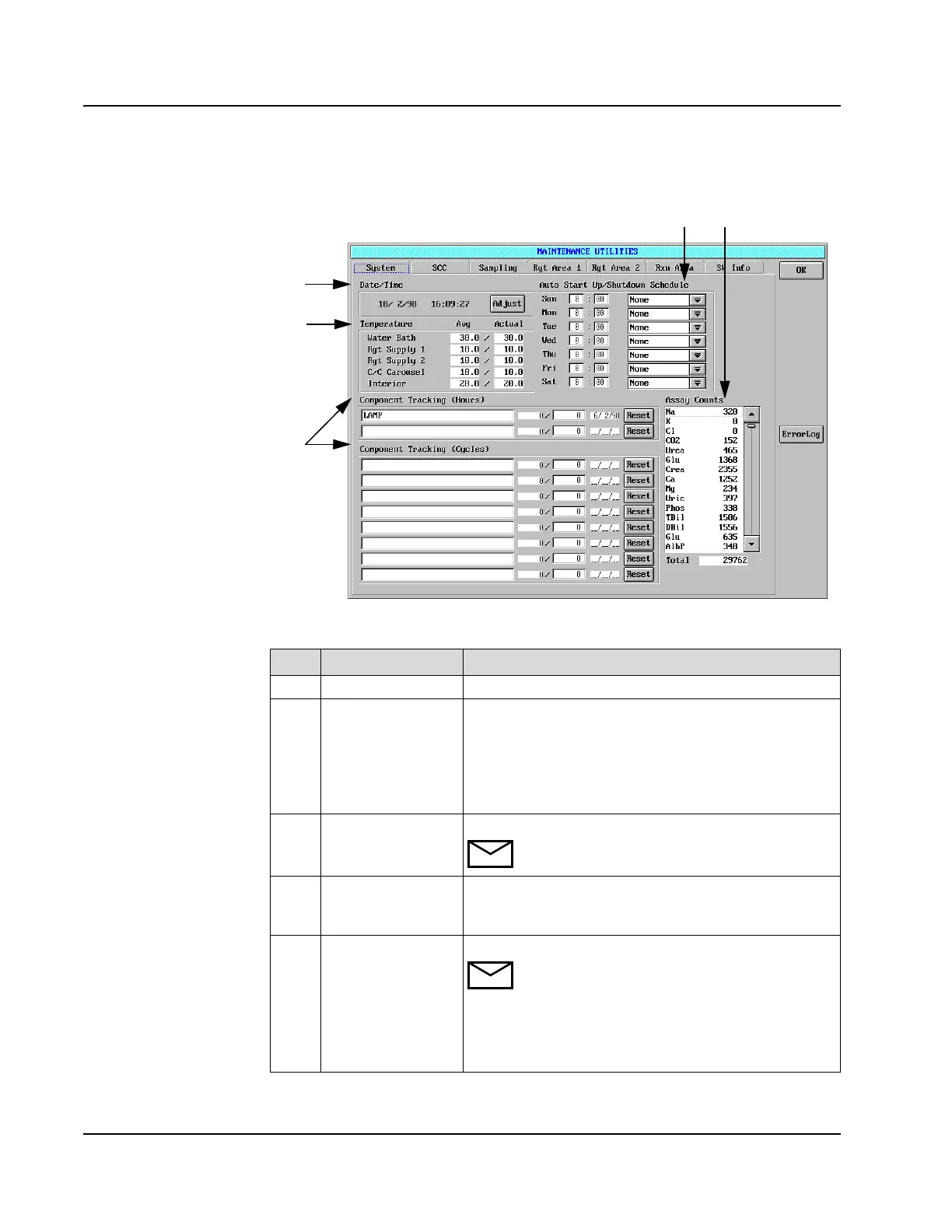
System Page
Figure 11.8: MAINTENANCE UTILITIES Screen, System Page
Item Field Allows the Operator to…
1
Date/Time Adjust the System date and time.
2
Temperature View the Avg. (average) and actual temperatures for the:
- Water bath,
- Reagent Supply Centers,
- Calibrator/Control Carousel
- interior of the Analyzer.
3
Component Tracking Track components by time (hours) or cycles.
NOTE: Each sample dispense is one cycle.
4
Auto Start Up/
Shutdown Schedule
Specify the date, time, and option for Automatic Power
ON, Power OFF, START UP, START UP 2, START UP
3, SHUTDOWN, SHUTDOWN 2, and SHUTDOWN 3.
5
Assay Counts View the individual as well as the total assay counts.
NOTE: When Na
+
is ordered and run by itself or
with any other ICT™ assay, the Na
+
assay count is
incremented. When K
+
/Cl
-
or K
+
are ordered and
run, only the K
+
assay count is incremented. When
only Cl
-
is ordered and run, only the Cl
-
assay
count is incremented.
45
1
2
3
Component
Tracking
• Select “reset” after
new component is
installed. (Current
day is entered.)
• ISE cycles do not
differentiate
between ICT and
non-ICT samples.
• Component
Tracking
cycles=sample
dispensed
• Both Lamp and ISE
come configured.
• Additional startup
and shutdown
options are
explained in
Section 2 of the
AEROSET OPs
Manual.
• Additional
Component
Tracking is found
in Section 10 of the
AEROSET OPs
Manual.
• When tracking
criteria is exceeded,
the Mtn Utilities
icon and Reset
button turn pink.



 To Next Page